

Author of thousands presentations. Share links to interesting content and resources for presentation creators.
Москва, Россия
Joined April 2018
- Tweets26
- Following47
- Followers30
- Likes13







Easy way to “stretch” vertical photo to horizontal slide and create empty area for text block. #powerpoint #slidedesign #hintsandtips #LifeHack
1
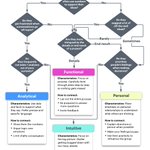
Every #presentation starts with your audience analysis. It's very important to understand how your communicator makes decision and what type of information he trusts. This flowchart will help you to be sure how to present and what is important.

Vizzlo is a nice data visualization tool with a good reference library https://nitter.cf/t.co/EiDpnTPykF and templates https://nitter.cf/t.co/y2cL5rqUZU). You should look at it just for an inspiration and to find some creative ideas how to visualize your bullet points #datavisualization #slidedesign

1
If fonts were people... As a clip: https://nitter.cf/t.co/hUEEGRdneM As a pecha-kucha: https://nitter.cf/t.co/ywJD5tNhEw As an image: https://nitter.cf/t.co/hX0spgC3tR #font #typography #presentations

1
Use #Sketchize service to show your app or web-site idea. Just print requirement device and draw on it. Believe me, your drawings on a #slide will be much easier to understand versus embarrfasing description in 10 bullet points. https://nitter.cf/t.co/zFNG1MixVT #presentation #ux

Six PowerPoint Designs For Six Bullets. Slides without bullet points that could be designed by non-designers. https://nitter.cf/t.co/xXLtKuCq4P #presentation #slidedesign

I always was too sceptical about online #presentation tools. But #Beautiful.AI demonstrates the new approach to #slidedesign. Limited slide customization options do not let user make something ugly. Do not hesitate to do anything you allowed! https://nitter.cf/t.co/rzTtU8ZftU
1
36 Signs You Pulled this Presentation Together at the Last Minute. I saw all of them on many different business conferencess and clients' meetings. https://nitter.cf/t.co/eoU6bGuPBP
If something goes wrong during #presentation, keep calm and explain to viewers what is happening and how are you trying to solve this issue. Don't worry, this things happens even with the best ones. https://nitter.cf/t.co/M2yj4CuoKf
Fresh way to demonstrate data is to put them on relevant images. This approach allows to communicate data context in the best way and demonstrate crucial differences. But you should admit that it's really hard to find images that reflect your data. https://nitter.cf/t.co/BppHqPi5yY
Image or reference is more clear for people than long misleading text description. Use mobile patterns library to present app ideas. Find relevant reference and add short description: "Everything will look the same, but work in complete diferent way”. https://nitter.cf/t.co/IY9hm8b8hJ
Make your slides more comfortable for reading by changing black text to dark gray. And please, do not use black background in #Powerpoint, because you are not Steve Jobs. Less color contrast on presentation slides brings more comfort for readers' eyes. nitter.cf/JonathanTorke/status/9…
1
Often when we see a logo, a question arises: "which font was used?" #logofonts is a nice project that shows #fonts behind famous and popular logotypes.
https://nitter.cf/t.co/Qg2PLqdm2M

1
Do you know that you can generate custom background for your #powerpoint slide at #Flaticon stock? Slides with creative background look really nice and cool. Don’t forget to use opacity settings for the background to make texts on slide more contrast.
https://nitter.cf/t.co/MCd0chH9wB
1
Paul Fuentes creates amazing #illustrations that could be used in #slidedesign. All of them are nice metaphors that could enhance every statement. They are all consistent and placed on statics background. Do not hesitate to ❤️ this guy’s images. https://nitter.cf/t.co/QfW4oyUR2U
It’s funny that Icons8 has not so many bright icons, but has absolutely fantastic collection of beautiful photos (https://nitter.cf/t.co/78WrKPL6yq), cool music archive (https://nitter.cf/t.co/78WrKPL6yq) and nice service for icons and texts mix (https://nitter.cf/t.co/UdG1dEFFvi).
#powerpoint #slidedesign
Here is basic hints how to improve #powerpoint slide composition. #presentationdesign

Dmitry Myskov retweeted

Article on how to display Tweets in real-time on your television or computer screen, creating a Twitter wall. presentationpoint.com/blog/t… @Twitter @julieterberg #Presentation #SlideADayProject
Here you can see how to design nice funnel for your #presentation in #powerpoint in 300 seconds: youtu.be/CsMQukcEC5s