

The all-in-one podcasting toolkit. Serving over 100k podcasters around the world. Start your podcast today! Email us at [email protected]
Jacksonville, FL
Joined November 2009
- Tweets15.3K
- Following755
- Followers14.6K
- Likes37.8K




Your Podcast Doesn’t Have to Be Weekly
A consistent podcast doesn’t require a weekly publishing schedule. On Podcasting Q&A, Cara shares how to choose a realistic release frequency, use seasons to build in breaks, and keep delivering what listeners came for.
Create the publishing schedule that helps you to keep podcasting!
Find out 3 reasons your podcast might not be growing on the latest Podcasting Q&A episode: pqa.buzzsprout.com/328913/ep…

Stop perfecting your podcast and start recording.
Don’t let stressing over the title, description, or artwork keep you from starting a podcast. Treat it like a small experiment: make a few episodes, see how it feels, and decide whether you want to keep going.
Buzzsprout's Podcast Starter Kit helps you start a podcast in five steps, so if you've been kicking a new podcast idea around now is the time to try it out!
Why Your Podcast Stats Don't Add Up (And What Metrics Actually Matter)
00:00 Unlikely Saboteur
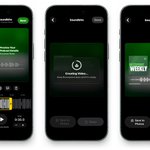
03:36 Create Captioned Soundbites On Your Phone!
06:22 Achievement Sharing With Share Studio
11:38 The Buzzsprout Logo Easter Egg
15:18 Why Podcast Metrics Feel Broken
19:09 YouTube Views Versus Engaged Views
24:23 Stop Combining Cross Platform Numbers
31:08 Spotify Plays And Incentives
40:17 Apple HLS Video Download Logic
46:32 Focus On People Not Dashboards
51:51 Fan Mail
57:48 Post Show: Not-So-Timeless Tickets
The Podcast Starter Kit helps you turn your idea into a ready-to-launch show!
Answer five questions about your podcast, then choose from a title, description, artwork and categories created for your show.
Choose I’m a New Podcaster when you sign up for Buzzsprout to get started.

Cleaning up “um,” “uh,” and other filler words can get repetitive, especially when they show up throughout an episode!
Now, the Buzzsprout transcript editor can remove a word or phrase everywhere it appears.
You can also save it to Autocorrect, so the same filler words are removed from future transcripts automatically.
Open the transcript editor in your Buzzsprout account to try it out.
Sharing clips on social media helps people discover your podcast as they scroll, even if they’ve never heard of your show.
Now, you can create soundbites and share them directly to social media right from your phone, making it easier to get your episodes in front of new listeners.
Update your Buzzsprout mobile app to get started.

Stop fixing the same transcript mistakes over and over again.
Does your transcript keep getting the same words wrong? Buzzsprout’s Transcript Autocorrect lets you save those corrections and automatically apply them to future transcripts. Fix recurring mistakes once and spend less time cleaning up every episode!
Listen to the full episode of Buzzcast to hear more improvements to Buzzsprout's Transcript Editor! buzzcast.buzzsprout.com/2314…

If you start a video podcast, what happens to the people who listen to audio only?
Adding video doesn’t mean leaving audio listeners behind! Alban explains how RSS remains the backbone of podcast distribution. Through it, one single video upload to Buzzsprout can reach video platforms while delivering audio to podcast apps.
Listen to the full episode to learn more about HLS Video podcasting! pqa.buzzsprout.com/328913/ep…

After years of requests, Buzzsprout officially has Dark Mode!
In this week's Buzzcast episode, we share why this highly requested feature took so long to build, what went into designing it, and how you can turn it on for your own Buzzsprout account.
Want to try it out? Log in to Buzzsprout, head to Settings → My Profile, and switch to Dark Mode!
We expanded the Buzzsprout API to make it easier to connect your podcast with the tools you use most.
Developers, apps, and AI can now take on more of the day-to-day work of running your podcast. From uploading episodes and editing transcripts to managing directory listings, the expanded API helps Buzzsprout fit more naturally into the way you work.
Check out the Buzzsprout API to get started.

We updated the Buzzsprout transcript editor to make everyday edits easier!
You can double-click to select words, use Find & Replace to update names and phrases, and move through common edits with keyboard shortcuts.
A cleaner toolbar and chapter markers help you find your way around, while Autosave saves your changes as you go.
Open the transcript editor in your Buzzsprout account to try it on your next episode.

Teens are turning podcast comments into chat rooms?
Podcast comments are becoming an unexpected place for teens to hang out and chat.
On Buzzcast, we talk about this clever use of the comment section and whether or not it's actually good for your podcast's discovery.
Would you be okay with teens turning your podcast comments into a chat room if it meant the algorithm sent more listeners your way?
We’re sorry to any of our video podcasters experiencing delays with YouTube!
Our developers are on the case, and the good news is there’s nothing you need to do. We’re currently waiting on YouTube to increase how many video episodes Buzzsprout can send them.
We asked for the increase almost two months ago, so we’re hoping they can get it approved soon. Thanks for your patience!

Anyone out there have a contact on the YouTube Podcasts team at Google?
@Buzzsprout has been waiting almost two months for an API quota increase so our podcasters can publish more video episodes to YouTube.
Would love an intro to someone who can help us get it unstuck. 🙏
