

One inbox for all your email accounts. Mailbird Next for Windows and Mac, Android and iPhone in beta. #OutlookAlternative
Sacramento, CA
Joined May 2012
- Tweets32.3K
- Following6.9K
- Followers6.9K
- Likes55.9K






One of the nicer things about launching Mailbird Next has been the mail we get back. 💌 Users write in with feedback, and we’ve been turning those into new features as fast as we can. The highlights, and a peek at what’s next 🧵

What's next? The upcoming release is already with early adopters, and it carries the requests we heard most often, including sidebar background images you can upload or generate from a description, and an app for finding any attachment you’ve ever received. A Linux beta version is on the way too! 🐧
🙋Want to become a Mailbirdian? Install Next today at getmailbird.com. And if you’re already on Next, opt in to early adopter updates under Settings > General to get the newest features a couple of weeks ahead of everyone else. 😎

You know how you rearrange your desk and suddenly work feels a bit lighter for a day or two?
Turns out that works for email too. Mailbird Next has hundreds of combinations for how the app looks: nine color themes in dark or light mode, five layouts, three menu views, and ten zoom levels.
🎨 Which combination will be your favorite?

Not on Next yet? Install it free for Mac and Windows: getmailbird.com/


Email is rarely the whole job. There’s the chat where the real decision happened, the task it turned into, the file it needs, and the meeting where someone will ask about it.
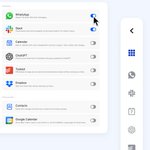
In Mailbird Next, all your go-to apps fit in the sidebar next to your inbox, including WhatsApp, Slack, Asana, Dropbox, and Google Drive. There are more than 40 app integrations, plus custom apps, so your own tools fit in too.

Not on Next yet? Install it free for Mac and Windows: f.mtr.cool/1gocmtit37
Most marketing emails come with a tiny spy: an invisible pixel that tells the sender when you opened the email, where you were, and how many times you went back to it. Mailbird Next’s Privacy Hub blocks those trackers, so what you read stays your business. 🔐
Want more? Block all images, and they’ll stay hidden until you click “Show images.”

👉 Install Mailbird Next and discover the Privacy Hub today: f.mtr.cool/4jnpp6z2ai
Our team's favorite new feature in Mailbird Next? Your inbox decisions now follow you from phone to desktop and back, Getting Things Done style, and it's available on the free plan. 🗂️
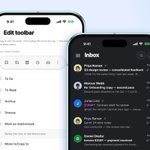
Go through your inbox on your phone and decide where each email belongs with an easy swipe: To Do, To Read, snooze, or archive. When you open Mailbird on your Windows or Mac later, the same lists are ready for you, across every account.

Not on Next yet?
💻 Install free for Mac and Windows: f.mtr.cool/64gyqcroqw
🤖 Install Mailbird on Android (beta): f.mtr.cool/ef1oyovcn6
🍏 Install Mailbird on iOS (beta): f.mtr.cool/nk5nlo87cr
One of Mailbird Next's superpowers is a unified inbox, calendar, and contact list for all your email accounts. If email feels like a hectic scavenger hunt (and it probably does), add your personal and work inboxes to Mailbird and read, reply, sort, and organize everything from one tidy place.
Bonus points for adding your go-to apps to the sidebar, which turns Mailbird Next into mission control. 🧑🚀

Not on Next yet? Install free for
Mac and Windows: getmailbird.com/
Install on Android: play.google.com/store/apps/d….
iOS is a few days out! 🚀
Mailbird Next: One calm inbox for every email account, on Windows and Mac producthunt.com/products/mai… via @producthunt

What Michael said 👇

You answer one email, three more arrive, and suddenly an hour of your workday is gone. The average employee gets 117 emails a day, but the problem isn't volume.
Michael Olsen, co-founder of Mailbird, says it’s the pressure we put on ourselves to respond:
success.com/strategies-to-ma…

Read all about it! 🗞️

Mailbird Launches Mailbird Next, Bringing Windows and Mac Into One Email App ow.ly/SJKe50ZUTep #MarTech #MarketingTechnology #MarketingTech #AdTech #ContentMarketing #MarketingAutomation

Great news, indeed!

Really welcome news for those of us who purchased lifetime licenses many years ago! #mailbird
getmailbird.com/mailbird-2-w…
