
Private Internet Access VPN service. Start browsing more securely and anonymously with PIA. Need Help? For customer support via Twitter, contact: @piacsm
US
Joined April 2011
- Tweets4.9K
- Following69
- Followers135K
- Likes3.5K





A login code has one job: proving the person signing in is you.
That’s why the code scam works so well.
It skips the hard part.
Instead of stealing a password, it asks you for the step that’s meant to confirm it’s really you.
Snapchat is a common target, but the same trick works anywhere a code is used to sign in.
If you didn’t ask for a code, don’t share it.
Learn more: privateinternetaccess.com/bl…
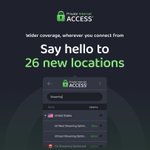
Connect from more locations than ever before 🌎
We've added 26 new server locations, bringing our network to 113 countries and 180 locations.
So, wherever you're connecting from, there's a good chance we're there too 🤝
From the Caribbean to Southeast Asia, try our new server locations now

5
4
2,550
The US, Germany, Russia, and China. Which country makes the most private search engines?
🔗 privateinternetaccess.com/bl…

2
4
1,693
PIA is now on the Mac App Store, optimized for your Mac and ready to download in the main Mac category.
Same privacy protection, easier to find: bit.ly/pia-mac

What happens when a government asks us for your VPN activity?
Nothing, because we don't have it.
We don't log VPN activity or connection info, so there's nothing to hand over even when someone asks.
Our Q2 2026 transparency report is now live, and the results are 19 legal requests received, 0 logs produced.
🔍 Full breakdown of request types, plus this quarter's Bug Bounty results, on the blog.
🔗 privateinternetaccess.com/bl…


If you run a de-Googled phone, your VPN options were pretty limited 📱
Sideload the APK and update it by hand, or go through the Play Store anyway.
Now there's a third option.
PIA is live on F-Droid, no Google account required ✅
And because F-Droid builds the app from our published source code, you can actually verify what you're installing matches what we've shipped.
🔍 Already on F-Droid? Search "Private Internet Access"
New to it? Get F-Droid from f-droid.org, let it sync, then search for us.
Read more: 🔗 privateinternetaccess.com/bl…

Slow VPN? 🐌 Try these 7 quick fixes:
1. Pick a nearby, low-load server
The farther your data travels, the slower it feels. If your connection lags, switch to a VPN server closest to your real location. If your VPN offers auto-connect, let it pick the best server for you and check if that improves your speeds.
2. Change the VPN protocol
Your VPN protocol is like the lane your traffic travels in: some are faster than others. Start with WireGuard for the best balance of speed and security. If that’s blocked, try OpenVPN with UDP (good for streaming and calls). Use OpenVPN with TCP only if you need extra reliability.
3. Update your VPN app and device
Don’t skip updates as outdated apps and softwares can drag down your VPN performance. Start with updating your VPN app and software, then restart your device and power-cycle your router for 30 seconds.
4. Use split tunneling for bandwidth-heavy apps
Some apps don’t need VPN protection (like game launchers, big downloads, or cloud backups). With split tunneling, you can route those outside the VPN so that important apps (calls, streaming, or banking) stay smooth inside the tunnel.
5. Try a different port
Some networks slow down or block common VPN ports. Switching to OpenVPN over port 443 can help because it blends with normal HTTPS traffic. If that doesn’t work, test other ports (like 1194 or 8080) in your VPN app.
6. Check your Multi-Hop and obfuscation settings
Extra privacy features can often make speeds slower. But in some cases, toggling them on can improve stability. For example, Multi-Hop can help if your ISP takes a slow route to certain destinations. Try switching these features on and off to see what works best for you.
7. Close resource-hungry apps and update software
Bandwidth-hungry apps can slow a VPN down. Temporarily disable them to test, then re-enable for safety. Quit or pause big downloads and re-test your speeds.
22
14
9,752
Looking for a VPN? Make sure you keep these things in mind before you click install:
✅ Speed
Good speeds are vital. Choose a VPN with fast servers that seamlessly support streaming and gaming.
✅ Security
When it comes to online security, quality encryption is crucial. Pick a VPN that uses the strongest encryption protocols.
✅ Privacy
Look for a VPN that has a strict no-logs policy to ensure your activity data is not stored in any way.
✅ Split tunneling
This feature allows you to create a custom VPN connection to specific apps and websites.
✅ Open-source
An open-source code allows you to take a look under the hood, and see how a VPN really operates.
✅ Advanced protection
If you need an extra layer of protection, look for a VPN that has a multi-hop feature. This allows you to chain your connection through two VPN servers to boost your anonymity.
✅ Cost
When it comes to your online privacy and security, you don’t want to settle. Choose a trustworthy and quality VPN that comes at a reasonable price point.

9
5
9,259
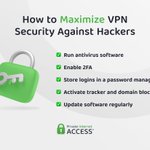
A VPN is key for online protection, but it’s even stronger when paired with other security measures. 💪
Here’s how to get the most out of your VPN to build a robust defense for your digital life: privateinternetaccess.com/bl…

Is the dark web really just a black market for hackers, leaked data, and pirated downloads? 🤔 Not entirely. There's a lot more to the story than you might think.
In this guide, we've broken down the different layers of the internet, how to access the dark web safely, and tips for protecting your personal data if you decide to explore it: privateinternetaccess.com/bl…

4
6
7,231
Black Friday might be over, but we’re not done yet. Our biggest sale of the year is still on!
Get a better, safer internet with PIA VPN, now with an extra 4 months when you select our 3-year plan.
Ends soon (offer details may vary by region): privateinternetaccess.com/bu…

Our Black Friday sale is here 🥳
Save big and stay secure with our 3 years + 4 months plan, with additional savings available when you bundle with our PIA Antivirus or Dedicated IP add-ons.
Shop our best deals, covered by our 30-day money-back guarantee (offer details may vary by region): privateinternetaccess.com/bu…

3
1
5,601
What defined online security in the US during Q3 2025? Here are 3 big things shaping digital #privacy right now:
🎒 Schools are becoming data mines
Across the US, schools are under scrutiny for how they handle student data. With more digital tools tracking attendance, grades, and behavior, experts warn that tons of info on kids are being collected with little oversight. The debate highlights a growing gap between the speed of classroom digitization and the safeguards meant to protect young users.
🚨 AI voice scams on the rise
The FBI issued warnings this past quarter about a new wave of deepfake voice calls. Scammers are cloning voices of senior government officials from just a few seconds of audio found online. They're using these fakes to demand money, influence contractors, and spread misinformation. What used to take professionals can now be done with a few clicks.
🤳 Facial recognition faces its reckoning
In states like Illinois and California, courts are rethinking how facial recognition fits into daily life. Identity itself is becoming a form of personal data, and the surge in lawsuits shows the urgent need for stronger boundaries around consent and ownership.
2
5,148
Our Q3 2025 Transparency Report is live! Every quarter, we publish exactly how many data requests we receive – and how we handle them. 👇
This time, our legal team processed 19 requests from authorities, all closed without disclosure. Most were subpoenas; none were warrants. The takeaway stays the same: because we don’t keep logs, we have nothing to hand over.
Our bug bounty program also stayed active, with independent researchers helping us identify and fix four valid vulnerabilities. None affected user privacy or service integrity.
Check the full report for more details: privateinternetaccess.com/bl…

3
1
5,390

ANSWER REVEALED! ✅
How’d you do? Let’s see if you guessed it right! 🔍
This week’s quiz question was:
2FA stands for two-factor _____.
(Hint: the process of verifying who you are.)
🥁 Drumroll, please...
The correct answer is ......

4
6
6,653
🤝 Not every connection request is what it seems.
Platforms like LinkedIn and Facebook are common starting points for social engineering attacks — where scammers use trust to trick you into giving up info.
Stay sharp. Verify before you click. Not everyone is who they claim to be.

1
6
5,357
🧰 Still debating whether to add a VPN to your digital toolkit?
Join the thousands who trust Private Internet Access to keep their data safe and their browsing private.
Why wait? Make online protection part of your routine.
It’s your turn.
privateinternetaccess.com/?u…

4
4,428
Think you know all there is to know about VPNs, online security, and PIA?
Fill in the blank and challenge your knowledge! 🧠✨
Can you guess the right word?
👇 Drop your answers in the comments below and stay tuned for the answers every Thursday!

4
1
3,964
