

🧑🔧 Free repair guides for every thing, written by everyone 📸 Share your repair with #ifixit 🌏 In Europe and Asia: @ifixitDE + @ifixitFR + @iFixit_Japan
- Tweets20.2K
- Following1.5K
- Followers132K
- Likes10.5K




ALT Overhead view of a person using an iFixit FixHub soldering iron to repair the exposed circuit board of a partially disassembled drone. The drone rests on a black repair mat atop a red vehicle hood, surrounded by wire cutters, solder, brass cleaning wool, and the FixHub Portable Soldering Station.


ALT Flat lay of partially disassembled gaming consoles, including a PlayStation 5, Nintendo Switch, and handheld gaming PC, with exposed circuit boards, batteries, and cooling fans. iFixit repair tools, blue opening picks, tweezers, a screwdriver, and colorful Joy-Con controllers are arranged across a purple background with diagonal orange, green, and blue stripes.


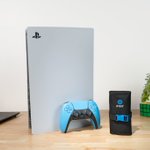
ALT A white PlayStation 5 console stands upright on a wooden desk with a light blue DualSense controller in front of it. A rolled-up black iFixit repair toolkit with a blue buckle sits beside the controller, alongside a laptop, Rubik's Cube, and potted plant.

ALT Close-up of a person using an iFixit precision screwdriver to remove a screw from the exposed cooling fan of a PlayStation 5 console. A laptop in the background displays an iFixit step-by-step repair guide, while a magnetic screw tray and screwdriver bits sit on the wooden workbench.

ALT Overhead view of a person cleaning a removed PlayStation 5 cooling fan with a small black brush, removing dust from between its blades. An iFixit precision screwdriver, cleaning brush, and screwdriver bit set are arranged on the wooden workbench.

ALT Overhead view of a person repairing a light blue PlayStation DualSense controller, using a cotton swab to clean around the right analog stick while holding it in place. An open iFixit toolkit, cleaning brushes, and a PlayStation 5 console sit on the wooden workbench.


ALT iFixit promotional graphic for the Game Console Toolkit featuring a partially disassembled Nintendo Switch surrounded by precision screwdrivers, opening picks, tweezers, and specialized repair bits. Large text reads “Fight Monsters, Not Stick Drift,” with callouts highlighting the toolkit's durability, cross-generation compatibility, and console-specific bits.


ALT Graphic with a blue header banner reading ‘14” MacBook Pro PROLED XDR’ next to an iFixit wrench-and-fist icon. On the left, a dark space gray MacBook Pro faces the viewer with its screen on, showing an abstract wallpaper of vertical silver, white, and blue streaks fading to black, split into three tall panels with a camera cutout at the top center. On the right, partly overlapping the laptop, an iFixit repairability badge shows a score of 5 on a gauge, with 5 segments filled in yellow, labeled ‘Repairability’ and tagged ‘Provisional.’ A handwritten blue note at the bottom right reads ‘Score Explanation’ with an arrow pointing right.

ALT Infographic with a blue header banner reading ‘Repair Highlights’ beside a clipboard checklist icon, summarizing the repairability of the 14-inch MacBook Pro PROLED XDR. A ‘Pros’ section lists three points: battery replacements are doable, if not exactly easy; the display and USB-C ports are both replaceable; and Apple offers day-one manuals, with Repair Assistant making part calibration easy. A ‘Cons’ section lists one point: storage is soldered, keyboard repairs are impractical, the fans are stuck under the logic board, and Pentalobe screws bar the way for all repairs. An italic footnote at the bottom reads, ‘Provisional scoring will be confirmed/revised when final repair parts, instructions, and software are available.’

