
Full-Stack & AI Engineer Building in public: https://nitter.cf/t.co/HafiERaxzn
Joined January 2016
- Tweets2.5K
- Following519
- Followers6.6K
- Likes3.4K





Nehemiah Kamolu retweeted

My domain expired today and now @Hostinger is following me on X 😭
Bro I’ll renew it, you don’t have to come looking for me.


Nehemiah Kamolu retweeted

At the upcoming Agentic Software Engineering Workshop, you'll see how clear project rules shape what AI builds in practical way.
I’m looking forward to exploring it with the students. way
Register here: eventbrite.com/e/agentic-sof…
#AIEngineering #AgenticSoftwareEngineering

Nehemiah Kamolu retweeted

A crucial skill when developing with AI is to know which "bugs" to tackle or ignore.
Because AI models will *always* find "bugs". You can run 10 cycles of code reviews, they will still find something.
That includes false positives BUT also *a lot* of esoteric, niche issues that will likely never matter for what you're building.
For example, I find that Astra loves to find weird pretty made up racing conditions like "if you bulk import emails and after the first 10 records were written, an email address changes, it will silently overwrite it". Stuff like that.
Which may never matter for what you're building.
If you just let AI review + blindly accept its findings and let it fix those findings, you'll just start adding layers of complexity and turn your codebase into a mess.
Don't let that happen. Use your brain, use your understanding of what you're building - don't outsource your thinking.
Nehemiah Kamolu retweeted

Everyone is looking for a shortcut these days.
A shortcut to get rich.
A shortcut to lose weight.
A shortcut to learn an instrument.
A shortcut to build an app.
I’m telling you: there is NO shortcut.
You can’t build a great body after a week at the gym. You can’t play an instrument after watching a few YouTube videos.
Building software is no different. It requires many different skills. And you can’t develop those skills overnight or by learning bits and pieces while talking to AI. You won’t have a clear mental map of how things fit together or when to use what.
AI gives rookies the impression that they can build an app in a day and make thousands of dollars every month.
And yes, that may actually happen for a few lucky ones. But it doesn’t apply to the other 99.9%.
If you’re one of the lucky ones, remember: you’re not always going to stay lucky. Sooner or later, someone will come along and build a better version of what you built. Better UX. Better architecture. Fewer bugs. Faster execution. That’s when competition starts eating your lunch.
We’ve seen this before. Yahoo was once a giant in search. Then Google came along with a better search engine and eventually took over the market. Then ChatGPT came along and changed how we search for information, disrupting Google and countless businesses that depended on its traffic.
That’s what happens when strong engineering, great UX, and a better solution to a real problem come together.
That’s why fundamentals still matter, even if AI eventually writes every line of code for us.
Learn a programming language. Build small projects. Build front ends and back ends. Learn SQL and data modeling. Design a few databases. Learn about code organization, complexity, APIs, testing, security, and UX.
Not because you need to memorize syntax.
Because that’s how you develop engineering judgment. You start with small problems and, over time, develop the mental models you need to solve bigger ones.
Then you can let AI handle more of the implementation while you focus on higher-level problems and decisions.
Remember, when you don’t know what you’re doing and you’re just prompting, everything AI generates can look perfect. To an inexperienced developer, it all looks right. AI is incredibly good at convincing you that its solution is solid.
If you don’t know enough to challenge it, you’ll accept the first answer and move on. But with a solid foundation, you can see the cracks and challenge AI. That’s when it starts to say:
“You’re absolutely right. That’s a better design than what I built.”
“You’re right on both counts. I didn’t consider that scenario.”
Building that foundation takes time. You can’t build it overnight by watching a YouTube video or even taking a single course. You need to spend several months taking courses, reading books, and, more importantly, building things yourself without AI’s help so you can learn to identify problems and solve them yourself.
Once you’re equipped with that knowledge and start using AI, you’ll act more like a tech lead. You won’t manually type every line of code. You’ll give AI the right instructions, review what it does, challenge its decisions, and guide it in the right direction.

Nehemiah Kamolu retweeted
🔵 25. High Availability Patterns In System Design 🔵
➤ Active-Passive Failover
One server handles all traffic while another server stays on standby in case of failure.
The passive server monitors the active server using heartbeat checks and takes over if the primary server fails.
✓ Simple to implement
✓ Lower cost
✓ Automatic failover
✗ Unused standby capacity
✗ Failover takes some time
Goal: Minimize downtime during server failures.
➤ Active-Active Failover
Multiple servers handle traffic simultaneously.
If one server fails, the other continues serving requests without downtime.
✓ High availability
✓ Better scalability
✓ No single point of failure
✗ More complex to implement
✗ Requires session management or shared storage
Goal: Keep the system available even if one or more servers fail.
➤ Master-Slave Replication
One master database handles writes while slave databases handle read operations.
Replication happens asynchronously from the master to replicas.
✓ Improves read performance
✓ Reduces load on master
✓ Easy to scale reads
✗ Master is single point of failure.
✗ Data loss possible if replication lag exists
Goal: Scale read operations and reduce database load.
➤ Master-Master Replication
Multiple database nodes can both read and write data.
Data is replicated between all nodes.
✓ High availability
✓ No single point of failure
✓ Better write scalability
✗ Complex conflict resolution
✗ Higher network and synchronization overhead
Goal: Provide high availability with write scalability.
➤ Availability In Numbers
Availability is measured in “nines.”
- 99% → ~3.65 days downtime/year
- 99.9% → ~8.76 hours downtime/year
- 99.99% → ~52.6 minutes downtime/year
- 99.999% → ~5.26 minutes downtime/year
- 99.9999% → ~31.5 seconds downtime/year
Higher availability requires more infrastructure, monitoring, automation, and cost.
This overview is part of a broader series on system design fundamentals.
Link: youtube.com/watch?v=bb9C_BeS…


🔵 24. Consistency patterns In System Design 🔵
Three patterns you need to understand to ensure your system behaves as expected under load.
➤ Weak Consistency
In this pattern, a system adopts a "best-effort" approach.
After a write operation, subsequent reads may or may not return the most recent data.
This model is ideal for real-time systems such as VoIP calls or online multiplayer games where maintaining a continuous, fluid connection is more important than ensuring every single data packet arrives perfectly in order.
➤ Eventual Consistency
Eventual consistency is a common choice for high-traffic social platforms.
Here, data is replicated asynchronously, meaning while a write might not be reflected for all users instantly, the system guarantees that all reads will eventually converge on the correct value, usually within milliseconds.
A perfect example is the "like" count on a viral video; while the number might fluctuate or lag slightly for some users, it will normalize shortly.
➤ Strong Consistency
For applications where accuracy is non-negotiable such as banking system, strong consistency is the gold standard .
This pattern ensures that every read operation returns the absolute most recent write.
To achieve this, the system often uses synchronous replication and locks data resources (like account balances) during transactions to prevent any discrepancies.
This overview is part of a broader series on system design fundamentals. Choosing the right consistency model is essential for balancing system performance, availability, and reliability.

Nehemiah Kamolu retweeted
🔵 24. Consistency patterns In System Design 🔵
Three patterns you need to understand to ensure your system behaves as expected under load.
➤ Weak Consistency
In this pattern, a system adopts a "best-effort" approach.
After a write operation, subsequent reads may or may not return the most recent data.
This model is ideal for real-time systems such as VoIP calls or online multiplayer games where maintaining a continuous, fluid connection is more important than ensuring every single data packet arrives perfectly in order.
➤ Eventual Consistency
Eventual consistency is a common choice for high-traffic social platforms.
Here, data is replicated asynchronously, meaning while a write might not be reflected for all users instantly, the system guarantees that all reads will eventually converge on the correct value, usually within milliseconds.
A perfect example is the "like" count on a viral video; while the number might fluctuate or lag slightly for some users, it will normalize shortly.
➤ Strong Consistency
For applications where accuracy is non-negotiable such as banking system, strong consistency is the gold standard .
This pattern ensures that every read operation returns the absolute most recent write.
To achieve this, the system often uses synchronous replication and locks data resources (like account balances) during transactions to prevent any discrepancies.
This overview is part of a broader series on system design fundamentals. Choosing the right consistency model is essential for balancing system performance, availability, and reliability.
🔵 23. Common Trade-Offs In System Design 🔵
➤ Performance vs. Scalability
Performance relates to how fast a system responds for a single user, whereas scalability is the system's ability to maintain or increase performance as load or resources grow.
➤ Latency vs. Throughput
Latency is the time taken to process a single request , while throughput is the total quantity of results or actions a system can produce within a specific timeframe.
➤ The CAP Theorem
This theorem states that in a distributed system, you must navigate trade-offs between three properties.
▸ Consistency (C)- All nodes see the same data
▸ Availability (A)- Every request receives a response
▸ Partition Tolerance (P)- The system continues to operate despite network failures.
Because network partitions are inevitable, designers must choose between CP (prioritizing consistency and sacrificing availability by returning errors during a partition) or AP (prioritizing availability and potentially returning stale data during a partition)

Nehemiah Kamolu retweeted
🔵 23. Common Trade-Offs In System Design 🔵
➤ Performance vs. Scalability
Performance relates to how fast a system responds for a single user, whereas scalability is the system's ability to maintain or increase performance as load or resources grow.
➤ Latency vs. Throughput
Latency is the time taken to process a single request , while throughput is the total quantity of results or actions a system can produce within a specific timeframe.
➤ The CAP Theorem
This theorem states that in a distributed system, you must navigate trade-offs between three properties.
▸ Consistency (C)- All nodes see the same data
▸ Availability (A)- Every request receives a response
▸ Partition Tolerance (P)- The system continues to operate despite network failures.
Because network partitions are inevitable, designers must choose between CP (prioritizing consistency and sacrificing availability by returning errors during a partition) or AP (prioritizing availability and potentially returning stale data during a partition)
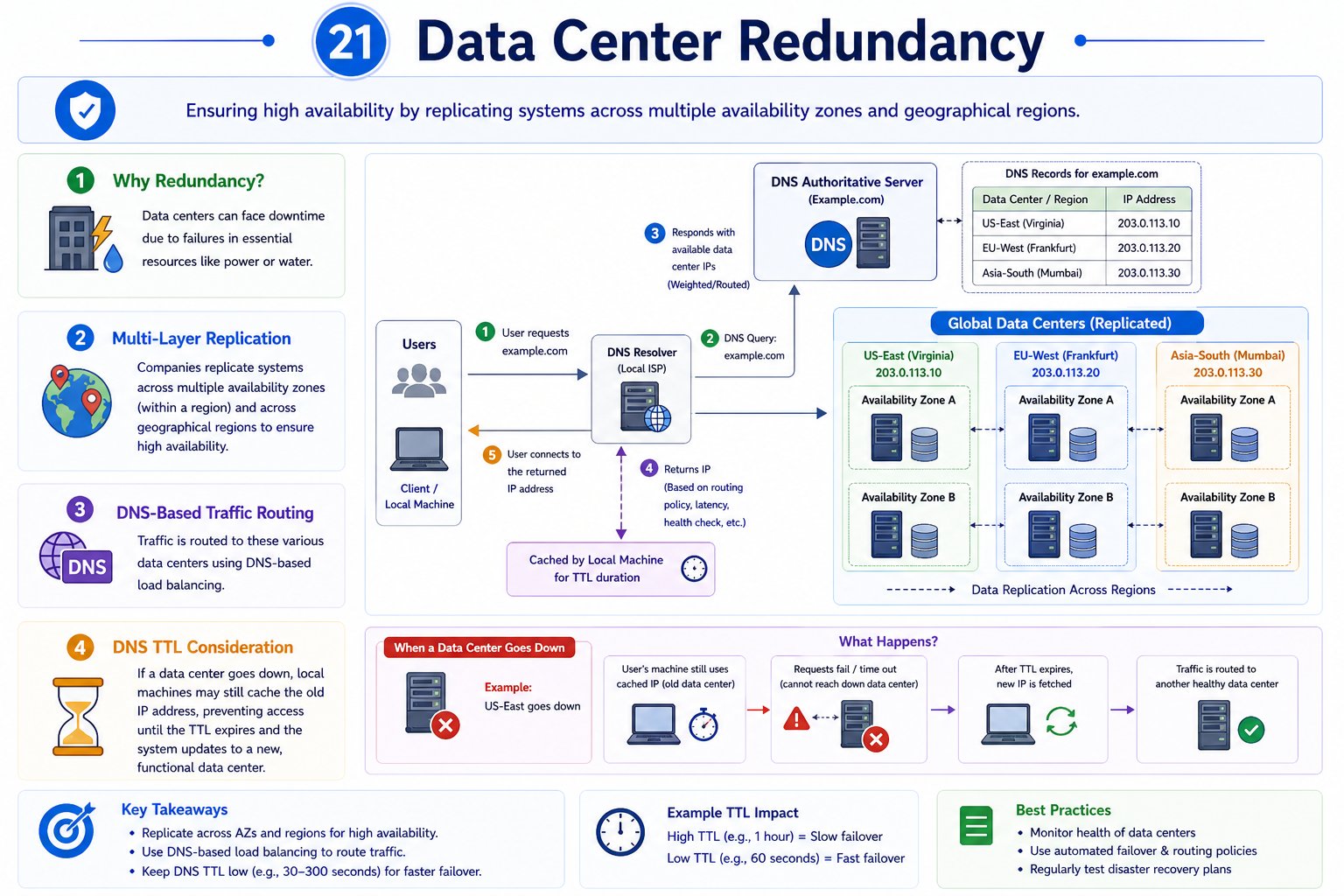
🔵 22. Data center redundancy 🔵
➤ Data centers can face downtime due to failures in essential resources like power or water.
➤ To mitigate this, companies replicate systems across multiple availability zones and geographical regions to ensure high availability.
➤ Traffic is routed to these various data centers using DNS-based load balancing.
➤ A key consideration is the DNS TTL (Time to Live).
If a data center goes down, local machines may still cache the old IP address, preventing access until the TTL expires and the system updates to a new, functional data center.
Nehemiah Kamolu retweeted
🔵 21. Caching 🔵
➤ Caching is all about how engineers optimize system performance by storing data in memory to bypass frequent, slow database lookups.
Here is how you can implement this strategy effectively:
➤ Move Beyond Raw Queries
While caching database queries directly is a common starting point, it quickly becomes a maintenance headache.
Complex queries are difficult to manage, and updating or invalidating cached data when a single row changes in your database creates unnecessary friction.
➤ Adopt Object-Oriented Caching
Shift towards caching application objects instead.
By mapping your database results to class instances within your code, you gain a cleaner, more intuitive way to handle data.
You simply store these object instances in high-performance, in-memory tools like Redis.
➤ Streamline Maintenance:
When your data changes, you no longer need to track down every potentially affected query.
Instead, you simply update or delete the specific object in your cache.
This approach makes your system significantly easier to maintain and faster to update.
Ultimately, caching is a game of trade-offs. You must always evaluate the specific needs of your application to decide if query caching or object caching provides the best performance for your unique challenge.
Go deep into system design in this playlist - youtube.com/playlist?list=PL…

🔵 20. Asynchronism 🔵
➤ Focuses on handling long-running operations to ensure they do not block or slow down the rest of the application.
➤ Avoiding Blocking
The primary goal of asynchronous processing is to ensure that tasks that take a long time to complete do not prevent the system from handling other incoming requests.
➤ Offloading Tasks
When a request is made that requires a time-consuming background process, the server offloads that task to a job queue or a similar background tool.
➤ Notification
Once the background task is successfully completed, the system notifies the server, which can then update the client or provide the requested information.
➤ Improved User Experience
By processing these tasks in the background, the system remains responsive and efficient, rather than leaving the user waiting for a single long process to finish.

Nehemiah Kamolu retweeted
🔵 20. Asynchronism 🔵
➤ Focuses on handling long-running operations to ensure they do not block or slow down the rest of the application.
➤ Avoiding Blocking
The primary goal of asynchronous processing is to ensure that tasks that take a long time to complete do not prevent the system from handling other incoming requests.
➤ Offloading Tasks
When a request is made that requires a time-consuming background process, the server offloads that task to a job queue or a similar background tool.
➤ Notification
Once the background task is successfully completed, the system notifies the server, which can then update the client or provide the requested information.
➤ Improved User Experience
By processing these tasks in the background, the system remains responsive and efficient, rather than leaving the user waiting for a single long process to finish.
🔵 19. Data Optimization Strategies 🔵
➤ Denormalization
To improve scalability, consider denormalizing your data from the beginning to avoid complex database joins.
➤ Code-Level Joins
Instead of relying on the database to perform expensive joins, move this logic into your application code.
➤ Database Choice
Depending on your specific needs, evaluating NoSQL databases can sometimes provide better horizontal scaling capabilities compared to traditional SQL databases.

Nehemiah Kamolu retweeted
🔵 19. Data Optimization Strategies 🔵
➤ Denormalization
To improve scalability, consider denormalizing your data from the beginning to avoid complex database joins.
➤ Code-Level Joins
Instead of relying on the database to perform expensive joins, move this logic into your application code.
➤ Database Choice
Depending on your specific needs, evaluating NoSQL databases can sometimes provide better horizontal scaling capabilities compared to traditional SQL databases.
🔷 Partitioning 🔷
➤ This technique involves dividing a large database table into smaller, more manageable chunks or subsets.
➤ By querying these smaller sections rather than the entire massive table, you significantly improve search and response times.
🔷 Types of partitioning 🔷
➤ Horizontal partitioning
Dividing a table based on rows within a single database.
➤ Vertical partitioning
Logically separating data based on columns within a single database.
➤ Sharding
This is a more advanced technique where partitions are moved to different database servers.
Each individual partition on these separate nodes is called a shard.
To manage this, a shard key (such as a unique User ID) is used to identify exactly which shard contains a specific piece of data.


Nehemiah Kamolu retweeted
🔵17. The Segment on Data Replication 🔵
◆︎ Learn how to handle database performance bottlenecks when a single database can no longer manage the volume of read and write requests.
🔵 Key strategies discussed
➤ Master-Slave Replication (Active-Passive)
◆︎ A setup where one master database handles all write operations, which are then replicated to one or more slave databases that handle read operations.
➤ Master-Master Replication (Active-Active)
◆︎ An architecture using multiple master nodes that can both accept writes.
◆︎This provides higher availability. If one master fails, the other can take over without significant downtime.
➤ Load Balancing for Databases
◆︎ Just as with web servers, a load balancer can be placed in front of database replicas to efficiently distribute read requests among them.
➤High Availability
◆︎ To avoid a single point of failure (SPOF) with load balancers, using an Active-Active or Active-Passive load balancer configuration, often utilizing a heartbeat signal to ensure the standby unit is ready to take over if the primary fails.

🔵16. Sticky Sessions (Session affinity) 🔵
⬩A technique used to ensure a specific client consistently receives responses from the same server.
➤ Mechanism
⬩When a client makes an initial request, the load balancer assigns a cookie to that client.
⬩This cookie acts as an identifier that maps the client to a specific server.
➤ Consistency
⬩For all subsequent requests, the client includes this cookie, allowing the load balancer to route them directly back to the same server that handled the initial interaction.
➤ Trade-off
⬩The primary drawback of this approach is the risk of overwhelming a single node if too many clients are pinned to the same server.

Nehemiah Kamolu retweeted
🔵16. Sticky Sessions (Session affinity) 🔵
⬩A technique used to ensure a specific client consistently receives responses from the same server.
➤ Mechanism
⬩When a client makes an initial request, the load balancer assigns a cookie to that client.
⬩This cookie acts as an identifier that maps the client to a specific server.
➤ Consistency
⬩For all subsequent requests, the client includes this cookie, allowing the load balancer to route them directly back to the same server that handled the initial interaction.
➤ Trade-off
⬩The primary drawback of this approach is the risk of overwhelming a single node if too many clients are pinned to the same server.
🔵15. RAID🔵
➤ RAID stands for Redundant Array of Independent Disks.
➤ RAID allows multiple physical hard disks to be logically combined into one.
🔵 Key RAID configurations 🔵
➤ RAID-0 (Striping)
Data is split into chunks and written across multiple disks.
This significantly improves performance and write speeds but offers no redundancy.
➤ RAID-1 (Mirroring)
Data is perfectly duplicated across disks.
If one disk fails, the data remains available on the other, providing high redundancy.
➤ RAID-10
A combination of striping and mirroring, providing both performance and redundancy, though it is more expensive as it requires four disks.
➤ RAID-5
Uses parity to provide redundancy with less disk space overhead than mirroring.
You can typically replace one failed disk.
➤ RAID-6
Similar to RAID 5 but offers higher fault tolerance, allowing for the simultaneous failure and replacement of two disks.

Nehemiah Kamolu retweeted
🔵15. RAID🔵
➤ RAID stands for Redundant Array of Independent Disks.
➤ RAID allows multiple physical hard disks to be logically combined into one.
🔵 Key RAID configurations 🔵
➤ RAID-0 (Striping)
Data is split into chunks and written across multiple disks.
This significantly improves performance and write speeds but offers no redundancy.
➤ RAID-1 (Mirroring)
Data is perfectly duplicated across disks.
If one disk fails, the data remains available on the other, providing high redundancy.
➤ RAID-10
A combination of striping and mirroring, providing both performance and redundancy, though it is more expensive as it requires four disks.
➤ RAID-5
Uses parity to provide redundancy with less disk space overhead than mirroring.
You can typically replace one failed disk.
➤ RAID-6
Similar to RAID 5 but offers higher fault tolerance, allowing for the simultaneous failure and replacement of two disks.
🔵14. Shared session state. 🔵
➤ Maintaining user sessions when a system is horizontally scaled across multiple servers is a challenge.
🔷 Key Challenges and Possible Solutions 🔷
➤ Session Inconsistency
If session data is stored locally on individual servers, a user may be forced to re-login if the load balancer routes their subsequent requests to a different server that lacks their session state.
➤ External Centralization
Rather than keeping session state on application servers, move it to an external location.
➤ Single Point of Failure
Centralizing session state in a single storage disk solves the consistency issue but introduces a risk: if that storage fails, the entire session system goes down.
➤ Use In-Memory Caches
For high-performance requirements, instead of traditional databases, use in-memory tools like Redis.
They operate in memory, making them extremely fast for handling session states like cookies.
A solution for the single point of failure will be shared in the next post.

Nehemiah Kamolu retweeted
🔵14. Shared session state. 🔵
➤ Maintaining user sessions when a system is horizontally scaled across multiple servers is a challenge.
🔷 Key Challenges and Possible Solutions 🔷
➤ Session Inconsistency
If session data is stored locally on individual servers, a user may be forced to re-login if the load balancer routes their subsequent requests to a different server that lacks their session state.
➤ External Centralization
Rather than keeping session state on application servers, move it to an external location.
➤ Single Point of Failure
Centralizing session state in a single storage disk solves the consistency issue but introduces a risk: if that storage fails, the entire session system goes down.
➤ Use In-Memory Caches
For high-performance requirements, instead of traditional databases, use in-memory tools like Redis.
They operate in memory, making them extremely fast for handling session states like cookies.
A solution for the single point of failure will be shared in the next post.
🔵13. Concepts for scaling systems 🔵
➤ Vertical Scaling
⬩ This approach involves increasing the resources of a single server such as upgrading the RAM or storage.
⬩The primary limitation is that every machine has a hardware ceiling; once you hit that maximum, you cannot scale further.
➤ Horizontal Scaling
⬩Instead of upgrading one powerful machine, this method involves adding multiple identical servers to your system.
⬩Requests are distributed across these machines.
⬩ This allows for virtually unlimited scaling by simply adding more units.
➤ Load Balancing
⬩ To effectively implement horizontal scaling, you introduce a load balancer.
⬩This component acts as the entry point for all incoming client requests.
⬩ It uses specific strategies to decide which server should process each request.
⬩It can help to ensure efficient distribution and prevent any single server from becoming a bottleneck.
More in the next post....

Nehemiah Kamolu retweeted
🔵13. Concepts for scaling systems 🔵
➤ Vertical Scaling
⬩ This approach involves increasing the resources of a single server such as upgrading the RAM or storage.
⬩The primary limitation is that every machine has a hardware ceiling; once you hit that maximum, you cannot scale further.
➤ Horizontal Scaling
⬩Instead of upgrading one powerful machine, this method involves adding multiple identical servers to your system.
⬩Requests are distributed across these machines.
⬩ This allows for virtually unlimited scaling by simply adding more units.
➤ Load Balancing
⬩ To effectively implement horizontal scaling, you introduce a load balancer.
⬩This component acts as the entry point for all incoming client requests.
⬩ It uses specific strategies to decide which server should process each request.
⬩It can help to ensure efficient distribution and prevent any single server from becoming a bottleneck.
More in the next post....
🔵 12. gRPC and GraphQL 🔵
▶ gRPC
◆︎A high-performance, open-source framework designed for communication between microservices.
◆︎It is built on HTTP/2 and uses Protocol Buffers (protobufs), a highly efficient binary serialization format.
Key Features:
◆︎ Efficiency: Smaller data sizes due to binary compression compared to JSON/XML.
◆︎Full-Duplex: Supports bidirectional streaming of data between the client and the server.
◆︎ Multi-language support: Protobuf files allow for the generation of client and server code in languages like Python, Go, Java, and JavaScript.
▶ GraphQL
◆︎A flexible query language that enables interaction through a single endpoint.
Key Benefits:
◆︎Efficient Fetching: Allows clients to request exactly the fields they need, preventing over-fetching of data.
◆︎Aggregation: Simplifies complex systems by aggregating multiple API calls into a single request.
◆︎Slow Network Optimization: By fetching only the necessary data, it performs better on restricted or slower network connections.
◆︎Takeaway: Developers should choose between REST, gRPC, or GraphQL based on specific business requirements and performance needs.

Nehemiah Kamolu retweeted
🔵 12. gRPC and GraphQL 🔵
▶ gRPC
◆︎A high-performance, open-source framework designed for communication between microservices.
◆︎It is built on HTTP/2 and uses Protocol Buffers (protobufs), a highly efficient binary serialization format.
Key Features:
◆︎ Efficiency: Smaller data sizes due to binary compression compared to JSON/XML.
◆︎Full-Duplex: Supports bidirectional streaming of data between the client and the server.
◆︎ Multi-language support: Protobuf files allow for the generation of client and server code in languages like Python, Go, Java, and JavaScript.
▶ GraphQL
◆︎A flexible query language that enables interaction through a single endpoint.
Key Benefits:
◆︎Efficient Fetching: Allows clients to request exactly the fields they need, preventing over-fetching of data.
◆︎Aggregation: Simplifies complex systems by aggregating multiple API calls into a single request.
◆︎Slow Network Optimization: By fetching only the necessary data, it performs better on restricted or slower network connections.
◆︎Takeaway: Developers should choose between REST, gRPC, or GraphQL based on specific business requirements and performance needs.
🔵 11. Real-Time Communication (RTC) 🔵
➤ RTC is about achieving a continuous, very low-latency exchange of messages between a client and a server.
🔵 Key protocols that can help achieve RTC or near-RTC🔵
➤ Polling
∘ The client repeatedly requests data from the server at defined intervals.
➤ Long Polling
∘ An improvement over standard polling where the client sends a request, and the server holds it until new data is available.
∘Once the response is sent, the client immediately initiates a new request.
➤ Websockets
∘ A persistent, full-duplex (bidirectional) communication protocol that operates over a single TCP connection.
∘ It begins with an HTTP request that includes an upgrade header. It is ideal for minimal latency and bidirectional messaging.
➤ Server-Sent Events (SSE)
∘ A push-only mechanism where the server streams events or data to the client.
∘ The client uses an event source object to listen for updates, but it cannot push messages back to the server.
