

Independent #ServiceDesigner based in France // from #UserResearch toto #implementation // @UlabSydney Alumni @UTS // ex-cofounder @gosouth ex-@InProcess
Paris, France
Joined October 2010
- Tweets1.2K
- Following984
- Followers422
- Likes152


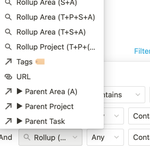


Hi @NotionHQ! I have a table with entries for each invoice I send to clients and another table with my clients names and logos. Invoice entries are related to clients. So far so good, I can see the total billed amount for each client using a rollup.
But how can I possibly > 1/3
2
68
showcase the total billed amount per year ? Given the rollup function cannot "discriminate" using any other properties, I'm at a loss... For illustration purposes, I cannot ask the rollup to sum up only billed amounts of invoices which sent dates are in year 2023. > 2/3
32
@NothionHQ Was searching for a specific page title just then (#notion on the web): no result whatsoever 🙅♂️⛔️ Had to search in my browser's history to find the page's url and load it! Shocking & scary! Thought for a sec Notion had lost it! How is that even possible??
One more thing @mmhmmapp :) Big Hands are great! I'd love to use the index finger to point to a detail in a slide I'm presenting. Atm I can almost only point to the sky. When I tilt my hand to point to the middle or bottom of the screen my hand is not recognised anymore.
Hi @mmhmmapp! Happy New Year! When presenting live, one would expect to click on a recorded slide for the chosen take to immediately start playing, is there a way to do that atm? In other words, can we forgo the "ok let's all look at a still of my weird face while I look for ▶️"
5
... to tick a box to automatically jump to the next slide: that would be awesome for, say a 3sec transition video, where it makes no sense for the audience to see the last still while the presenter is busy clicking on the next slide manually.
Live mode bare of functionalities appart from the essential live ones (pointers and the like) for people who have set up their scenes to a T and wish to focus on their content? Slides would play automatically when selected. Plus, for selected slides, users would have the ability
That doesn't make for a very coherent experience in my opinion.
🤔
Edit mode (which btw is not just for editing but also partly for live presenting, right? so the name's misleading)
Playback mode
Publish (which is not a mode but an action — why is it there?)
...
Why not a...
Actually @mmhmmapp I'm just noticing that in Edit mode videos are played right on selecting the slide and recorded slides can't be played, while in playback modes videos are not played automatically but recorded takes are played upon clicking on the slide then on play...


Hi @CordySwope, thank you for the follow. Looking forward to hearing more about your currents projects. Cheers
@NotionHQ Looking for a keyboard shortcut here, maybe you can help me! On a database in board view grouped by a multi-select property, when I drag an item from one column to the next it changes the property the same way it'd work with a select property. 1/3
2
2/3 Now say I want this item to have two labels (i.e. to be in two columns), I can manually edit that property by opening the item's page, but it's a slow process. Isn't there a key I can hold while dragging-and-dropping this item ?
Just realised why @Gmail search engine is so useless beyond word-based queries: labels and stars are applied to individual emails not threads! Kill me now! Try filtering all starred email conversations from your inbox (is:starred in:inbox): the result is bogus! So damn shocking!
1
Here is a great summary of this age-long non-sensical take on labels. Can't belive no action has ever been taken to solve this. webapps.stackexchange.com/qu…
Thank you #AmazonFrance to say out loud what I’ve been quietly thinking about soccer all along. #BreadAndCircuses

I just published A Service Design look at an Ikea mondain touchpoint — or how to create value through little attentions along the customer journey… #ServiceDesign link.medium.com/zZst8Ba0ljb
