Cloudback (@CloudbackIt) header
Cloudback (@CloudbackIt) profile picture

Cloudback is a cloud #backup #service for GitHub, GitLab, Azure DevOps and Linear. SOC 2 type II compliant, with CMEK and BYOS.

Ecuador, Quito
Joined July 2020
Photo by Cloudback (@CloudbackIt)Photo by Cloudback (@CloudbackIt)Photo by Cloudback (@CloudbackIt)Photo by Cloudback (@CloudbackIt)Photo by Cloudback (@CloudbackIt)Photo by Cloudback (@CloudbackIt)Photo by Cloudback (@CloudbackIt)Photo by Cloudback (@CloudbackIt)Photo by Cloudback (@CloudbackIt)Photo by Cloudback (@CloudbackIt)
Cloudback shows deduplication per repository: backups processed, backups deduplicated, total size, and space saved - from Last Week to Last Year, with a donut and a bar chart. #DevOps #CloudStorage
5
In Cloudback's repository list, the State column shows whether each repo is backed up automatically: Scheduled or Not scheduled. Filter by Not scheduled to find any gaps, then fix them one repo at a time or in bulk with Bulk Operations. #DevOps
1
Set a custom backup schedule in Cloudback: open the Schedules page, click + Add a new schedule, name it, pick times in the Hour/Day/Month tabs (the cron expression is generated automatically), and Save. Then apply it in a repository's details. #DevOps #Backup
2
Before a risky repo transfer, trigger a manual Cloudback backup: select the repo and click Trigger. Manual backups go ahead of scheduled ones in the queue, so it starts as soon as possible. Follow it on the dashboard, then make the change. #DevOps #GitHub
17
Cloudback's Operations API reads a backup definition with one request and updates its schedule, storage and retention with another. The request shape is the same for GitHub, GitLab, Azure DevOps and Linear, authenticated with an X-API-Key header.
12
A finished status doesn't tell you what's inside a Linear backup. Cloudback's Workspace Details page lists exact counts: teams, projects, issues, comments, cycles, documents, labels, users, attachments, embedded files. #Linear
3
Cloudback backups of a Linear workspace download as a password-protected ZIP (AES-256). The built-in Windows ZIP handler doesn't do AES, so use 7-Zip. Inside: plain JSON in directories (issues, projects, comments) plus a metadata.json with counts. #Linear #DevOps
7
Add customer-managed storage (BYOS) in Cloudback: open Storages > Add a new storage, name it, pick a provider (Azure, S3, Google Cloud, Wasabi, OneDrive), set archive options. Cloudback moves the archive to your storage, then deletes its copy. #DevOps #backup
11
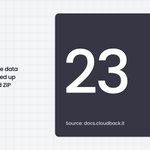
A Linear workspace holds more than tickets. It holds the planning structure around them. Cloudback backs up 23 data categories from a Linear workspace - issues, projects, documents, cycles, initiatives, embedded files - in one encrypted ZIP. #Linear #Backup
1
Cloudback uses two GitLab tokens, not one. Cloudback backs up with read-only read_api. The api write scope is in a separate token, requested only when you run a restore: create project, push repo, recreate issues and MRs. #GitLab #DevOps
6
Cloudback for Azure DevOps is on the Azure Marketplace, so repository backup goes on your existing Azure bill. Pick a plan by repo count: $10 per 10/month, $75 per 100, $500 per 1000. Stack units to cover more. #AzureDevOps
24
git clone doesn't fetch Git LFS objects unless you ask for them. So a DIY backup script can end up storing pointer files, not the binaries. Cloudback's Azure DevOps backup runs git lfs fetch --all after cloning, so the real LFS content lands in the backup archive. #GitLFS
8
Cloudback restores into your GitHub org from any source account by default. Want an allowlist? Add a GitHub Actions org variable: CLOUDBACK_ALLOWED_RESTORE_SOURCE = github:source-org-1,gitlab:source-group-2 Org targets only. Owners bypass it. #GitHub #DevSecOps
10
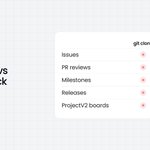
A git clone gets your code, branches, and tags. It doesn't get issues, PR reviews, milestones, labels, releases, or ProjectV2 boards. Those live in GitHub's database. Cloudback backs those up next to a bare clone, as plain JSON you can read. #GitHub #DevOps
8
Your GitHub backup bill shouldn't grow when you hire. Cloudback prices per repository: 1 repo = 1 unit. Units are shared across every connected account and platform. Three engineers or twenty - protecting 50 repos costs the same. #DevOps #GitHub
1
17
Every Cloudback backup is a ZIP archive with AES-256 encryption, and each one gets its own unique password that Cloudback manages. Someone with access to the storage still can't read the backups. #security #DevOps
1
8
Restoring a Cloudback backup uses one flow: the Restore Wizard. Open the Backups tab, click the Restore icon, then Select source, Select target, Restoring. GitHub and GitLab add a Select platform step for cross-platform restore. #DevOps #backup
7
Cloudback defaults to daily backups and a 30-day retention policy. You can change both: weekly, monthly, or a custom schedule down to specific hours, days, and months. Set the time zone so backups run on your team's clock, not a server's. #DevOps #Backup
9
Since August, a 100-member Linear workspace costs $130/mo to back up, not $450. Per-unit pricing didn't change - workspaces just use fewer units as they grow. Nothing to reconnect. #Linear #Backup
1
12
Two questions to ask about your Git backups: where do they live, and did you get to choose? Cloudback Managed Storage: US, EU, UK, Sydney, Singapore. BYOS: AWS S3, Azure, Google Cloud, OneDrive, Wasabi, Alibaba Cloud, OpenStack Swift. #DevOps #backup
216