

Welcome to my coding journey! I share SwiftUI programming tips to help others learn and grow. Explore tutorials, code snippets, and more on my blog and Patreon.
Barcelona, España
Joined November 2009
- Tweets16.1K
- Following606
- Followers1.6K
- Likes70.1K




Pinned Tweet
🗯️Unleash your inner geek with the Binary Clock Widget, available on the App Store for iPhone and iPad.
🔗 apps.apple.com/us/app/widget…

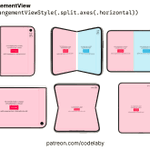
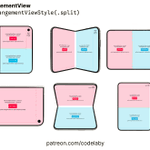
I designed two distinct styles for separate even columns using SwiftUI's geometry and fold detection (.division reserved regions).
#SwiftUI #iphoneDuo #UXUI
1
9
1,023
Dev notes:
swiftuisnippets.wordpress.co…

58
Gracias al artículo de Arturo, he creado safeContainerMargins
Define márgenes con fallback automático: ideal para las particularidades del iPhone Duo y evita que iPhone, iPad y macOS se queden a 0.
nitter.cf/Codelaby/status/211975…

Si el contenido de tu pantalla tiene que alinearse con el título de navegación, ¿de dónde salen esos 16 puntos de padding? En SwiftUI, el margen del sistema depende del contenedor y de la posición de la vista. En el iPhone Duo, los dos lados pueden necesitar distancias distintas.
Desde iOS 27.1, puedes aplicar los márgenes laterales del contenedor con `.contentMargins(for: .container, edges: .horizontal)`. Y si necesitas los valores para un carrusel, `GeometryProxy.contentMargins(for:edges:)` te da los `EdgeInsets`.
Ahí encajan las dos APIs llamadas `contentMargins`. La guía `.container` resuelve cuánto espacio corresponde. `.scrollContent`, disponible desde iOS 17, indica dónde aplicarlo. Combinarlas permite alinear la primera tarjeta con el resto de la pantalla y conservar el desplazamiento hasta el borde.
Mide cerca de la vista que va a usar el resultado. Si una vista antecesora ya aplicó el margen, la lectura puede dar cero. El área segura se gestiona aparte.
Dejo el enlace en el hilo, con ejemplos y un fallback para versiones anteriores de iOS.
#SwiftUI #Swift #iOSDevelopment
1
3
221
Ever notice how iOS (iPhone & iPad) sets default container margins to 0, while devices like the iPhone Duo have non-equal margins
.safeContainerMargins(.horizontal, 16, for: .scrollContent)

2
8
949
I built a lightweight safeContainerMargins() extension using .onGeometryChange() to intelligently apply a fallback value per axis only when the system gives you 0!
1
87

Building adaptive music layouts with ArrangementView
One screen, two arrangements:
• Portrait → overlay (lyrics behind player)
• Landscape on wide → split (player + lyrics side by side)
#iphoneDuo #iosDev #SwiftUI
5
10
543

Dev notes:
swiftuisnippets.wordpress.co…

62
I prefer to set it to at least 27.1 and take advantage of the framework's features; iOS users keep their devices updated.

8 SwiftUI APIs and the iOS version each one needs.
iOS 14:
LazyVStack
@StateObject
iOS 16:
NavigationStack
Swift Charts
iOS 17:
@Observable
SwiftData
ContentUnavailableView
TipKit
Your minimum target is a feature list.
Set it to iOS 17 and all 8 are yours.
Set it to iOS 15 and you lose 6.
Xcode stops the build when you call an API newer than your target. #available lets you ship both paths, but you write the feature twice.
Open your project's minimum deployment target today. Reply with the one API you are waiting on.
1
512


Dev notes:
swiftuisnippets.wordpress.co…


3
180
codelaby retweeted

kept seeing cool liquid photo morphs in video edits and wanted that inside one of my apps (not rendered in something like after effects)
so i made it a swiftui view that allows you to drop in your photos and they just flow into each other
github.com/haplollc/LiquidPh…
Simple and fast; allows for selection by combining text and code.

MD QuickLook - macOS 原生高速 Markdown Quick Look 预览插件
支持 GFM、代码高亮、公式、深浅色、缩略图,Rust + Swift 实现。
👉 github.com/armamut/md-quickl…

94


codelaby retweeted

Fireworks Card Effect Using SwiftUI
youtu.be/znw9hSkrVXY
NOTES: Inspired by the iOS 27 Birthday Card