

Mobile app for real-time Florida Highway Patrol traffic alerts, live maps, traffic cameras, and dispatch updates. Independent; not affiliated with FHP or FLHSMV
Florida, USA
Joined July 2021
- Tweets105K
- Following80
- Followers976
- Likes1

𝗙𝗛𝗣 𝗡𝗼𝘁𝗶𝗳𝗶𝗲𝗿 𝟮.𝟬 𝗜𝘀 𝗡𝗼𝘄 𝗔𝘃𝗮𝗶𝗹𝗮𝗯𝗹𝗲 𝗪𝗶𝘁𝗵 𝗮 𝗡𝗲𝘄 𝗧𝗿𝗮𝗳𝗳𝗶𝗰 𝗖𝗮𝗺𝗲𝗿𝗮 𝗟𝗮𝘆𝗲𝗿!
We’re extremely excited to announce the release of FHP Notifier Version 2.0, now available on both iOS and Android! This major update introduces one of our most requested new features, traffic cameras, allowing users to get a closer look at roadway conditions directly from the Incident Map.
With this new feature, users can now access thousands of traffic cameras located along interstates, highways, and other major state roads throughout Florida. These cameras provide frequently updated images of roadway conditions, allowing users to see what traffic and surrounding roadways look like before heading out.
Traffic cameras are displayed directly on the Incident Map using camera icons. When selecting a camera, users can view its most recently available image, along with information such as the roadway, nearby intersection or mile marker, direction of travel, county, and the time the image was last updated.
One of the biggest benefits of this feature is the ability to view nearby traffic cameras when an incident is reported. Whether you're monitoring a vehicle crash, roadway closure, fire, or another incident, you can now check nearby cameras to get a better understanding of roadway and traffic conditions in the surrounding area.
𝗛𝗼𝘄 𝘁𝗼 𝗘𝗻𝗮𝗯𝗹𝗲 𝗧𝗿𝗮𝗳𝗳𝗶𝗰 𝗖𝗮𝗺𝗲𝗿𝗮𝘀
Traffic cameras are disabled by default and must be manually enabled through the app's settings. To enable them, open Settings using the gear icon, select “Map Overlays,” and turn on “Show Traffic Cameras.” Once enabled, camera icons will appear throughout the Incident Map wherever cameras are available.
Please note that these cameras display frequently updated still images rather than continuous live video. Camera coverage is primarily concentrated along major roadways, meaning cameras may not be available along smaller or local roads.
This new feature is available in both light and dark mode and, like all other features within FHP Notifier, is completely free to use!
If you do not see the new "Show Traffic Cameras" feature within the Map Overlays option in Settings, please make sure you have updated FHP Notifier to Version 2.0 through the Apple App Store or Google Play Store. You can check which version of FHP Notifier you currently have installed by selecting the “About” button in the top-right corner of the app. Most devices should automatically update, but automatic updates may take several days, while a manual update is immediate.
We greatly appreciate everyone who continues to use FHP Notifier and provide feedback to help us improve the app. We’re always working to introduce new features and improvements that make it easier for Floridians to stay informed about what’s happening on roadways across the state.
Have a suggestion or feature request? We’d love to hear from you! Send your feedback to [email protected].
Google Play: play.google.com/store/apps/d…
Apple App Store: apps.apple.com/us/app/fhp-no…

1
91
𝗙𝗛𝗣 𝗡𝗼𝘁𝗶𝗳𝗶𝗲𝗿 𝗛𝗮𝘀 𝗛𝗶𝘁 𝟭𝟬,𝟬𝟬𝟬 𝗗𝗼𝘄𝗻𝗹𝗼𝗮𝗱𝘀 𝗔𝗰𝗿𝗼𝘀𝘀 𝗙𝗹𝗼𝗿𝗶𝗱𝗮!
We’re extremely excited to announce that FHP Notifier has officially reached 10,000 downloads statewide across Florida! We truly appreciate everyone who has downloaded the app, shared it with others, provided feedback, and continued using FHP Notifier to stay informed about what’s happening on roadways across the state.
We’ve also recently redone our website and added many more details about FHP Notifier, including information about the app, its features, how it works, and more. Feel free to check out our website at fhpnotifier.com/ and let us know what you think!
𝗛𝗲𝗹𝗽 𝗨𝘀 𝗥𝗲𝗮𝗰𝗵 𝗘𝘃𝗲𝗻 𝗠𝗼𝗿𝗲 𝗙𝗹𝗼𝗿𝗶𝗱𝗶𝗮𝗻𝘀!
If you find FHP Notifier useful, please consider sharing the app with your local community, whether that means sharing it in different Facebook groups, with your friends, family, coworkers, or anyone else who may benefit from it. Whether someone wants to stay informed during their daily commute, keep up with incidents near where they live or work, or simply be more aware of what’s happening on roadways across Florida, sharing the app is one of the best ways you can help us continue growing. Every share helps us reach more people across Florida who may find FHP Notifier useful for staying informed about what’s happening on their roadways.
If you’re enjoying FHP Notifier, please also consider leaving us a review on the Apple App Store or Google Play Store. The more reviews we receive, the more the app can be pushed out to additional users across the state, helping even more people discover FHP Notifier and stay informed about what’s happening on Florida’s roadways.
Thank you again to everyone who has helped us reach 10,000+ downloads. We truly appreciate your support and look forward to continuing to grow FHP Notifier and help even more Floridians stay informed about what’s happening on their roadways and in their communities!
Google Play: play.google.com/store/apps/d…
Apple App Store: apps.apple.com/us/app/fhp-no…

𝗞𝗻𝗼𝘄 𝗦𝗼𝗺𝗲𝗼𝗻𝗲 𝗪𝗵𝗼 𝗖𝗼𝘂𝗹𝗱 𝗨𝘀𝗲 𝗙𝗛𝗣 𝗡𝗼𝘁𝗶𝗳𝗶𝗲𝗿?
Help us spread the word! If you’ve found FHP Notifier helpful, consider sharing it with your friends, family, coworkers, or anyone else who may find it useful.
Whether it’s helping someone stay informed during their daily commute, keeping up with traffic incidents around where they live and work, or simply staying aware of what’s happening in their community, every new user helps us continue growing across Florida.
If you’re enjoying the app, we’d also really appreciate it if you took a moment to leave us a review on the Apple App Store or Google Play Store. Reviews help others discover FHP Notifier and provide valuable feedback as we continue developing the app. Reviews also lead to the app being pushed out to more users!
Thank you to everyone who has downloaded, shared, reviewed, and supported FHP Notifier so far. We truly appreciate it!
Google Play: play.google.com/store/apps/d…
Apple App Store: apps.apple.com/us/app/fhp-no…

87
𝗪𝗵𝗮𝘁 𝗱𝗼 𝘆𝗼𝘂 𝘁𝗵𝗶𝗻𝗸 𝗼𝗳 𝘁𝗵𝗲 𝗻𝗲𝘄 𝗛𝘆𝗯𝗿𝗶𝗱 𝗠𝗮𝗽?
With the release of our new 1.7 update, we’ve made some changes to the way our satellite map works and introduced a brand-new Hybrid map option.
The Satellite map is now focused solely on the existing satellite imagery, without the previous road layer. If you want roads, cities, waterways, and other map details displayed over the satellite imagery, you can now switch to Hybrid.
The new Hybrid map features a more detailed road overlay along with cities, waterways, and other geographic details, all displayed on top of our existing satellite imagery. While our old map layer provided a similar function, the new Hybrid map offers significantly more detail and a much more defined road overlay.
We’d love to hear what you think! Do you prefer the new Hybrid map, or do you like the prior Satellite view? Let us know in the comments!

65
𝗨𝗽𝗱𝗮𝘁𝗲 𝗥𝗲𝗴𝗮𝗿𝗱𝗶𝗻𝗴 𝗠𝗮𝗽 𝗜𝘀𝘀𝘂𝗲
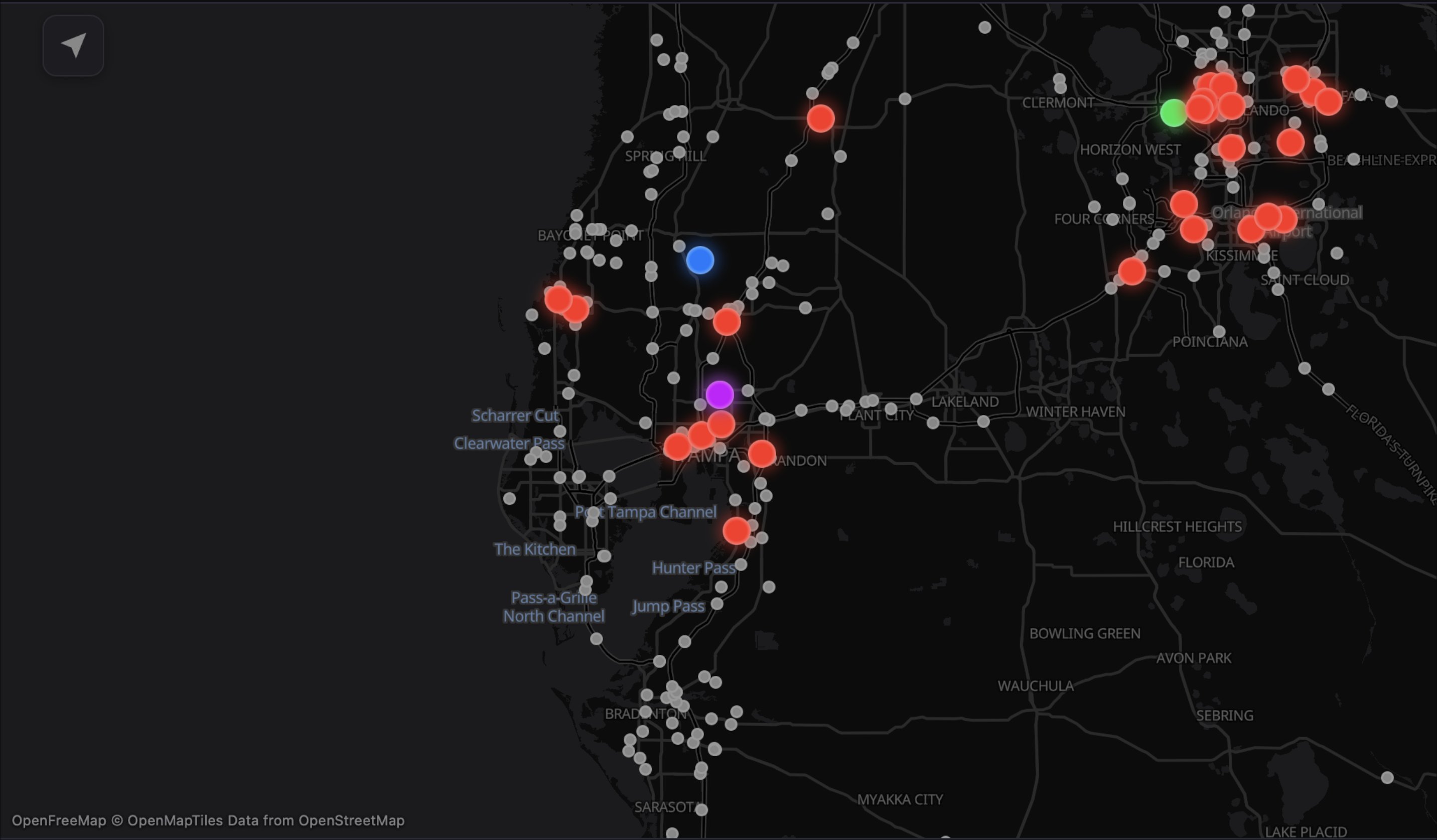
We are pleased to announce that a new update (1.7) is now available that resolves the previous map issue where an “API key required” message appeared across portions of the map.
As part of this update, we have switched to a new map data provider and introduced a new Hybrid map option. Hybrid combines our existing satellite imagery with a more well-defined and reimagined road layer, providing a clearer view of roads and the surrounding area.
Please note that users viewing Satellite imagery may no longer see road lines. If you would like to see roads displayed over the satellite imagery, please switch to the new Hybrid map option in Settings under “Map Style.” Users using the default map will see no difference, and no changes are needed.
If you are still seeing an “API key required” message, please update FHP Notifier to the latest version, as this issue has been resolved in the new update. Most devices should automatically update, but automatic updates may take several days in which a manual update is immediate.
We greatly appreciate your patience while we worked to resolve this issue and improve the mapping experience.
80
𝗜𝗻𝗳𝗼𝗿𝗺𝗮𝘁𝗶𝗼𝗻 𝗥𝗲𝗴𝗮𝗿𝗱𝗶𝗻𝗴 𝗠𝗮𝗽 𝗜𝘀𝘀𝘂𝗲
We are aware of a current issue affecting the map where “API key required” appears across portions of the map. We are actively working on a new update to resolve this issue and are in the process of switching map providers to prevent similar problems in the future.
Unfortunately, our current map provider, CARTO, made an abrupt change to its map access requirements without prior notice to us. This change has impacted thousands of apps and websites that rely on CARTO’s mapping services, not just FHP Notifier.
This issue does not currently affect our satellite map as that uses a different provider. If you need to view the map without the “API key required” message while we work on a permanent fix, you can switch to the satellite map in the app.
We apologize for the inconvenience and appreciate your patience while we work to get the map back to normal.

87
📱 𝗛𝗮𝘃𝗲 𝗙𝗛𝗣 𝗡𝗼𝘁𝗶𝗳𝗶𝗲𝗿? 𝗟𝗲𝘁 𝗨𝘀 𝗞𝗻𝗼𝘄 𝗛𝗼𝘄 𝗜𝘁’𝘀 𝗚𝗼𝗶𝗻𝗴!
Have you downloaded FHP Notifier yet? If you’re already using the app, we’d love to hear from you! Leave a comment below and let us know how your experience has been so far, what you like about the app, or anything you’d like to see added in the future.
If you’ve found FHP Notifier useful, please consider leaving us a review on the App Store or Google Play. Reviews help others discover the app and help us continue improving it.
You can also help us grow by sharing FHP Notifier with your family, friends, coworkers, local online community groups, or anyone else you think could find it useful.
Thank you to everyone who has downloaded, shared, reviewed, provided feedback, and supported FHP Notifier! – at Florida, USA

𝗗𝗶𝗱 𝘆𝗼𝘂 𝗸𝗻𝗼𝘄 𝗙𝗛𝗣 𝗡𝗼𝘁𝗶𝗳𝗶𝗲𝗿 𝗶𝘀 𝗮𝘃𝗮𝗶𝗹𝗮𝗯𝗹𝗲 𝗼𝗻 𝗠-𝗦𝗲𝗿𝗶𝗲𝘀 𝗠𝗮𝗰𝘀? 💻
Because FHP Notifier is compatible with iPad, the app can also be downloaded and used on Apple silicon Macs, giving Mac users another way to access FHP Notifier.
At this time, we do not have plans for further development for laptops or desktops beyond Mac. M-Series Macs are able to run compatible iPad apps natively, so a separate Mac version of FHP Notifier is not currently necessary.
FHP Notifier is currently available on iOS, iPad, and M-Series Mac, along with Android devices and tablets. – at Florida, USA

112