

Gamer Coder Geek Hacking Enthusiast AI Lover Also love playing soccer, jamming, anime ....You know, your typical non-mongoloid Asian dude.
India
Joined November 2017
- Tweets168
- Following28
- Followers8
- Likes118




My Developer Portfolio is finally live!
ht-dev.vercel.app/
1
5

Check out this item on OpenSea opensea.io/assets/matic/0xe7… via @opensea
Harshith Thota retweeted
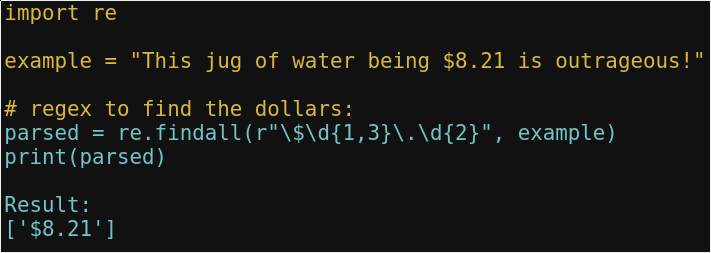
Meet GPT-J, an open 6Bil parm transformer from eleuther.ai, doing English mainly, but also many other languages quite well, and even programming. I'll share various examples as I poke around.
Yellow is my input to the model.
Cyan is the model's output.
Harshith Thota retweeted
GAN Theft Auto in the news engadget.com/gan-theft-auto-… 👀

Harshith Thota retweeted

Our GAN Theft Auto featured in @TechLinkedYT !
Love you guys, btw :)
cc: @Sentdex
youtube.com/watch?v=5TR5viGY…
So @MMOByte and @Elyon_thegame are offering 200 CLOSED BETA keys for #Elyon completely free! mmobyte.tv/elyon-closed-beta… Wanna play one of the hottest #MMORPG of 2021?! #MMOByteGiveaway #MMOByte
@discord When you upload a portrait image, it gets resized based on the width. On mobile devices, it almost fills the screen and looks big enough. But the same behavior occurs on Desktop and because of this, the uploaded image is very small compared to the screen's viewport.
1
Deadliest Hacker in Warzone Zombie Royale | Warzone Haunting of Verdansk... youtu.be/28mxJ9TlAMc via @YouTube
1