

https://nitter.cf/t.co/8QuwtfAdzk
Joined July 2026
- Tweets6
- Following15
- Followers0
- Likes0



Your printer doesn't print the hole you drew.
Print five holes with 0.05 to 0.25 mm of clearance per side and try the real shaft: the one that presses, the one that holds, the one that slides. Those are your three fits.
kapycad.com/en/academy/3dpri…
46
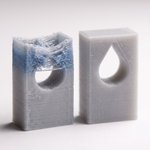
A horizontal round hole has a roof with nothing under it, so it sags.
Carry the top up to a point at ~45° (a teardrop) and every bead rests on the one below. Or reorient so the hole prints vertical.
kapycad.com/en/academy/3dpri…

ALT A horizontal round hole printed with a sagging roof next to the same hole with a teardrop top that printed clean
4
The 45° overhang rule isn't a physical constant. It's a balance point that moves.
Good cooling, thinner beads and lower speed let you go steeper. The same geometry can print crisp at 55° on one machine and droop at 48° on another.
kapycad.com/en/academy/3dpri…

5
KapyCAD 2 is in beta for Maker subscribers: a new engine up to 5x faster, printability analysis, and assemblies that actually move.
Ships to everyone on Dec 15.
kapycad.com/en/blog/all/kapy…