

The first testing & evaluations platform for MCP servers.
San Francisco, CA
Joined April 2026
- Tweets162
- Following49
- Followers180
- Likes190






MCPJam retweeted

loved yapping MCP with Den (lead maintainer of mcp)!
we dive into:
- why mcp? (tl;dr: reach users where they are)
- evals and how to test across many clients quickly
- my talk: rethinking CI/CD for agent-native software
- our journey at @mcpjams
youtu.be/FvZyllCGQxo?si=flF_…

Do you know if your server is following the spec?
If it works in one client but breaks in another, conformance checks can help you figure out why. You can test Protocol, OAuth, Apps and Tasks, then open any failed check to see the exact request and response.
Check out Conformance in MCPJam:
youtube.com/watch?v=sY5A27QU…

1
2
151
MCPJam retweeted
day 11/ of mcp learnings
your coding agents can check its own code- can it check how chatgpt or claude will actually use it??
at @asana, we usually found out something broke in chatgpt or claude ..when someone told us
now i would → bring that feedback into the dev lifecycle by giving your coding agent a way to test against the clients your users actually use (even locally on your machine)
- E2E test → simple as user prompt + expected outcome. can add assertions/evaluators at each stage of the request flow too (did it connect, pick your tool, pass the right args, use your response, deliver the outcome)
- differential test → if you e.g. change a tool description, compare against a baseline
- host app + harness → give your coding agent the client environment to evaluate against
clip from my talk on this at agntcon + mcpcon na 👇
(a lot more to share here from me here...)

Claude writes better code when it can verify its work. Checks that used to be expensive, like tests, benchmarks, and end-to-end runs, are now cheap.
Here’s how the Claude Code team thinks about verification:
claude.dev/blog/how-the-clau…

MCPJam retweeted
love the discovery → selection → access → success funnel in the post breaking down evals
for mcp and cli builders: you only see the tool/command call itself while discovery and selection happens outside in the client/agent
evals need to run against that client environment- and you may have incomplete information from production- so experiment yourself!! if you want to deliver user value- ensure you're testing e2e across the client-server system boundaries
nitter.cf/PrathmeshPatel_/status…

MCPJam retweeted
@mcpjams now lets you test the full MCP Apps UI experience against @OpenAI's plugin extensions and @claudeai's interactive apps! 🚀
here’s what you can test for your mcp server now, even locally (!!!) on your machine 👇
1/ sidebar entrypoint: open your app directly from the sidebar.
2/ model context: your app tells the model what’s on screen.
3/ app tools: the model edits what your app shows, live.
4/ conversation panels: keep your app open in a side panel next to the chat.
5/ extended forms: your server can ask for structured input, even image choices, right in the chat.
6/ plugin settings: test your plugin’s settings from the server’s details panel.
7/ + logs, cross-client testing, and more. see every message between host and app, down to the json-rpc payload, across clients.
🔥 run "npx @mcpjam/inspector@latest" to test now!🔥

Test your full MCP Apps UI experience against @OpenAI's plugin extensions and @claudeai's interactive apps! 🚀

@mcpjams now lets you test the full MCP Apps UI experience against @OpenAI's plugin extensions and @claudeai's interactive apps! 🚀
here’s what you can test for your mcp server now, even locally (!!!) on your machine 👇
1/ sidebar entrypoint: open your app directly from the sidebar.
2/ model context: your app tells the model what’s on screen.
3/ app tools: the model edits what your app shows, live.
4/ conversation panels: keep your app open in a side panel next to the chat.
5/ extended forms: your server can ask for structured input, even image choices, right in the chat.
6/ plugin settings: test your plugin’s settings from the server’s details panel.
7/ + logs, cross-client testing, and more. see every message between host and app, down to the json-rpc payload, across clients.
🔥 run "npx @mcpjam/inspector@latest" to test now!🔥
3
129
Our CEO @PrathmeshPatel_ is on Day 10 of his two month series of MCP learnings with MCP turning two 🎂 this month!
PSA 📣 : DCR is now deprecated in the latest spec- adopt CIMD / preregistration for your MCP server if you haven't already
day 10/ of mcp learnings
when I led mcp & oauth at @asana, I led multiple mcp client registration methods migrations 😭
quick primer: before an AI app like chatgpt or claude can log users in to your server, your auth server has to know it as a “client” with a client id. client registration is how that id gets created
every migration traded some ease-of-adoption for higher client identity fidelity
open DCR-> anyone connects, no reliable client identity
closed DCR-> some identity, but fragile
preregistration-> high client identity, more friction to setup per host
it started with our public security incident. DCR didn’t cause it, but DCR made it really hard to answer the first questions we had: which users were affected & which clients were they using?
1/ open DCR (dynamic client registration): the AI app registers itself automatically through an endpoint on your auth server- zero friction
but every host registers a client its own way- per session? per user? per (user + time period)? so a "client id" didn’t tell us which host app was calling & we couldn’t group calls by host app, rate limit by client, or quickly see who was affected
2/ closed DCR: same self-registration, but only clients with allowlisted redirect URIs (where users get sent back after login) could register
more reliable client identity- but now folks needed to submit a form to get their client registered, and if they changes redirect URIs too 😭 if openai or anthropic changed their redirect URIs- 🐞
3/ preregistration: you register a client id per host in the server's developer marketplace
re-using our existing app marketplace rules was a big win- established client identity. the tradeoff is increased dev friction-> every host needs its own setup, so smaller clients and marketplaces beyond the big ones require extra setup
ill dive into what client registration method to pick based on your needs next up-
📣 psa: DCR is now deprecated in the MCP spec. prefer CIMD
🔐 for enterprise, EMA is a big unlock to let your company’s IdP (+ IT team) decide which clients to support- more on both CIMD + EMA soon

1
151
MCPJam retweeted
day 9/ of mcp learnings
ways to fetch user outcomes for your mcp server without seeing user prompts
your server sees the tool calls- but whether the user got what they needed happens in the host application e.g. chatgpt/claude/muse (which your mcp server can't see)
what works today:
1/ in your server: a "context"/"intent" argument on your tools, a conversation id, a "get_more_tools" tool for missing capabilities, a "feedback" tool
2/ in the chat: mcp apps UI, so you can log telemetry from your UI for clicks to your backend
3/ outside the host app: real prompts from your own in-app agent, sandboxes for user testing with internal/beta users, synthetic agent users that run your ICP's top use cases, support tickets + sales disco calls
🙏🏽 what i’d love love love to see: major host apps agreeing on a standard way to pass this (‼️ with user consent + privacy + pii redaction built-in ‼️) without server devs "coercing" agents to do so- which is the current state of the ecosystem
it could look like: the user’s context/intent in _meta, plus a conversation_id for grouping (openai already sends openai/session)
see my mcp dev summit talk on evals from april for a fuller explanation: youtu.be/qbGuUh5yBVA?si=OpsN…

More firsthand mcp learnings from our CEO, @PrathmeshPatel_ !
This one is on his learnings on survivorship bias- dont use tool call counts as a proxy for successful MCP server usage!
day 8/ of mcp learnings
survivorship bias
with mcp, it’s easy to treat tool call volume as a proxy for users succeeding- and to prioritize the most-called tools (i made this mistake last year at @asana)
in ww2, the us military wanted to add armor to its bombers- so they studied the planes that came back. they saw bullet holes clustered on the wings, and planned to armor those spots
they were only looking at survivors though! planes hit in the engines didn't make it back
tool call volume can skew a few ways:
1/ model never selects your tool! you won't have a log for this- user goal is underrepresented
2/ model calls your tool multiple times without delivering user value- every call is a server log w/ a success status code- user goal is overrepresented
in scale’s mcp-atlas benchmark, 40% of o3 pro (old, I know)- failed tasks had no tool call at all
don’t use raw tool call counts as a proxy for successful mcp server usage!
pointing you back at my prev tweet on the "user value chain", request flow of: connection → discovery → tool selection → tool call → tool response → user value
tool call volume only counts the middle
more on this in my effective mcp blog: mcpjam.com/blog/effective-mc…

1
183
MCPJam retweeted
does your mcp server perform the same in claude web chat vs. claude desktop? chatgpt work vs. codex?
probably not
heres how I use @mcpjams to test across all of them with even more client profiles at caniuse.dev, side-by-side experiments, traces per run, and swarms of users prompting for your mcp server
try it for yourself: app.mcpjam.com or locally 'npx @mcpjam/inspector@latest'

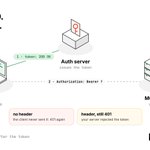
MCPJam Inspector’s OAuth Debugger lets you follow each step and open the requests and responses along the way:
• the first request, without a token
• discovery and registration
• PKCE and consent
• the token exchange
1
19
Before you start changing your auth code, check where the flow breaks.
You might find a token your server rejects, or a client that never sends it. Either way, you have something concrete to fix or to put in a bug report.
Try it at app.mcpjam.com
25
MCPJam retweeted
day 7/ of mcp learnings
your mcp server only sees a part of the user request flow
a user can prompt in claude/chatgpt “show me my open tasks”. the model picks one of your tools, the mcp client calls your server, you send a response back, the agent renders an answer for the user
your server sees the tool call and the response- it doesn’t see the user prompt, why that tool got selected, or whether the user got value from the interaction
when i led @asana's mcp + claude/chatgpt app launches, adoption looked great- but I couldn't tell if users were actually satisfied fro our logs
so i break down each request as this "user value chain":
connection → discovery → tool selection → tool call → tool response → user value
we cant deliver a valuable experience to a user unless all of these steps of the request flow work
more to come on this and failures at each stage of the request flow->


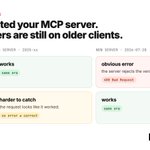
In MCPJam Inspector, you can pin the protocol version for a whole client or for a single server:
• Latest (2026-07-28)
• 2025-11-25
• 2025-06-18
• 2025-03-26
On each version, run the same flow: connect, list tools, and call a tool.

1
27
It's easy to test only the version you use day to day, but your users may be connecting with older clients.
Testing each version lets you reproduce what they see and fix it before they report it.
Try it in app.mcpjam.com
23