

Something MEGA coming soon… MEGABOT link: https://nitter.cf/t.co/pR8Wi69AdX Powered by @OMNIcreative_
Joined August 2024
- Tweets538
- Following92
- Followers421
- Likes1.4K


Pinned Tweet
Introducing...
MEGABOT
A first of its kind NFT Telegram trading bot.
Buy, sell and MEGA-sweep your favourite NFTs all in one convenient place.
Get mega rewards for trading... 👀
Powered by @OMNIcreative_ and @tensor_hq API.
MEGABOT link below 👇


MEGABOT retweeted

buying NFTs?
use @Megabotcorp and farm some points as well
free money imo
WITHDRAW AND EXPORT PK
Select MEGA wallet from either shortcut or via /start menu.
Withdrawing SOL
Choose the amount of SOL you wish to withdraw from your account.
Exporting your Private Keys
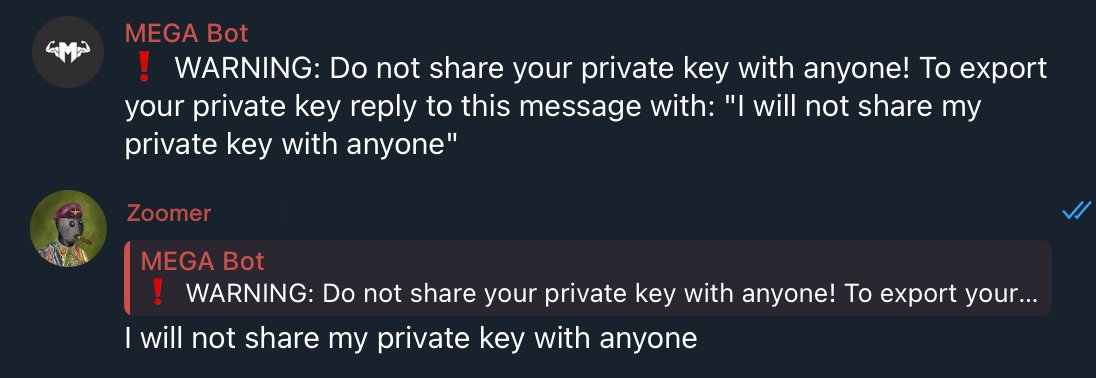
Select "Export PK' to export the private key for your account.
A reply will be prompted. Reply to the warning message with the phrase "i will not share my private key with anyone" to receive your PK.
If you do not reply directly to the message it will not work, so make sure you do this.
1
13
285

How tf do you use MEGAbot?
Here's the mega dummies guide!
First:
Follow the link: t.me/MEGAbot_corp_bot or search telegram username: @MEGAbot_corp_bot
Press or type '/start' and your welcoming message will appear.
You have now created your MEGA wallet. 👇🧵

EDIT YOUR LISTINGS
After listing an NFT you can manage your listings by navigating to 'MEGA sell and manage' via shortcut or the /start page.
Cycle through using 'next' and 'prev' to find the collection you would like to manage your position in and click listings.
Here you will be able to View, Edit or Cancel your Listings.
Use 'next' and 'prev' to cycle through your listings for your selected collection.

1
11
161
SELLING NFTS
Navigate to 'MEGA sell and manage'.
Use 'next' and 'previous' to find the collection you would like to sell and then press 'list' — this will randomly list an NFT from your collection.
If you would like to choose a specific NFT to list then press select and use next and prev to cycle through the individual NFTs.
Once you press list you must send a message with the price you would like to list for or you can simply type 'floor' to list at the floor price.

1
11
169
MANAGING YOUR NFTS
Having successfully aped an NFT, you can now manage your position by clicking 'MEGA sell & manage' from the /start menu.
From here you can buy, sell and view the NFT's you hold.
Use 'Prev' and 'Next' to cycle between the collections you are holding.

1
10
137
BUYING NFTS
Once you've deposited SOL, enter '/start' and your wallet will refresh with your new balance.
You can now buy an NFT using your balance by pressing the 'MEGA buy' button.
Send a message with the collection name and confirm your selection from the list.
Select the number you would like to buy and click buy. (you can choose your bulk buy amount in settings)

1
11
1,136
DEPOSIT SOLANA
You will need to send $SOL to your new wallet to start trading NFTs.
Navigate to your MEGAbot start menu.
Tap on your wallet address to copy it.
Then, use your wallet of choice - (Phantom, Backpack, ME Wallet) - and transfer yourself some SOL to start trading.
MEGAbot does not custody any funds. You are the only one in control of this wallet.

1
12
176