

Work/ed w/ @theresaaFN @VaqzDE @zysacovfx @sammy999zz @davefnr_ @sagefnr @arthfv1 Get started here: https://nitter.cf/t.co/rucPQACqKd
Joined April 2026
- Tweets159
- Following8
- Followers303
- Likes237





Pinned Tweet
Insane Fortnite Benchmark🚀
AMD ryzen 7 5700X
RTX 5060 TI
16GB DDR4 - 3200 MHz
Fortnite map code "6016-0463-0988"
Average FPS +108,2 % ↑
1% Percentile FPS +144,0 % ↑
0.2% Percentile FPS +142,6 % ↑
PureTweaks is doing hes job, if you want your PC fully optmized book a optimization now on our website link is down below.

Pure Tweaks retweeted

LFT w/ @foehyn
Me: fortnitetracker.com/fortnite…
foehyn: fortnitetracker.com/fortnite…
need a good IGL or supporter ( perf IGL )
DM ME or @foehyn


🚨BEFORE → AFTER🚨
Client came to me after getting scammed by @ovymgmt. His system was completely unstable crashing 3 times a day, terrible frametimes and completely inconsistent gameplay in Fortnite and after asking ovy for help he got blocked and kicked from his server.
After fixing everything properly:
Average FPS: 232 → 381 FPS (+65%)
1% Lows FPS: 139 → 298 FPS (+114%)
0.2% Lows FPS: 25 → 196 FPS (+694%)
0.2% lows went from unplayable to almost 8x higher. No more constant crashes and the system is finally stable.
This is what a proper optimization looks like when the PC was completely broken before.
Want results like this? Check the website, link is down below 👇


Pure Tweaks retweeted
‼️PURE TWEAKS BCD EDIT UITILTIY‼️
I dropped a BCD edit utility in our discord, it creates a restore point first so you’re safe, then you can just hit APPLY or REVERT.
These BCD tweaks don’t really increase your FPS, they’re more for latency and input response, on some systems you can get better timer stability and a bit more direct feeling, but don’t expect big FPS gains.
It sets these BCD tweaks:
• disabledynamictick = yes
• uselegacyapicmode = no
• usephysicaldestination = no
• bootux = Disabled
• loadoptions = DDISABLE_INTEGRITY_CHECKS
• nointegritychecks = Yes
• testsigning = No
• hypervisorlaunchtype = off
Link is down below 👇
‼️PURE TWEAKS BCD EDIT UITILTIY‼️
I dropped a BCD edit utility in our discord, it creates a restore point first so you’re safe, then you can just hit APPLY or REVERT.
These BCD tweaks don’t really increase your FPS, they’re more for latency and input response, on some systems you can get better timer stability and a bit more direct feeling, but don’t expect big FPS gains.
It sets these BCD tweaks:
• disabledynamictick = yes
• uselegacyapicmode = no
• usephysicaldestination = no
• bootux = Disabled
• loadoptions = DDISABLE_INTEGRITY_CHECKS
• nointegritychecks = Yes
• testsigning = No
• hypervisorlaunchtype = off
Link is down below 👇
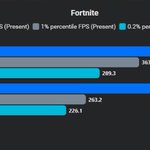
‼️Fortnite Benchmark‼️
Intel core 19-14900kf
NVIDIA RTX 4090
64GB DDR5 - 5600 MT/s
• Average FPS : 459 → 578 FPS (+26%)
• 1% Low FPS : 263 → 364 FPS (+38%)
• 0.2% Low FPS : 226 → 289 FPS (+28%)
a 60 sec. Benchmark was done on this Fortnite map "6016-0463-0988"
No Bios, only Windows
Want results like this? Check the website, link is down below 👇

Pure Tweaks retweeted
‼️Fortnite Benchmark‼️
Intel core 19-14900kf
NVIDIA RTX 4090
64GB DDR5 - 5600 MT/s
• Average FPS : 459 → 578 FPS (+26%)
• 1% Low FPS : 263 → 364 FPS (+38%)
• 0.2% Low FPS : 226 → 289 FPS (+28%)
a 60 sec. Benchmark was done on this Fortnite map "6016-0463-0988"
No Bios, only Windows
Want results like this? Check the website, link is down below 👇
Pure Tweaks retweeted

get ur tweaks from @PureTweaks_ fast and boosts fps/delay so much 🐐
Pure Tweaks retweeted
‼️DISCORD DEBLOAT, LESS RAM + BETTER FPS WHILE GAMING‼️
Discord eats a lot of resources in the background for no reason. With a proper debloat you can cut that down so your games run smoother and more stable.
In the video I show exactly how to do it. There’s also a .bat tool that does a big part of the debloat for you, you get that in my Discord.
Link is down below 👇
‼️DISCORD DEBLOAT, LESS RAM + BETTER FPS WHILE GAMING‼️
Discord eats a lot of resources in the background for no reason. With a proper debloat you can cut that down so your games run smoother and more stable.
In the video I show exactly how to do it. There’s also a .bat tool that does a big part of the debloat for you, you get that in my Discord.
Link is down below 👇
‼️THIS REGISTRY "TWEAK" CAN HELP YOU ALOT WITH INPUT DELAY AND FPS‼️
Win32PrioritySeparation is a Windows registry setting that decides how the CPU splits its time between the program you’re using right now (your game) and everything running in the background.
This can reduce latency and improve your FPS because your game gets noticeably more CPU time compared to background processes. A lot of people feel better frametimes and less hitching after changing it.
How to set it:
Win + R → type regedit → Enter
Go to:
HKEY_LOCAL_MACHINE\SYSTEM\CurrentControlSet\Control\PriorityControl
Double-click Win32PrioritySeparation
Select Decimal and set the value:
Best FPS → 42
Better input delay → 24
Both → 32
OK → restart your PC
Done.
This was only one tweak that can help your PC with performance. If you want your PC completely optimized, check our website the link is down below 👇
