

@Spocsk
Account based inFrance
About this account
- Account based in
- France
- Connected via
- France App Store
Account-level information from X, not a live location or the device used for a specific post.
Software Engineer 🇫🇷 Build In Public Cat Keeper 🐈⬛ 🐈 IA, Automation, Tech Stuff 🍎 addict 1# SaaS: https://nitter.cf/t.co/BNDrjNsKDe
France
Joined September 2013
- Tweets511
- Following365
- Followers181
- Likes990

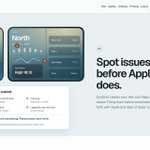



Your App Store screenshot has a transparent background → upload rejected.
PNG with an alpha channel is the #1 silly error. Flatten before you upload.
More traps → duoshot.site/en/rejection

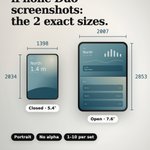
iPhone Duo screenshot sizes for App Store Connect:
• Outer 5.4″: 1398×2034
• Inner 7.6″: 2007×2853
Portrait. No alpha channel. 1–10 per set.
Full table → duoshot.site/en/specs

the one step i refused to automate in my saas is the step that gets apps rejected.
duoshot.site checks dimensions and format on its own, then flags framing and how similar your closed and open screens look. but "is this really your app in use" and "is the text still readable near the fold" stay a human click. an AI can resize an image all day, it can't tell apple your screenshot is honest.
so the report splits it in three: what's checked, what's flagged, and what you have to confirm yourself.
what's the one step of your release you still won't hand to AI?

I shipped my first saas, and it's for a phone you can't even buy yet.
duoshot.site preps App Store screenshots for the iPhone Duo. the closed screen is 5.4", the open one is 7.6", they need two different pixel sizes (1398×2034 and 2007×2853), and both sets still have to tell the same story about your app.
apple says duo screenshot uploads open later this year. so i'm building before the demand is there, on purpose. the day uploads open, every dev with a listing will need two matching sets at once, and i'd rather already have the tool than start coding it that week.
would you build for a device before it's in people's hands, or wait until the market proves itself?


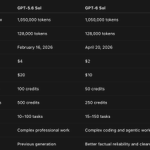
For those wondering about GPT 5.6 Sol vs GPT 6 Sol, Here it is:


Please welcome GPT-6 Sol and GPT-6 Luna to the GPT-6 universe.
GPT-6 Sol and Luna build on the advances behind GPT-6 Astra, bringing much of its strengths into faster and more affordable models to support work at scale.
We’ve also made caching and inference more efficient, and we’re passing the savings directly to you: 50% lower API prices for Sol and Luna compared with GPT‑5.6 promotional pricing.


From people who already tried Grok 4.7, send what you’ve already done with it.
I’m so curious because I don’t know if I go for the moment with the$100 Codex or Claude.
It explains many things now…. I've been using it for a couple of hours now and got no big differences while using it with Cursor.
But now it's clear: you need to use it with Grok Build to get the best overhaul use of 4.7

Important to use Grok 4.7 with our Build harness for the best results
X.ai/build

Hey i told you to check isnewgrokmodelavailable.xyz/


two ios tracks on the desk. one lane tonight.
if i bounce between both, neither ships. curiosity picks the product. consistency finishes the screen.


freelance acquisition starts before the dm.
if the portfolio doesn’t show stack + proof in the first scroll, prospects won’t dig. i refreshed dylan-cdo.fr for that, not aesthetics.

sunday night check before polish: does restore purchases in settings actually work after a reinstall?
if that path is slow or broken, the pro story looks fake even when storekit is fine. i stopped treating restore as a checklist item: it’s the trust button.
camera on the settings flow tonight. if restore isn’t instant, i don’t ship another frame.


one input. one first result. then the rest.
if screen 1 doesn’t deliver the store promise, retention is just expensive curiosity.


i’m killing onboarding that asks six questions before the product does anything.
one input, one first result, then the rest. that’s the appllama lesson i keep relearning in cursor on my app.
if screen 1 doesn’t deliver the store promise, retention metrics are just expensive curiosity.


freelance acquisition for me starts before the dm.
if dylan-cdo.fr doesn’t show angular / nestjs / product proof in the first scroll, i’m asking strangers to do detective work. i refreshed the portfolio for that reason, not for aesthetics.
prospects don’t owe you a click deeper.

i've been running grok bot + cursor with grok 4.6 hard on ios app design and honestly it's still not where i need it
great for wiring flows and swiftui scaffolding. weak when the screen has to feel native and intentional
for now i keep the model for structure and i still decide the visual hierarchy myself
apple put up the iphone duo hig link. i'm not rewriting my apps for a rumor. i'm checking one thing: which of my current layouts break if the canvas gets weird.
next step is putting my onboarding frames next to the hig, not reading a thread about it.
if you ship swiftui, the useful part isn't the keynote. it's which constraint you actually have to change.