

Azure Cloud and DevOps Engineer ☁️ Cloud, AI, Tech, Random thoughts. Sharing things I find interesting, useful or worth talking about ✌️
Indore
Joined May 2018
- Tweets2.1K
- Following862
- Followers886
- Likes4K




Most teams still treat their cloud database as passive storage. That architecture is already outdated.
Microsoft just rolled out Database Hub and Database Agents in Fabric and Azure, turning databases into active AI infrastructure:
Centralized Fleet View: Manage SQL Server, Azure SQL, PostgreSQL, and Cosmos DB from one control plane.
Built-in Agent Memory: Native vector search, embeddings, and MCP integration directly inside the database layer.
Autonomous Tuning: Database agents inspect slow execution plans and suggest index or query fixes automatically.
Moving AI memory into your primary database removes an entire sync pipeline from your stack.
Would you trust an AI agent to suggest or apply index changes on your production database?
1
6
174
AI agents just aced Linux tasks and completely failed on iPhones.
A brand-new 300-task OS benchmark dropped yesterday, and the gap is wild:
Gemini 4 Argon beat humans on Ubuntu Linux (95.8% vs 74.6%)
Then collapsed to just 18.8% on iOS tasks
Overall, top agents still trail humans (68.5% vs 77.3%) across real multi-step workflows
Text benchmarks make models look superhuman, yet basic mobile UI navigation still breaks them.
What is one everyday workflow where AI agents still fail miserably for you?
4
4
274
One thing I don't understand.
AI coding agents can write an entire app in 30 seconds.Yet 96% of engineering teams say AI improved speed while only 4% updated how they measure code quality.
If we ship 10x more code without changing our tests, are we building faster or just creating faster outages?

5
8
356
Can I ask a DUMB cloud question?
We see AWS, Azure, and Google Cloud spending tens of billions on AI data centers. Yet Wall Street banks are quietly offloading AI data center loans to shed risk.
Is AI infrastructure a guaranteed goldmine, or are we building too fast?
3
4
140
The hardest part of incident response is not reading the alert. It is correlating logs, metrics, and recent deploys under pressure.
AWS DevOps Agent just added isolated Linux sandboxes and org-wide spaces so an incident agent can safely run diagnostic scripts, analyze huge log files, and post live root-cause updates straight into Slack or Teams.
Giving on-call bots a read-only sandbox to test hypotheses beats waking up three engineers at 3 AM.
Would you let an AI agent run read-only diagnostics during a live production incident?
2
4
187
Every major cloud or airline outage in November 2026 got blamed on "rogue AI bugs" on social media.
When the actual postmortems came out, the root causes were the exact same classics: bad router configs, on-premises hardware bugs, and unmapped service dependencies.
AI speeds up how fast bugs are found, not how fast teams test rollbacks.
Do you have a tested rollback plan for your most critical service, or just hope the deploy holds?
☁️ Azure Learning Series | Series 2 Recap
Azure Organization and Management | 20 Lessons
How does an organization manage hundreds of Azure resources, subscriptions, identities and cloud operations?
That is what we explored throughout this series.
Here is what we covered:
🔹 Organization and hierarchy: Microsoft Entra tenants, tenant root groups, management groups, subscriptions, resource groups and Azure resources.
🔹 Resource management: Azure Resource Manager, resource providers, resource types and resource identifiers.
🔹 Governance and protection: Azure tags, resource locks, ownership, resource organization and management boundaries.
🔹 Azure management tools: Azure portal, Cloud Shell, Azure CLI, PowerShell and the Azure mobile application.
🔹 Resource visibility and optimization: Azure Resource Graph for querying resource inventory and Azure Advisor for personalized recommendations.
🔹 Support and operations: Azure support plans, support severity and raising effective technical support requests.
What should you take away from these lessons?
Managing Azure is not just about creating resources. It is about understanding how resources are organized, who can manage them, how they are protected, how to automate operations and how to maintain visibility across your environment.
The real value comes from connecting all these concepts and using them together in practical cloud environments.
✅ Series 2: Azure Organization and Management | 20/20 lesson topics covered in this learning journey.
Next up: Series 3 | Azure Identity and Access
We will move deeper into authentication, authorization, Microsoft Entra ID, service principals, managed identities and Azure RBAC.
#Azure #AzureCloud #CloudEngineering

5
108
Aadarsh retweeted

🚨 WHAT THE HELL IS HAPPENING IN CYBERSPACE?
Another massive name just confirmed a cyberattack.
FIFA has officially confirmed a breach. Hackers claim to have stolen 12GB+ of internal data.
And that’s not all:
🔴 US Treasury’s financial crime watchdog hit.
🔴 CIA’s unclassified intelligence network breached.
🔴 Japan’s space agency JAXA compromised.
🔴 South Korea’s power utility: 1.52 million people affected.
🔴 Belgium: 1.2 million residents’ data exposed.
🔴 French hospital forced to disrupt cancer treatment after ransomware.
🔴 Canada’s Bell hit by an AI-linked attacker.
Banks. Governments. Space agencies. Football’s biggest governing body. Hospitals.
No industry seems untouchable anymore.
Is this what the next era of cyber warfare looks like?
1Password just disclosed a backend breach that started with a compromised employee GitHub account, giving attackers access to private repositories, CI/CD pipelines, and account metadata for a subset of users.
The good news is that 1Password's zero-knowledge design worked as promised. Customer password vaults and secret keys are encrypted locally on user devices, so the attackers could not open any vaults. Still, names, email addresses, and invitation or recovery tokens were copied, prompting 1Password to lengthen verification codes from six digits to ten characters.
This is a textbook reminder of two things: zero-knowledge encryption saves you when servers get breached, and developer GitHub accounts are now prime targets for reaching production pipelines.
5
76
☁️ Azure Learning Series | Day 20 of 20
📘 Topic: Azure support plans and support requests
Imagine your production application suddenly stops responding. You have checked the application, network and Azure resources, but the issue still needs Microsoft's investigation.
This is where Azure Support becomes important.
What are Azure Support Plans?
Microsoft offers different support options based on your workload and business requirements.
🔹 Basic: Included with Azure. Provides self-help resources and subscription management support, but not technical break-fix support through an engineer.
🔹 Developer: Designed for trials, development and non-production workloads.
🔹 Standard: Suitable for production workloads that need technical support and 24/7 access.
🔹 Professional Direct (ProDirect): Designed for business-critical Azure usage, with additional advisory and escalation support.
🔹 Unified Enterprise: Provides broader support across Azure and other Microsoft technologies for enterprise customers.
How do you create an Azure Support Request?
Open the Azure portal.
Navigate to Help + support.
Select Create a support request.
Choose the issue type and affected Azure service.
Select the relevant subscription and resource.
Describe the problem, its impact and when it started.
Provide diagnostic logs or reproduction steps where relevant.
Select the available support plan and severity.
Review the details and submit the request.
Understanding severity levels:
• Severity A: Critical business impact with significant service loss or degradation requiring immediate attention.
• Severity B: Moderate business impact where services are impaired but work can continue with a workaround.
• Severity C: Minimal business impact with minor service impediments.
The available severity levels and initial response times depend on your support plan and local support hours.
What makes a good support ticket?
Include the affected resource, subscription ID, exact error message, timestamps with time zone, troubleshooting already performed, business impact and relevant diagnostic logs.
Avoid uploading passwords, client secrets, access keys or unnecessary customer data.
Important distinction: Subscription management support, including billing and quota adjustments, is available with Azure subscriptions. Technical break-fix support through Microsoft engineers requires an eligible support plan.
Also, initial response time is not the same as resolution time.
Key takeaway: Raising a support request is not just about reporting an error. Choosing the correct severity, selecting the right service and providing useful technical evidence can help Microsoft investigate the issue more effectively.
🎯 This completes Series 2: Azure Organization and Management.

1
5
69
If you are moving an AI app from a side project into an enterprise cloud, two security terms will come up in almost every architecture review: Zero-Data-Retention (ZDR) and Customer-Managed Keys (CMK).
Here is what they mean in plain English:
Zero-Data-Retention (ZDR): The AI provider processes your prompt, returns the answer, and immediately deletes the conversation instead of storing logs on their servers.
Customer-Managed Keys (CMK): When conversation data does need to be stored for audits or compliance, it stays inside your own cloud storage encrypted with keys only your company controls.
This week, Anthropic expanded its Enterprise Safeguards (EFS) to combine both ideas on AWS and Google Cloud, with Microsoft Foundry support on the way. Customers keep their own encrypted logs while still getting misuse alerts sent straight to their SIEM.
Separating who owns the data from who runs the model is quickly becoming the default pattern for enterprise AI. Does your company require Zero-Data-Retention before approving a new AI provider?
3
8
319
AI coding tools are speeding up how fast developers write code, yet most teams are not seeing lower delivery costs.
A new CloudBees survey of European IT leaders shows 71% are shipping code faster with AI. The catch is that 34% now spend at least an hour reviewing, testing, or fixing generated code for every hour saved writing it. Even worse, 51% of organizations budget nothing for downstream failures like broken CI builds, rollbacks, or production incidents.
Writing code was never the only bottleneck in software delivery. When code generation scales up overnight, CI pipelines, automated testing, and code review become the real pressure points.
Where has AI coding created the biggest slowdown for your team so far: pull request reviews, flaky test suites, or production bugs?
5
9
135
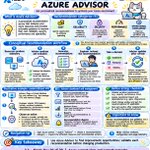
☁️ Azure Learning Series | Day 19 of 20
📘 Topic: Azure Advisor
Managing Azure resources is not just about deploying them. You also need to continuously review cost, performance, security and reliability.
This is where Azure Advisor becomes useful.
Azure Advisor is a personalized cloud consultant that analyzes resource configurations and usage telemetry to identify opportunities to improve your Azure environment.
What does Azure Advisor help you optimize?
🔹 Cost: Identify opportunities to reduce unnecessary spending, such as reviewing underutilized resources.
🔹 Reliability: Improve workload availability, resiliency and recovery readiness.
🔹 Security: Identify security recommendations and configuration gaps.
🔹 Performance: Find opportunities to improve resource and application performance.
🔹 Operational Excellence: Improve resource management, deployment practices and operational workflows.
How does it work?
Your Azure resources generate configuration and usage information.
Azure Advisor analyzes that information against recommended best practices.
It generates personalized recommendations for applicable resources.
You review the recommendation, its potential impact and affected resources.
You decide whether to implement, postpone or dismiss it.
Advisor updates its recommendation status as changes are recognized.
Practical example:
Suppose Azure Advisor identifies an underutilized Virtual Machine.
Instead of immediately resizing or deleting it, review its usage pattern, workload requirements, dependencies and business importance.
Then decide whether resizing, scheduling or another optimization makes sense.
Useful features:
• Filter recommendations by subscription, resource group, resource type and impact.
• Review affected resources and recommended actions.
• Track your Advisor Score across five categories.
• Download recommendations as CSV or PDF.
• Configure recommendation digests to receive periodic summaries.
Important: Azure Advisor provides guidance, not automatic approval to change production infrastructure. Always validate recommendations against workload requirements before implementing them.
Also, new resources can take up to 24 hours to receive recommendations, and changes may take time to appear in Advisor after remediation.
Key takeaway: Azure Advisor helps cloud engineers move beyond simply managing resources to continuously improving cost, performance, security, reliability and operations.

1
5
107