


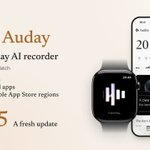



Introducing Auday 1.1.0 — a major upgrade!
Auday turns your Apple Watch into your all-day AI recorder—combining voice, health, real-time stress, and location signals to understand your day, not just answer your questions.
Bringing all-day AI recording to Apple Watch early on, and reaching No. 1 on the Paid App charts in multiple AppStore regions, we’ve stayed ahead of the curve.
We made a new video for 1.1.0 walking through all the major updates in detail—watch it below, and catch the highlights here:
• Custom recording recovery engine: Rapidly auto-resumes Watch recording right after alarms, Siri, or calls, giving you steady all-day recording without worrying about missed moments.
• On-device models run faster, with a lighter core: Parallel voice matching, checkpoint resume, and a completely rebuilt storage architecture keep everything smooth while transcribing in the background.
• Built into your routine: Start or stop via Shortcuts, Siri, or the Action button, wrap up automatically with Sleep or Focus, and check Lock Screen widgets at a glance.
• Full control over records & memories: Listen right away, long-press to edit, delete or re-transcribe a single hour, and keep saved memories independent even after deleting audio.
• Stronger workflows: Speaker distinction in cloud transcription, steadier self-hosted support, incremental Auday Skill sync, and fallback export.
One-time purchase. No Auday subscription. Your personal archive stays on your device.
To celebrate this major upgrade, our 50% off promo is now live — just $9.9 for a one-time purchase.
Available worldwide on the AppStore: apps.apple.com/app/id6814210…
Auday: Turn your Apple Watch into your all-day AI recorder.
Soon after launch, Auday reached No. 1 on the paid app charts in multiple App Store regions, bringing a pioneering all-day AI recording experience to the Apple Watch.
Now, Auday 1.0.9 is here. A major performance upgrade, built from the inside out.
Faster on-device transcription. A smoother app. More reliable background processing. Less waiting.
An all-day recorder needs to keep up with real life: long recordings, a growing collection of memories, and interruptions along the way.
For 1.0.9, we went back to Auday’s foundations. We rebuilt how your history is stored and loaded, made local transcription faster, and worked through the slowdowns, crashes and interruptions that can make everyday use frustrating.
• Rebuilt at the core. Much lower memory use.
We rebuilt Auday’s storage and history loading to reduce unnecessary work, especially with large archives.
In the Mac snapshot-preparation benchmark shown in the video, using 26,641 records, peak memory fell from 1,976 MB in 1.0.8 to 69 MB in 1.0.9—a reduction of about 96% for that operation.
Across the app, we’ve also improved startup, history browsing and responsiveness, with fewer memory-related stalls and interruptions.
• Faster transcription, right on your iPhone.
Turn your recordings into readable text faster with on-device transcription. Long transcription sessions are handled more efficiently, with improved recovery to reduce repeated processing after interruptions.
Less time waiting for your words. More time putting them to use.
• Steadier in the background. Easier to resume.
We improved how transcription saves progress and picks up after interruptions.
When iOS ends a background task, Auday now makes it clear when to reopen the app and continue, instead of showing a misleading failure message. Clearer progress in Dynamic Island and Live Activities also helps you see what’s happening.
Completed work is preserved and reused in more situations, so an interruption means less starting over.
• A smoother app, even as your history grows.
Open Auday, browse past conversations and prepare a Chat with fewer pauses. Edit transcripts without waiting for all your AI history to load.
You can also edit completed hours while the rest of your day is still being transcribed. Getting one thing done should feel easier while Auday works on the rest.
• Crash fixes, with your help.
Some users reported unexpected crashes. We listened closely, reviewed the diagnostic logs they shared, and investigated the causes in detail.
Auday 1.0.9 fixes issues behind crashes affecting some users and improves stability. Your reports and logs directly helped us identify problems and make this release better.
• More reliable from recording to export.
We’ve improved long Watch recording imports, recovery from interrupted uploads, and compatibility with cloud and self-hosted transcription services.
We also fixed audio export failures and reduced memory use when connecting large collections to desktop AI assistants through Auday Skill.
These improvements matter when you’re revisiting a conversation, processing a long day, or keeping a copy of something important.
To everyone who has put up with a slow launch, a crash, a stalled task or an unexpected retry: thank you for your patience, and for taking the time to tell us what happened.
Those everyday frustrations matter to us. We’ve put substantial work into 1.0.9, and we’ll keep listening, fixing and improving.
Less waiting. More time to record, revisit and understand your day.
One-time purchase. No Auday subscription.
App Store: apps.apple.com/app/id6814210…
We’ve gathered some feedback from Auday users, and it’s made our day! Thank you for your support—we’ll keep making Auday better. A new update is coming soon!
Turn your Apple Watch into an all-day AI recorder.
Get Auday on the App Store: apps.apple.com/app/id6814210…


Turn your Apple Watch into your all-day AI recorder.
Combining voice, health, real-time stress and location signals.Understand your day. Not just answer your questions.
We’ve just released Auday 1.0.7.
AppStore: apps.apple.com/app/id6814210…
• Less overhead. Better recovery.
More efficient Watch recording and syncing, clearer cloud processing, and improved self-hosted transcription. Updated compatible servers support task recovery and lossless FLAC uploads.
• Ready for iPhone Duo.
Adaptive layouts for folded, unfolded and partially folded screens, with improved navigation, keyboard handling and Chat draft preservation.
• Your day, at a glance.
New Lock Screen widgets show recording time, activity and yesterday’s saved reflection. Light and dark Home Screen widgets keep your day close, too.
• Revisit an hour. Refresh your day.
Transcribe an hour again with your chosen model and refresh its Highlights and Summary. Regenerate a Daily Reflection while keeping the saved one readable.
We’ve also added swipe-to-delete for AI Chat history and expanded debug exports to help investigate issues.
Thanks for your feedback—and for helping us keep making Auday better. One-time purchase. No Auday subscription.


We used AI to edit this video for Auday 1.0.5. Take a look!
Turn your Apple Watch into an all-day AI recorder.
Our next update is already on the way, and we expect to release it this week. Stay tuned!
apps.apple.com/app/id6814210…
4
38
485,728
Turn your Apple Watch into your all-day AI recorder.
Auday has reached #1 on the paid app charts in multiple AppStore regions—and become part of so many people’s everyday lives.
Now, Auday 1.0.5 is here!
From the conversations on your wrist to the work on your desktop, here’s what Auday brings together:
• Your memories, now on your Mac.
The new Auday Skill connects your iPhone to compatible desktop AI assistants, including Codex, Claude and WorkBuddy. Bring your transcripts, Highlights, reflections and saved memories into research, writing and deeper analysis. Transfer locally with encryption, and choose what your Mac can access.
• Transcription, your way.
Choose Efficient or Accurate on-device transcription, or connect your preferred online service. Identify your own voice during local transcription, search by meaning, replay the original audio and export what you need in batches.
• Context that helps you understand your day.
Connect conversations with optional health, activity and location context. Revisit Highlights, reflect on your day, and ask questions with answers grounded in your own records. Saved memories give future conversations more context.
We also heard your feedback.
After the last update, some of you still encountered sync and processing problems in difficult edge cases. We know how frustrating it is to finish recording and then find yourself waiting, retrying or wondering where things got stuck.
For 1.0.5, we focused on those less visible but essential parts of the experience: long recordings, large audio uploads, interrupted cloud-transcription tasks and recovery after interruptions. We improved how completed progress is preserved, reduced unnecessary reprocessing, and fixed timestamp and model-switching issues.
Reliability matters just as much as new features. Thank you for taking the time to tell us when something wasn’t working.
And to everyone who has supported Auday—even while putting up with some frustrating little bugs—thank you for sticking with us. As a thank-you, our 50% off offer continues.
One-time purchase. No Auday subscription.
AppStore: apps.apple.com/app/id6814210…


Auday 1.0.4 brings new features and a long list of fixes, shaped by feedback from hundreds of you.🥰
Our developer’s report goes through it all: what’s new, the problems you reported, what went wrong, and how we’ve addressed them—issue by issue, with screenshots and detailed explanations.
Thank you for helping us make Auday better. Read the full report below.


5
17
3,853
Over the past two days, the Auday team has been fully focused on improving the app. After 48 hours of concentrated development and testing, we’ve prepared Auday 1.0.4—bringing broader on-device transcription, a fully localized interface, and improvements throughout recording, syncing and daily review. Thank you for your patience and feedback.
The previously announced Accurate transcription mode joins our existing Efficient mode, supporting 100 languages and language variants. You can choose the balance of speed and recognition quality that suits your recordings and device. Eligible iPhone 15 and later devices can use Neural Engine acceleration, while Efficient mode gains optional automatic transcription for unfinished and newly received audio. Both modes run locally on iPhone, without uploading original recordings for cloud transcription.
We’ve also introduced optional personal voice recognition. Three 15-second readings create a voice profile that helps Auday identify your contributions in longer recordings and provide attribution context for AI-generated content. Together with recorded body and location context, these signals help Auday AI answer questions about what you said, where you were and what happened. Stronger factual checks, location retrieval and cross-day summaries support more focused answers, with links back to the original words.
Processing is now easier to follow. Transcription feedback distinguishes preparation, recognition and voice analysis, with system background-task cards and Dynamic Island updates on supported devices. Daily Reflection shows hourly preparation, daily Summary, Reflection and memory selection separately. Audio compression, noise reduction and level enhancement improve storage and listening, while filtered quiet intervals retain their original timeline positions. Recognition continues to use the original received audio.
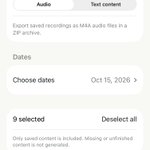
The interface now supports Chinese, English, Japanese and Korean across iPhone, Apple Watch, settings and help. Batch export lets you select dates and hours, then save audio as M4A, transcripts as TXT, and Highlights, summaries and Daily Reflections as Markdown. Recording, transcription and search remain on-device. Optional AI uses the provider you configure, with relevant content sent directly to that provider rather than through Auday servers.
Alongside these additions, we’ve worked through and addressed nearly all the issues reported by our users during this period. These include recordings taking too long to reach iPhone, transfer backlogs stopping midway, delayed interruption alerts, Daily Reflections remaining pending, oversized inputs blocking generation, and Highlights or Summary buttons appearing unresponsive. We’ve also improved historical-review preservation after schedule changes, saved-conversation stability, search results, scrolling and idle processing, with clearer failure explanations and recovery controls.
Auday AppStore: apps.apple.com/us/app/auday-…
Every report and screen recording helps us understand what needs attention. We’ll continue improving Auday around real everyday use—making the recordings captured on your Apple Watch easier to reliably find, understand and revisit.
Our 50% launch discount continues! Thank you for your support—we want more people to have the opportunity to try Auday at half price.
An important note when updating: based on our experience investigating update issues, the Apple Watch app may not always update alongside the iPhone app, which can leave the two versions out of sync and affect recording transfers. We strongly recommend confirming that all Watch recordings have synced to your iPhone before uninstalling and reinstalling the latest Auday Apple Watch app. Update the iPhone app normally—there is no need to uninstall it.


8
2,465
We’d love for you to read the developer story behind Auday—how it grew from an idea into the product it is today.
A new update is coming soon, with improved stability, bug fixes, broader language support, and more accurate models. We’re working carefully on each of these improvements.
A special thank you to our users in Japan for your incredible support during Auday’s launch. Your encouragement means so much to the entire development team. We’re also considering improvements tailored to your needs, guided by your feedback.
To thank our users around the world, we’re extending Auday’s 50%-off launch offer worldwide for one more week. We’d love for more of you to give Auday a try!

Auday 1.0.1 is now live!
This update adds Japanese and Korean support for AI-generated content, including summaries, Highlights, daily Reflections and Chat replies. You can switch languages in Settings → AI Primary Language.
It also fixes the silent-recording issue affecting some Apple Watch Ultra users, improves transfer reliability between Apple Watch and iPhone, and brings a major overhaul of local storage for smoother loading and browsing as your recording history grows.
On launch day, Auday reached #1 in the App Store’s paid Lifestyle charts in multiple countries. The response has far exceeded our expectations, and every download, message and suggestion has been a huge encouragement. Behind Auday is a solo developer, working late to collect your feedback, investigate issues and keep improving the app. Thank you for your support and patience.
We also want to explain the choices behind transcription. To support a wider range of iPhones while keeping resource use low and minimizing slowdowns, our current on-device speech recognition model prioritizes speed and efficiency. In tests on iPhone 17 Pro, several hours of audio often took just a few seconds to transcribe. Actual performance varies with the device and recording. That speed comes with some accuracy trade-offs. Auday AI uses surrounding context when interpreting transcripts and generating content to help identify and work through recognition errors, reducing their impact on summaries, analysis and conversations.
For the next update, we plan to introduce an optional speech recognition model with higher accuracy and slightly higher resource requirements, alongside the current lightweight model. You’ll be able to switch between them and choose the balance of speed and accuracy that best suits your iPhone and your needs. We’ll also continue adding support for more languages.
To thank everyone for the support, we’re extending our 50% launch discount for one more week. Buy once, with no Auday subscription.
AppStore: apps.apple.com/us/app/auday-…
Thank you for being part of Auday’s beginning. We’ll keep listening and making it better.
A helpful update from an Ultra user: @madxfpv reports that recording is working with sound after updating Auday on the Watch. We’re glad to see the fix helping in real use! If you’re still getting silence after updating your iPhone app, please also check that the Watch app has finished updating. Their post explains what worked for them. Before removing or reinstalling the Watch app, sync any recordings you want to keep to your iPhone. We’re continuing to investigate reports from users who still have trouble.
nitter.cf/madxfpv/status/2107798…


The best AI recording hardware?
You may already own it.
Introducing Auday—now live on Product Hunt.
Turn your Apple Watch into your all-day AI recorder.
Beyond voice, Auday combines health, real-time stress, location, and other signals to understand your everyday life—not just answer your questions.
Record on your wrist. Revisit your day with transcripts, timelines, highlights, reflection, and AI chat.
Almost everything runs locally on your devices. Bring your own API key for AI. We don't even have a backend server.
App Store launch offer: half price. Just $9.99 for a one-time purchase. No subscription.
We'd love your support and feedback on Product Hunt. Take a look, join the conversation, and tell us what you'd want your watch to remember.
Product Hunt: producthunt.com/products/aud…
App Store: apps.apple.com/us/app/auday-…
Website: auday.ai/
🤖 Made with AI