





ғᴀᴅᴇ 👻 retweeted

.@oxgeek is spilling the tea on how to create high-quality video content (even if you're shy on camera).


ғᴀᴅᴇ 👻 retweeted

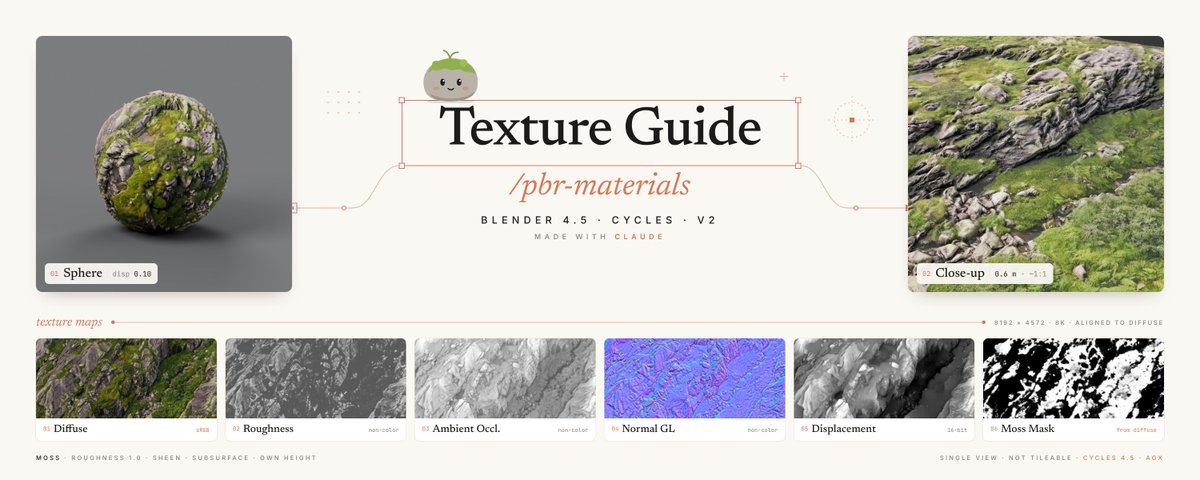
HOLY F*CK. I made an 8K photoreal rock + moss material from a single reference with Claude Opus 5.5
No scanner. No paid library. Just a reference, an image generator, Python scripts and Blender.
The pipeline:
1. Generated the base texture from a reference (top-down, flat light, no shadows)
2. Built every PBR map from it: roughness, AO, normal, 16-bit displacement
3. Aligned all maps to the diffuse, so color, height and normals sit in the exact same place
4. Pulled a moss mask out of the diffuse color
5. Claude wrote the Blender scripts: material, scene, lights, this poster
8192×4572. Real displacement in Cycles, not a fake bump.
The trick that makes it look real: moss is NOT the same material as rock.
Rock: roughness straight from the map.
Moss: roughness 1.0, soft sheen, subsurface, its own height in little cushions.
Two materials inside one shader.
Where I messed up:
- first sphere looked like plastic. Low-poly mesh + weak displacement = nothing moves. Fix: dense mesh, real displacement
- moss height turned into needles. Fix: two masks, a sharp one for shading and a blurred one for height
- plane at displacement 0.40 = stretched spikes. Dropped it to 0.12
nitter.cf/mukadeshinigami/status…


ғᴀᴅᴇ 👻 retweeted
HOLY F**K, OPUS 5.5 JUST BUILT 2 IPHONES IN 1 WEEK. ONE GUY. NO 3D STUDIO. NO TEAM
this is f*cking unreal...
> I describe the shape in plain text
> Opus 5.5 writes the blender code, runs it, fixes its own mistakes
> then Opus 5.5 builds the whole website around it
real 3d in the browser, not renders.
nitter.cf/mukadeshinigami/status…
🧵CLAUDE OPUS 5.5 AND I MADE AN IPHONE IN BLENDER. THEN BUILT A WEBSITE WHERE IT CHANGES COLOR AS YOU SCROLL...
This was a two-part project, and I did it together with Claude Opus 5.5.
✳️ PART 1: The phone
how it went:
01 references
iphone 18 pro tech docs + real iphone photos for the prompts
02 model
body, camera block, the whole thing in blender
03 fix what looks off
materials and smoothing on the camera block came out bad, so we spent extra time and found more references. the lenses too, solved with references of 3d lenses
✳️ PART 2: The site
04 export
.glb (glTF), the standard way to ship 3d models to the web
05 landing
iChoice, apple retail & service in berlin. react + typescript, vite, tailwind
06 make it move
three.js renders the phone, drag it with your mouse or finger. scroll switches the finish:
deep burgundy → silver → glacier blue, and the background follows. gsap runs the scroll and reveal animations
If you need a complete guide, let me know ↓

ғᴀᴅᴇ 👻 retweeted
HOW TO MAKE THIS IPHONE IN BLENDER WITH CLAUDE OPUS 5.5. THE FULL GUIDE YOU ASKED FOR...
part 1 only: the model. the website gets its own post
✳️ WHAT YOU NEED
> blender
> claude opus 5.5
> blender mcp, so claude builds the model right inside blender
> references. this matters more than anything else
01 collect references first
iphone 18 pro tech docs for real proportions: height, width, thickness, corner radius, camera block size
plus real photos of the phone from every side: back, sides, camera block close-ups
02 block out the body
through blender mcp claude builds the model itself, you direct. give it the docs and photos, and ask for the base shape first. no details yet
prompt i'd start with:
"here are the iphone 18 pro dimensions and reference photos. build the body in blender at real scale: rounded rectangle, correct corner radius and thickness. body only, no buttons or cameras yet"
03 add the camera block
separate step, separate prompt. plateau, three lens rings, flash, sensor. compare with the photos after every change
04 materials
frame, back glass, camera plateau and lenses each get their own material
05 fix what looks off
this is where most of the time went:
> the camera block looked bad. wrong materials, and the smoothing on the edges made it look like plastic. fix: more references, close-ups of that exact area, and asking claude to redo just that part
> the lenses looked fake for a long time. what finally worked: references of a real camera lens, so claude could copy how the glass and rings are actually built
06 render + export
render it on a simple stage to check it looks right (pic 2)
then export as .glb, that's the file the website loads
what i learned:
> claude gets you 80% fast. the last 20% is you looking at references and saying "this part is wrong"
> one part per prompt works way better than "make me an iphone"
> if something looks fake, the fix is almost always a better reference, not a longer prompt
part 2 website next. want it? ↓
nitter.cf/mukadeshinigami/status…

🧵CLAUDE OPUS 5.5 AND I MADE AN IPHONE IN BLENDER. THEN BUILT A WEBSITE WHERE IT CHANGES COLOR AS YOU SCROLL...
This was a two-part project, and I did it together with Claude Opus 5.5.
✳️ PART 1: The phone
how it went:
01 references
iphone 18 pro tech docs + real iphone photos for the prompts
02 model
body, camera block, the whole thing in blender
03 fix what looks off
materials and smoothing on the camera block came out bad, so we spent extra time and found more references. the lenses too, solved with references of 3d lenses
✳️ PART 2: The site
04 export
.glb (glTF), the standard way to ship 3d models to the web
05 landing
iChoice, apple retail & service in berlin. react + typescript, vite, tailwind
06 make it move
three.js renders the phone, drag it with your mouse or finger. scroll switches the finish:
deep burgundy → silver → glacier blue, and the background follows. gsap runs the scroll and reveal animations
If you need a complete guide, let me know ↓


