When you create a new #Revit central model, be sure that when you do your first sync you tick the box that relinquishes ‘User created worksets’.
By default, it’s not ticked!
If you don’t tick the box, you will remain the owner of all the worksets in the model!
2
110
Did you know: you can use #PropertyWizard for #Revit to read properties of host elements?
For example, you can access the width of a host wall from each hosted door and window.
56
Did you know: You can control the visibility of Revit links at both the Type and the Instance level.
Usually, you customize the Type, and leave the Instance ‘Not Overridden’.
When you find a link where both Type and Instance are customized – that’s usually a mistake!
62
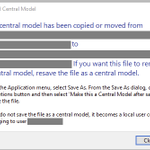
If you get an unexpected message saying that ‘This central model has been copied or moved’ when you're trying to open a #Revit central model, check you are using the correct file path.
There may be several paths to the central model, but only one of them is 'correct' for Revit.
If you've been using #Revit for a while, you may have missed some of the updates in recent releases. To bring yourself up-to-date, Autodesk have a webpage with convenient links to all the Revit updates from the past few releases.
Did you know: you can collapse and expand parts of a Word document, simply by using the built-in heading styles?
79
If the display language on the #Autodesk forums randomly changes, you can use the globe icon at the top right to change it back to your local language.
1
55
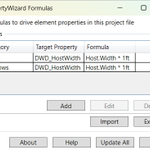
It is frustrating that you cannot manipulate text values with standard Revit formulas.
You cannot set one parameter to “Yes” when another parameter is “FD30”, for example.
However, you can do this, and more (in Revit) with #PropertyWizard formulas.
1
60
Is it possible to change the location where #Autodesk #DesktopConnector saves files?
Not according to Autodesk. Unless you know differently?
It might be possible to move the whole user profile to s different drive, but that seems overkill.
60
Facets and reflections. From the archive.
@Gallery365photo
#Gallery365in2024
#Gallery365in2024AugustHaas
How do you export all the loaded families from a #Revit model?
Use File menu / Save As / Library / Family
1
53
My first for this month. Getting into the groove.
Colour and movement. Rain and reflections. Shiny bright and dirty dark.
@Gallery365photo
#Gallery365in2024
#Gallery365in2024AugustHaas
Why do your #Revit Tags show a question mark when they should be showing the parameter value!?
Is the Shared Parameter in the model the same as the one in the tag?
It’s possible to have two SPs with the same name but different definitions. And that will stop the tag working!
61
Did you know: with a standard VLOOKUP in #Excel, the lookup list needs to be in alphabetical order.
If your list could be out of order, set the optional 4th parameter, 'range_lookup' to FALSE to force exact matching.
37
Did you know: #Revit links have both an Instance workset and a Type workset!
To avoid unexpected results, it’s important that they’re both set to the same value.
3
84
Worth a read: Article by @emollick on planning for the future(s) of AI
Multiple folks at four major AI labs I’ve spoken to really think the exponential continues for the next couple years. (Only person I feel ok naming is Kevin Scott, CTO of Microsoft, as that was public)
Skepticism is fine & warranted. But consider what ifs oneusefulthing.org/p/confron…
1
57