

Artist, VFX, Design, Writer
Joined October 2020
- Tweets2K
- Following5.6K
- Followers202
- Likes3.4K

1nable retweeted

GITHUB IS ACTUALLY INSANE RIGHT NOW.
You can build an entire AI content factory without hiring a team.
Here are 10 open-source repos worth checking out:
1. OpenCreator
Give Codex a creator workspace for writing scripts, generating images, creating voiceovers, translating videos, and editing content.
github.com/krillinai/Open…
2. Social Media Research Skills
Use Claude Code or Codex to research viral posts, analyze competitors, mine comments, and extract hooks from video transcripts.
github.com/ScrapeCreators…
3. Local Deep Research
Turn any topic into a detailed research report using web searches, your documents, and local or cloud AI models.
github.com/LearningCircui…
4. FLUX.2
Generate and edit images for thumbnails, social posts, and marketing campaigns. The Klein 4B models have Apache-licensed weights.
github.com/black-forest-l…
5. Kokoro
Turn written scripts into AI voiceovers with a compact, open-weight text-to-speech model.
github.com/hexgrad/kokoro
6. ACE-Step 1.5
Generate music from text prompts, create instrumentals, and regenerate specific audio sections. It can run locally on supported hardware.
github.com/ace-step/ACE-S…
7. Short Video Factory
Create batches of short videos from prompts and your footage, with AI-generated scripts, voiceovers, editing, and subtitles.
github.com/YILS-LIN/short…
8. AI YouTube Shorts Generator
Convert long YouTube videos into vertical Shorts with AI-selected highlights, transcripts, and automatic cropping.
github.com/Anil-matcha/AI…
9. Podcastfy
Turn source material into AI-generated podcast conversations, customize the dialogue, and produce audio in multiple languages.
github.com/souzatharsis/p…
10. Social Media Agent
Turn a URL into X and LinkedIn posts, review and edit the drafts, then schedule them through an AI agent workflow.
github.com/langchain-ai/s…
Research, writing, visuals, voiceovers, music, video editing, and distribution.
You can automate almost every stage of content creation with the right tools.
Which part of your workflow would you automate first?
Want to build your own AI content factory? 👀
Follow me for more AI tools, open-source gems, and workflows that help you create smarter and faster. 🚀


1nable retweeted

The biggest thing I've shipped since Marketing Skills itself!
🆕 skill: /reverse-engineer-marketing — see how any company actually grew using public data.
Give it a domain and it:
→ Charts their monthly Google traffic and brand searches
→ Dates every launch, price change, ad start, and campaign on that chart
→ Finds the months growth stepped up, and which campaigns lined up with them
→ Maps every page type on their site from the sitemap, and when each one appeared
→ Pulls the keywords and pages that bring them search traffic (with your SEO tool)
→ Checks which brands ChatGPT, Perplexity, Gemini, and AI Overviews name, and which pages they cite
→ Finds their live ads, longest-running ads, hooks, offers, and landing pages
→ Catches the paid promotion ad libraries miss: newsletters, podcasts, YouTube sponsorships, affiliates, coupon sites, events
→ Finds their best posts, creator videos, giveaways, and launch weeks
→ Logs funding rounds, launches, and press waves by date
→ Tracks every pricing change and how their free trial ends
→ Finds their referral loops, "made with" badges, and affiliate programs
→ Detects every marketing tool on their site, and the month each one was added
→ Reads their DNS to see who sends their email and which tools they've verified
→ Dates new subdomains from certificate logs
→ Shows every homepage headline change, month by month
→ Reads their open jobs to see which channels they're scaling next
→ Transcribes founder podcasts and talks, and pulls out every growth claim with a date
→ Breaks down what their top posts have that their worst posts don't, channel by channel
→ Mines 1-2 star reviews and "switched from" posts for where they're weak
→ Compares them to you, stage by stage, using your own Search Console and analytics
→ Profiles 3-5 competitors side by side: what's table stakes, what's a bet, what you're missing
→ With your OK: signs up, logs their onboarding and 60 days of emails, maps the upgrade wall and cancel flow, and books the demo
→ Funnel Hack mode: buys through their funnel to map order bumps, upsells, abandoned-cart emails, and live A/B tests
→ Watch mode: reruns every month and reports only what's new
→ 31 industry packs, from SaaS and DTC to solar, insurance, and games
Then it turns what worked into ideas you can copy, each with the skill that runs it and a ready-to-run prompt. Plus the ideas to skip, and the one to start this week.
Here it is on Granola. 53 skills. Free & open source 👇
1nable retweeted

专门扒竞争对手营销打法的开源工具:REM
只要输入一个产品官网,它就会顺着公开线索,把对方的获客策略一点点挖出来。
可以找在Meta、Google上投过什么广告,哪些素材持续投放很久
还能研究TikTok、X、YouTube 上哪些内容表现最好
还能查到官网铺了哪些 SEO 页面,靠什么吸引搜索流量,还会翻出网站历史版本,看看它以前主打什么卖点
而且它会给分析结果附上证据来源,查不到的信息也会标记出来。隔段时间再跑一次,还能对比竞争对手最近换了哪些打法。
项目叫 Reverse Engineer Marketing,开源,支持命令行、Web 界面和 MCP。
GitHub:
github.com/dansugc/reverse-e…

1nable retweeted

SwitchX 3.0 is here. Our biggest update yet.
Rebuilt on MiniMax H3 for professional video-to-video:
→ Up to 4 references
→ Backgrounds that move
→ Camera tracking, no markers
→ Prompts that direct the scene
Your performance stays locked. Only the world around it changes.
1nable retweeted

アドビ、とんでもない技術を出してきました。
手元のJPEG写真をブラウザでアップロードするだけで、立体的にブラシで描けます。
・建物の奥行きを理解
・手前にあるオブジェを避けて描ける
#AdobeMAX 2026のSneaksの #ProjectDeepBrush より。
1nable retweeted

I've tried @t3dotcodes and I don't understand why people pick it over @orca_build
Instead of switching, I built three plugins for Orca 👇
1nable retweeted

🚨 someone just built architecture & design — a Steam early access tool that turns floor plans into real-time 3D buildings
A trained architect spent years on a side project so people could design buildings without fighting CAD.
Draw accurate 2D plans. Instantly see the full 3D building. Walk through it in first person or VR. Add stairs, multi-storey layouts, custom roofs, doors, windows, furniture, kitchens, materials, terrain, landscaping, ponds, time of day, and weather.
The newest update adds real growing ivy that climbs windows, corners, and curved walls.
→ 2D floor plans that stay accurate in 3D
→ first-person walkthrough + full VR mode
→ multi-storey buildings, stairs, and custom roofs
→ kitchen configurator, furniture catalog, and materials
→ terrain sculpting, landscaping, ponds, time of day, and weather
→ export clean PDF vector plans
→ import your own 3D models + Steam Workshop support
→ live now on Steam in early access as architecture & design
Built so architecture feels more like designing in a game than drafting in traditional software.
Who’s sketching a house in this next? 🔥
1nable retweeted

I spent months of my life and thousands of dollars looking for the best AI coding setup.
I've finally found it - T3 Code.
So, I made a video showing my full $1,000/mo setup:
1nable retweeted

Conductor is shutting down and we put together a list of alternatives.
Here is a new and expanded list with over double the alternative products.
There's 43 in total, sorted by coverage of Conductor's core defining features:
Paradev, Tembo, Multica, Continuum, Agentastic, T3 Code, Traycer, Kcap, OpenHands, Orca, Warp, Replicas, Paperclip, Paseo, Orchestrator, Niteshift, Cloudroom, bb, Ghostex, Superconductor, Podium, AQ, Devin, Ellipsis, Synara, Emdash, Maestro, Boxes, CloudCLI, QM, Herdr, OpenClaw, Nimbalyst, Murmell, Capy, Rex, Supacode, Intent, OpenChamber, Sculptor, Darting, Vorflux, ArkenOS


1nable retweeted

En lo que va de semana, he pasado de herdr a Orca, después a herdr-app y, finalmente, me he quedado con T3 Codes.
Os explico lo que me ha gustado de cada uno, lo que no y por qué me he quedado con el último:
Herdr @herdrdev
Como tmux, pero para agentes. Es minimalista, muy rápida, personalizable y cumple muy bien con el fin para el que está hecho.
Lo malo es que no tiene features que se están haciendo populares como conectarse por el móvil y estás limitado a lo que te dé el harness de CC o Codex.
Orca @orca_build
Se está haciendo muy famosa rápidamente, tiene un montón de features desde visualización de artifacts, alternar entre subscripciones, conexión desde donde estés con el móvil, conexión con GitHub, Linear y otros para ver issues, automations y una larga lista.
Entiendo el hype que hay actualmente, pero en mi opinión y con mi manera de trabajar, creo que es demasiado tosco hasta el punto de que me llega a agobiar. Habrá gente que le guste tener una navaja suiza, pero personalmente soy de herramientas más sencillas. Eso sí, funciona muy pero que muy bien.
Herdr-app
Hace nada sacaron la versión en app de herdr y le añadía algunas features como poder customizarte el layout y generarte plugins para añadirte componentes como un reloj, un diff, un explorador de archivos o incluso un kanban para ver los agentes.
Yo de hecho he hecho un pequeño plugin para tener un panel con algunas funcionalidades relacionadas con git como una vista de grafo con el historial de commits, un panel de unstaged y staged changes, e iconos para que sea un poco más estético. (link: github.com/LaiqianDS/herdr-m…)
Lo que no mola es que aún está muy verde, las conexiones a entornos remotos por SSH están un poco buggy y que carece de features al igual que su versión TUI. Es más bonito, pero no mejora.
T3 Code @t3dotcodes
Si no has escuchado hablar sobre T3 es que vives debajo de una piedra. La verdad es que el hype era brutal y decidí que era el momento de comprobar si era merecido, y puedo confirmar que lo es.
Tiene las funcionalidades justas y necesarias (conexión con el móvil, alternar entre suscripciones, conexión a entornos remotos por SSH, vistas de terminal, navegador y diffs integrados, etc.), y encima están muy bien pulidas.
La única queja que más de uno le pondrá es que no es vista de TUI, si no más bien de chat, como la app de Claude Code. Yo que tampoco soy de usarlo me he acabado acostumbrando e incluso me parece más agradable visualmente.
Así que nada, espero que, si estás en este rabbit hole como yo y no paras de probar uno y otro, esta información te ayude a decidirte un poco (por lo menos, hasta que me de por probar otros como paradev.com, capy.ai o alguna parida nueva.

ALT herdr TUI

ALT Orca

ALT Herdr app

ALT T3 Code
1nable retweeted

Orca now lets you configure Chat UI or TUI separately for each harness!
I set Codex to Chat UI and Claude Code to TUI to save money—Anthropic’s Agent SDK chat UIs burn through your 5-hour limit ~1.7x faster than the TUI.
Unless you never hit that cap, stick with Claude Code in the TUI.

🚨 Heads up: Anthropic has a metering bug where Agent SDK chat UIs burn your Claude Code 5h limit ~1.7x faster than the TUI.
Orca has first-class support for both chat UI and the real TUI. right-click → move your live session into the Claude Code TUI, full context.
Pretty UI when you want it. TUI when limits matter.
1nable retweeted

逆向工程界这两天杀出一个核弹级 Rust 新项目:craft-anything。
它的定位极其暴力:
不只是看懂封闭软件的代码,而是彻底观测它的底层工作原理,并在理解的基础上,直接帮你克隆重构出一套属于自己的原生软件!
传统 IDA Pro 或 Ghidra 只是把汇编翻译成死板的伪代码,而 craft-anything 走的是系统级全景观测:
· 沙箱内自动抓包与 Hook:丢进一个未知的应用或前端包,它自动记录所有系统调用、内存状态机迁移与网络私有协议
· 拓扑重构架构图:内置符号执行引擎,把乱成一团的 API 请求和事件流,自动还原成清晰的业务架构交互图
· 直接生成骨架代码:结合 Coding Agent,直接输出结构清晰的模块化规范与原生复刻代码
不管是想扒大厂闭源软件的底层私有协议,还是想搞 Clean-Room 净室逆向手搓原生替代品,原本需要几天的人工逆向分析,现在几分钟内搞定。
纯 Rust 打造,内存占用极低。搞安全、逆向和底层架构的兄弟建议直接马住!
👉 开源地址:github.com/storytold/craft-a… #Rust #AI #开源

1nable retweeted

Your Harness. You Define It.
Meet Creator Mode in DeepSeek Harness.
Turn ideas into plugins that you can use, from a design workspace to a sandbox game or a 3D LLM visualizer.
What will you create?
1nable retweeted

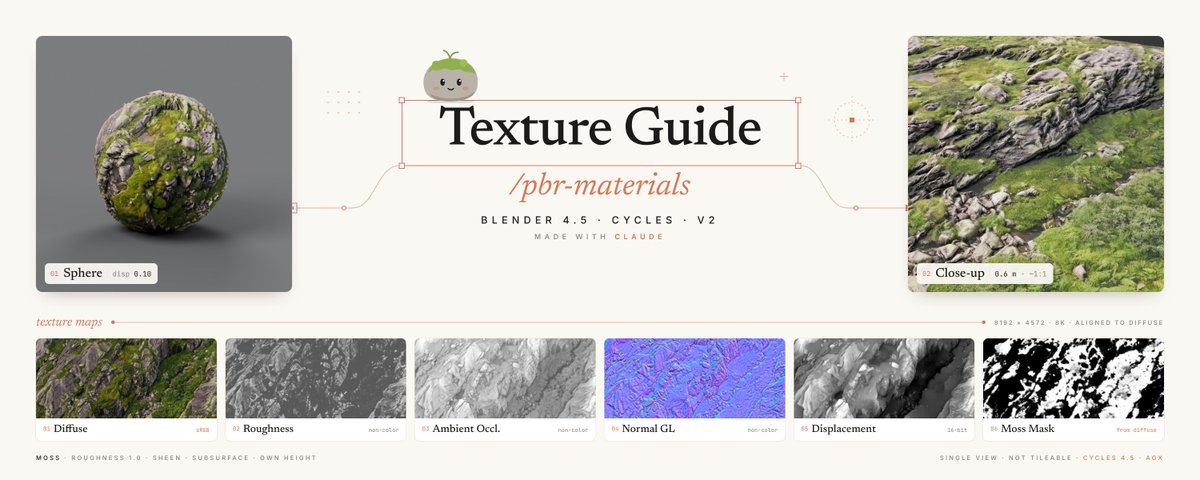
HOLY F*CK. I made a 4K photoreal rock material with real 3D grass growing on it with Claude Opus 5.5
No scanner. No paid library. Real textures as the reference, my own maps, and Blender.
Grass in a texture is usually a lie. It's painted flat, and the moment light comes from the side, it falls apart.
So this time the grass isn't painted into the texture. It's real strands growing out of the rock, rendered in Cycles.
What's in it:
- Rock base with a full PBR set: diffuse, roughness, AO, normal GL + DX, 16-bit height, ORM packed
- Every map aligned to the diffuse, so the relief sits exactly on the color
- Real displacement in Cycles, not a fake bump
- Two layers of grass: a short dense carpet and long dry tufts sticking out of it
3 things that made it look real:
→ Grass grows only where the texture says grass
The orange patches in the color map decide where it grows. Bare rock stays bare, every tuft sits on its patch.
→ Grass is its own material
Layered shading: dry matte stone underneath, dry fibres on top. Not one shader trying to be both.
→ Short + long, not one length
One length of grass looks like a carpet. A dense short layer plus random long blades looks like a field.
And it works on a ball too: grass fibres all the way around, the rock showing through the cracks.
Honest note: 4K this time, one view, not tileable. Grass is new for me, so I got it right first.
nitter.cf/mukadeshinigami/status…


1nable retweeted

Vibe coders, thank me later
21st.dev
reactbits.dev
magicui.design
uiverse.io
mobbin.com
Your app stops looking AI-generated!
1nable retweeted

Introducing /reanimate
Reverse engineer any animation from any website, video or gif.
reanimate.niazmorshed.dev/

1nable retweeted

Orca is a banger. Exactly what an agentic ide should be.
It brings my macbook pro, windows pc (for gpu work) and mac mini (for automations) into one app, along with my harnesses: codex, claude code and hermes.
I do most of my daily work on the macbook. The windows machine handles blender renders and small local models. The mini runs hermes agents and automations day and night.
I’ve been using codex and claude code since launch. Their desktop apps replaced vscode pretty quickly for me. I was also using herdr to connect my machines over ssh and that worked very well.
Orca brings those things together, including my linear and github tasks. And the mobile app is excellent. I can check on agents and reply from my phone when I’m away from the computer.
And it has a lot of other great features: a resource manager, an embedded browser, artifacts, subscription usage tracking, a caffeine-style mode to keep the computer awake while agents work, and many other things
Really well built @orca_build

1nable retweeted

According to their S-1:
~250 customers pay Anthropic >$10M per year
1900 customers pay >$1M/yr
11,900 customers pay >$100k/yr


1nable retweeted

This is insane! I got opus 5.5 to create a blockout of a village in blender, then I used FLUX 3 Klein + Fibo 2 to texture the whole map! We pick 128 views around the map and get the image model to texture gray areas, then we project the image onto the blockout. Open source here - github.com/Patch-gg/trompe