

ARKANCE UK Community is a platform for anyone who has an interest in design and analysis technologies to exchange ideas, experience and expertise.
Gatwick
Joined December 2010
- Tweets9.3K
- Following305
- Followers1.2K
- Likes241




MapThat – Simple Search - Zoom to Per Layer
Did you know?
The DynamicMaps team have updated MapThat so that when you use the Simple Search Tool,…
Read more: eu1.hubs.ly/H0myPqn0
#ARKANCE #MAPThat #DynamicMAPS

Did you know?
The #DynamicMaps team have updated #MapThat so that when you use the Simple Search Tool,… and hide the search tool back and then re-open it,.. instead of removing the Blue Pin, we now retain the Blue Pin in the map!
Read more: eu1.hubs.ly/H0mvr5X0
#ARKANCE

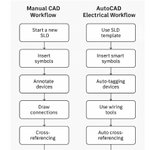
AutoCAD Electrical 2025 can speed up the production of single-line diagrams (SLDs) by automating repetitive tasks and providing built‑in tools tailored for electrical design.
Here’s an overview of how it helps:eu1.hubs.ly/H0mtv5G0
#ARKANCE #Electrical

MapThat – Basemap Ordering
Question: Is it possible to define the order that Basemaps are shown in the Basemap Picker?
Answer: eu1.hubs.ly/H0mty0x0
#ARKANCE #MapThat #DynamicMaps

Revit 2026: Creating Custom Templates
Think of a template as a pre-set starting point. Templates have an .rte file extension rather than the .rvt extension that a project uses.
Read more: eu1.hubs.ly/H0mtsqg0
#ARKANCE #Autodesk #Revit2026

Revit 2026: Understanding Revit Families
Families are Revit files (.rfa) which you create and load into Revit Projects (.rvt) and use to create and populate your building model.
Read more: eu1.hubs.ly/H0mtrpy0
#ARKANCE #Autodesk #Revit

Dimension “Break” Command
During the process of adding dimensions to a drawing, some dimension lines may overlap or cross other dimensions and objects.
Read more: eu1.hubs.ly/H0mrqBR0
#ARKANCE #Autodesk #AutoCAD #design

Revit 2026: Working with Toposolids – Part 2
A Toposolid is a 3D component that represents the shape and elevation of the site model in Revit with integrated features ......
Read more: eu1.hubs.ly/H0m8qCg0
#ARKANCE #Autodesk #Revit #Toposolid

AutoCAD Electrical 2026 – Migrating From A Previous Release
The following is a basic guide on upgrading your #AutoCAD #Electrical from a previous release and considerations that should be taken into account.
Read more: eu1.hubs.ly/H0m8nW-0
#ARKANCE #Autodesk

Revit 2026: Working with Toposolids – Part 1
Toposolids in Revit, introduced in version 2024, are a new way to represent site topography, replacing the older toposurface element.
Read more: eu1.hubs.ly/H0m8kb90
#Revit #ARKANCE #Autodesk


Revit 2026 Tip - Splitting Floors into separate entities
I recently had a question on how to split a large floor slab into different elements so that each part could be in a different model.
Read my answer here: eu1.hubs.ly/H0lp_nn0
#ARKANCE #Autodesk #Revit

Revit 2026’s improved assembly editor makes complex joins easier
The modelling of complex wall joins has always been a common point of discussion with #Revit users.
Read more: eu1.hubs.ly/H0l7Yst0
#ARKANCE #Autodesk #Design

Revit Tip – Unable to Convert ReCap Mesh Elements to Revit Families?
With the release of Revit 2026, there is now a new built-in workflow that allows users to link in an Autodesk ReCap Mesh file into Revit ...
Read more: eu1.hubs.ly/H0l7WPW0
#ARKANCE #Autodesk #Revit

Rotating an Object to an Existing Line (An update from a previous blog)
This is not a new function, since it has been with #AutoCAD for many releases, but it’s one of those sub command options that is often overlooked or not known...
Read more: eu1.hubs.ly/H0l4v1q0
#ARKANCE

Revit Tip – Suppress non-core wall/slab layers in 3D and Section Views
When modelling walls, floors and roofs within Revit, it is possible to model slab elements within an assembly...
Read more: eu1.hubs.ly/H0l49wR0
#ARKANCE #Autodesk #Revit

Revit Tip – Improving the look of #Revit Content
The default installation of Revit typically installs with a default library of content, doors, walls, electrical fixtures etc.
Read more: eu1.hubs.ly/H0l0l1P0
#ARKANCE #Autodesk #Design

Revit 2026: Sheet List Schedules Enhancements
Sheet Lists now support new built-in fields such as Width, Height, and Scale, enabling the creation of more detailed drawing registers.
Read more: eu1.hubs.ly/H0k-37w0
#ARKANCE #Autodesk #Revit #Design

AutoCAD Architecture Tip – Missing Option to Open IFC files?
I was recently asked whether #AutoCAD #Architecture could open IFC files. Read my response here; eu1.hubs.ly/H0kRGPD0
#ARKANCE #Autodesk #AEC

Revit and Dynamo Scripting
One of #Revit’s strengths is its approach to data driven #design and automated creation of schedules, which ensure consistency when issuing construction documentation.
Read more: eu1.hubs.ly/H0kRz150
#ARKANCE #Autodesk
