

content management tools for creators and streamers // https://nitter.cf/t.co/l6EqwmeKtU // for support, join our discord https://nitter.cf/t.co/c0OY0mh9oQ
United Kingdom
Joined August 2020
- Tweets67
- Following2
- Followers71
- Likes25





We've released a minor update today giving creator's full visibility of their clip audio IDs, even if we haven't flagged them as potential serious infringements.
Previously we only showed clips with what we believe were serious infringements. Now you can see all Audio IDs.


2
1
From both Corporal and Pang, thank you again! You can follow our next steps:
NotCorporal on Twitter: GameDev and Modding
nitter.cf/notcorporal
PangDev on YouTube: Programming and GameDev
youtube.com/channel/UCBX3-GA…

This is still experimental, so let us know if any issues come up - or there's any additional feedback!
We've struggled a lot to get this working over the couple of years we've looked into this, as Twitch has not given us appropriate support - but managed to build a solution.
1
Automatic deletion only applies to new clips found, but for existing infringements we've also added a button on the clip group to delete them all - or delete only if they fall under the view threshold.
1
1
If infringements are found, and the bot is configured, clips will be auto-deleted if they fall under the minimum view threshold with infringements.
Some clips may want manually verifying, so you can specify a maximum views threshold that will leave higher viewed clips unaffected
1
1
In response to the DMCA issues still expanding, we've added an update today that allows you to add our bot as an editor, and configure it to automatically delete detected clips using the Broadcaster plan.


1
2
We've got a lot in store for 2021 behind the scenes that we can't wait to share with creators, thanks for your continual support!

1
We've released a small update on Copilot today adding some quality of life improvements for clip tracking:

1
2
copilot // retweeted

Thanks to the tools provided by @copilotgg, my Twitch channel is back in healthy shape.

Thanks for letting us know! Sounds like a bug/oversight on our part, we'll see to getting the allowlist of labels applied here.
1
1
We might have too much of a delay on recognition, as it can take up to 10 seconds to make an accurate guess on the current audio ID, though a good idea! I'll mention it in our next meeting and see if it's feasible.
1
Additionally, we have re-issued some new labels and media types and promoted them to serious copyright infringements.
Please check in on your channel dashboard and resolve any new serious infringements that may have appeared today!
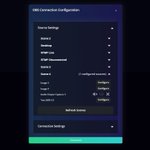
Configurations are saved per browser, so you can deploy your own source controls and settings for different scenarios - such as a server dedicated to OBS streaming. Copilot will only need to remain in the background in a browser.
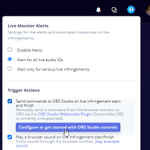
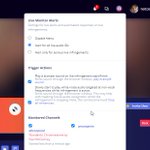
Make sure to configure what type of alerts you want to listen for, serious infringements content high risk content whereas "live audio IDs" are any found audible content. Then select your channel name to monitor at the bottom.


1
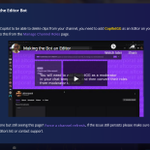
Install the OBS Websocket plugin into your OBS client, open up Copilot in a new tab and set up the OBS connection within the alert section.
Once connected, you can then view your sources on your dashboard and select what you want to show/hide/mute on an infringement lifetime.


1
After 10-15 seconds of detected media in your stream, we will mute the scenes you configure for a couple of minutes to lower the amount of live infringed content. This won't remove infringements from your VOD, but will hopefully reduce prolonged infringements to a smaller window.
1
1
Live monitor alerts received an update today that can automatically mute, hide, or toggle a source in OBS studio when an infringement is picked up on your stream. This is now live for all subscribers - and was originally codenamed Guru in the sub plan.

Additionally: For larger creators who have been processing a lot of clips, we've been doing a lot of backend work to help reduce load times of your dashboards and improve the general UI experience.
Clips load in as you scroll now, which should make things a bit more snappier.
