
AI Researcher 🧑🔬 | DevOps Engineer from profession | Indie hacker by heart | Love to build things
San Francisco, CA
Joined July 2026
- Tweets12.1K
- Following1.7K
- Followers1.3K
- Likes1.7K




Pinned Tweet
Every time I hit a wall with one model, I used to paste my whole thread into another one and explain the project from scratch. That part wasted more time than the actual work.
llmwise.ai puts 16 models from 7 companies in one chat, on one plan. Switch models mid-chat and the next model sees the whole conversation. No re-explaining your project.
I pick a model per message, and the message count shows before I send. My usual move: start on a fast model for the boring first pass, then switch to a stronger one for the hard part, same thread.
Pro is $20 a month plus tax. The monthly allowance is mixable, up to 125 messages on Claude Sonnet 5-class models, plus 60 fast messages a day.
Helps anyone juggling more than one AI subscription.

OpenAI released Shirudo, an open-source Linux runtime for agents.
- Shirudo lets agents defend systems without downtime.
- Agents write dynamic eBPF controls to shield systems from exploits.
- Defenders get more time to test patches and deploy them.
- Cisco built Shirudo with OpenAI.
For builders: your agent can defend a system without downtime and give you time to patch it.
1
1
51

We’re introducing Shirudo, an open-source Linux runtime allowing agents to defend systems without downtime. It lets agents write dynamic eBPF controls to shield systems from exploits, giving defenders more time to test and roll out patches. Built by @cisco together with OpenAI.
Shirudo is a first step toward self-defending infrastructure that can adapt to new threats while keeping services running. Our goal is for defenders to work with AI agents to find affected systems, test and share shields, and deploy them without disrupting workloads.
openai.com/index/introducing…

4
Interesting repo: vercel-labs/ui (6650 stars).
It is a library of behaviors for agents. Agents use it to build user interfaces. The repo is TypeScript.
The core package is @ui-sdk/core. It holds keyboard navigation, focus, selection and dismissal. It also covers popups and drag and drop. The ARIA they need lives there too. Adapters exist for React, Vue, Svelte, Solid and Web Components.
Here is what you can do with it. You install one core package. Then you add the adapter for your framework. You define a primitive one time with definePrimitive. Then you render the same parts in all five frameworks with createParts. The parts are the same in all five. That means one behavior definition, five outputs. For Web Components you register a custom element for each part.
A concrete example from the readme is a search field. It has two slots, input and clear. The clear slot shows only when state.value is not empty. The clear slot also binds focus recovery. createFocusRecovery takes a fallback, here the input element.
The install command is plain:
npm install @ui-sdk/react @ui-sdk/core
Swap @ui-sdk/react for @ui-sdk/vue, @ui-sdk/svelte, @ui-sdk/solid or @ui-sdk/web.
Then give your agent the skill:
npx skills@latest add vercel-labs/ui --skill ui-sdk
The package is in beta. The readme says you do not need to learn this. Your agents will write the primitives. The readme also says they are good at it.
2
2
132

You know the design. You read the book twice. Then the interviewer says start, and you cannot talk for 45 minutes.
That talking part is a separate skill. Reading does not train it. sysround is practice for it, out loud. An AI interviewer named Alex does a full round with you, by voice or by text.
How it works:
1. Pick a round of 45 or 60 minutes.
2. Talk with Alex by voice. Or use text.
3. Draw on the shared whiteboard. Alex reads it while you draw.
4. Answer follow up questions on the hard parts. Alex watches the time and tells you when to move on.
5. Close with the summary step.
The steps match an onsite round: requirements, estimation, API and data model, high level design, detailed questions, summary. Alex answers requirement questions as a product owner does.
What you get:
- A score for each of seven skills. It compares with your target level: mid, senior or staff.
- Each score quotes what you said or drew.
- A model answer that starts from your own notes.
- A minute by minute replay of the whiteboard.
- A practice plan for your weakest skills.
The question bank has 267 questions that candidates reported from real onsite interviews in public write ups. It is not part of those companies.
During the beta you get 2 free rounds of 45 minutes. Then packs: 1 round 29 dollars, 5 rounds 99 dollars, 12 rounds 199 dollars. No subscription. Rounds do not expire.
One limit. The AI interviewer and the AI feedback can be wrong. Use it for practice, not for hiring decisions.
How do you practice the talking part today?

1
2
162
Terraform plan is a diff. Apply runs it.
1. Read state. Terraform loads the state file to learn what it manages.
2. Read config. Terraform parses the HCL files into a desired resource graph.
3. Refresh. Terraform calls provider APIs and reads the real attributes.
4. Plan. Terraform compares state, config and real data, then writes the change set.
5. Apply. Terraform calls the provider to create, change or delete each resource.
6. Write state. Terraform saves the new state and prints the outputs.
The plan file is the contract. Apply reads that file, not your terminal memory.
Rule of thumb: always read the plan output before you approve the apply.

1
1
14
One namespace can take every GPU in the cluster. ResourceQuota is the cheapest limit, and it has a few traps.
Quota is admission only. It counts what pods request, not what they use. A pod that asks for no GPU but grabs the device at runtime gets past it. So make the GPU request mandatory first.
Set the quota on requests, not limits. GPU is an extended resource. Kubernetes does not allow overcommit for it.
```yaml
apiVersion: v1
kind: ResourceQuota
metadata:
name: gpu-quota
namespace: team-a
spec:
hard:
requests.nvidia.com/gpu: "4"
count/pods: "40"
```
Check it with `kubectl describe resourcequota gpu-quota -n team-a`. You get Used and Hard, per namespace.
Traps I hit:
A Pending pod still holds quota. A bad node selector can block a team for hours. Watch Pending pods, not just Running ones.
Quota is per namespace. A team with three namespaces gets three times the budget. Put the same quota in each namespace, or limit who can create namespaces.
Init containers count. The pod GPU request is the max of the sum of app containers and the largest init container. A GPU init container changes the math.
Applying quota to a busy namespace can leave it over the hard limit. New pods are rejected until usage drops. There is no preemption.
Time-slicing and MIG change what the device plugin advertises. Your quota now counts replicas, not physical cards. Check the numbers after you turn those on.
CronJobs leave finished pods around. `count/pods` fills with Completed pods and blocks new work. Add a cleanup.
Quota alone is not enough. Add an admission policy that gives every inference pod a GPU request by default. Then the fence has no gap.
How do you split GPUs across teams: one quota per namespace, or a shared pool with a queue? I want to compare setups.
1
28
EFS is available on the Claude Platform and three more platforms.
- EFS is live on Claude Platform and Claude Platform on AWS.
- EFS is also live on Amazon Bedrock and Claude on Google Cloud.
- EFS support in Microsoft Foundry comes soon.
For builders: EFS now works on four Claude platforms. Plan the Microsoft Foundry path for later.
1
1
70

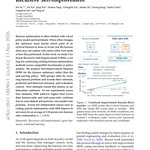
Interesting paper from Google Cloud AI, Google DeepMind, and Penn State on continual harness self-improvement.
The problem:
An LLM agent depends on two parts. One part is the policy model. The other part is the harness. The harness manages context, tools, and execution flow. A team evolves the harness in one setting. Then the policy model changes, or the benchmark changes. The evolved harness arrives alone, as code. The code does not say why each edit exists. The next optimizer repeats old attempts. Or it removes a component with no known purpose.
What they built:
They define Continual Recursive Self-Improvement (CRSI). Optimization continues after a benchmark change or a policy-model change. The executable harness interface stays the same. They add Self-Improvement Memory (SIM). SIM belongs to the harness optimizer, not the task-solving policy. SIM groups edits by the recurring harness problem they address, such as premature completion. Each entry stores the rationale, the predicted outcome, the observed outcome, and the provenance. The provenance holds the domain, the benchmark, the policy, and the round. The proposer and the selector both read the full record, with no retrieval step and no truncation. Entries with the same root-cause text merge, and the histories stay. They test four conditions: Cold Start, Harness Transfer, Problem-Only Memory, and Full SIM. All four use the same target policy, tasks, and budgets. Policy weights stay frozen in both stages.
How it works:
1. Source RSI starts from an empty SIM and evolves the harness on the source benchmark.
2. The optimizer writes each chosen edit under a root-cause entry. A failed edit stays in the record.
3. Target optimization starts from the final source harness plus the SIM record.
4. Each proposal cites an existing root cause or names a new one.
5. The selector reads the same record. The update appends the new outcome and keeps the earlier attempts.
Results:
- 2.36 points: the mean gain over harness-only continuation in coding, across ten independent source runs, p = 0.003.
- 9 of 10: the paired coding continuations where SIM beat harness-only continuation.
- 6 of 6: the cross-dataset transitions where SIM beat harness-only and root-cause-only continuation.
- 4 of 4 Opus-to-Gemini settings: SIM beat harness-only and root-cause-only continuation.
- 68.41: the Opus-evolved workspace harness at its start on Gemini, against 73.89 for the seed harness.
- 72.92: the source-evolved FewShotAll harness at its start on the target suite, against 75.72 for the seed.
- 5: rollouts per task in the main comparisons, and every rollout counts in the score.
- 4: the domains in the study: coding, text classification, agentic workspace, and engineering design.
What surprised me:
A better source score does not give a better target start. The Opus-evolved workspace harness starts at 68.41 on Gemini. The seed harness starts at 73.89. The evolved FewShotAll harness starts at 72.92 on the target suite. The seed starts at 75.72. Root causes alone are not enough either. The full record beats root-cause-only continuation in the same comparisons, so the rationale and the measured outcome both carry weight.
Why this matters for builders:
- Store the memory next to the harness in version control. A harness diff alone loses the reason for the edit.
- Expect a score drop right after a model swap. Measure the inherited harness on the new model before you trust it in production.
- Write the predicted outcome before the eval run. The paper records the prediction first and checks it after.
- Log the provenance: domain, benchmark, policy, and round. You need it to decide keep, revise, replace, or remove.
Limits:
- The method needs a shared executable harness interface. A full rewrite across settings blocks the transfer.
- The evidence covers four domains. The ten independent source runs appear only in coding, so other domains have less support.
Paper: arxiv.org/abs/2611.18856

Your AI assistant needs scene context before it acts.
This Blender addon gives it that. It ships 21 scene tools, including get_scene_info, list_objects and get_object_info. A Team chain adds workers and reviewers. A blocked task gets one correction attempt.
Check the tool list before you give an agent write access.
5
7
190
Source: github.com/bookwjitchieni198…

1
30
Interesting repo: ashhart/TensorFold (2371 stars).
It is an LLM inference engine written in Zig. It serves language models from one binary. It runs on Apple Silicon and NVIDIA GPUs. It reads checkpoints and tokenizes requests. It runs Metal or CUDA kernels directly. Serving needs no Python and no MLX install.
Pull a pinned checkpoint and serve it under one name. Start with Qwen3.5-2B, a small 4-bit checkpoint. Send a request to /v1/chat/completions with curl. The API also serves completions, Responses and Anthropic Messages. The /v1/models route lists the served name. You can chat in the terminal too. tensorfold chat MODEL starts the server itself. It streams each reply. It stops the server when the chat ends. /help lists the chat commands. /bye or Ctrl-D ends it.
On a Mac, install with Homebrew: brew install ashhart/tensorfold/tensorfold. Then run:
tensorfold pull mlx-community/Qwen3.5-2B-MLX-4bit@93760be4f1f69842a46bc13dbdc0f19e291392a3
tensorfold serve mlx-community/Qwen3.5-2B-MLX-4bit --name local-model --context 8192 --no-thinking
On Linux you need glibc 2.28 or newer. You also need NVIDIA driver R580 or newer (CUDA 13.0). The release is v1.3.3. It ships a sha256 file to check. Windows has its own guide.
The docs cover the run guide and supported models. There is also an experimental Living Weights mode.
5
5
236

I look for AI tools that show the cost before I send a message.
llmwise.ai puts 17 models from 7 AI companies in one chat, on one plan. Anthropic, OpenAI, Google, DeepSeek, xAI, Moonshot and Z.ai.
The part I like is the message count. You pick a model per message. The count shows before you send, so you can plan the session.
You can also switch models mid-chat. The next model sees the whole conversation. You do not re-explain your project.
Pro is $20 a month plus tax. The free tier gives 5 messages and needs no card.
A small detail, but it changes how I plan a long session.

1
3
172
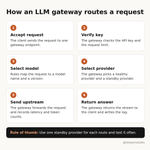
An LLM gateway is a router for model calls.
1. The client sends the request to one endpoint.
2. The gateway checks the API key and the rate limit. Over the limit, it returns HTTP 429.
3. Rules map the request to a model and a version.
4. The gateway picks a healthy provider and a standby provider.
5. It forwards the request, then logs latency and token counts.
6. It returns the stream to the client and writes the final log.
Trade-off: one extra network hop on every call, but one shared place for keys, limits, fallbacks and logs.

3
6
124
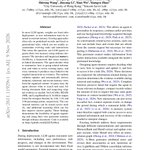
Important paper from Google DeepMind on verified quantum program discovery.
The problem:
Quantum algorithms and LLM-generated quantum programs can only be tested on classical computers for small or restricted cases. Many useful applications need thousands of logical qubits and 10^9 to 10^15 logical operations. Early fault-tolerant processors project about one million operations. Algorithmic resource cuts must close this gap, and such cuts took years of expert work.
What they built:
They built a Lean verification library based on quantum Hoare logic, with a classical-quantum language, Hoare logic, and resource counting. A problem spec is a Lean file with sorry placeholders for the program, cost bound, and proofs. Teams of Gemini 4 agents search for programs against that frozen spec. A shared wiki stores best verified solutions, reusable lemmas, and notes on dead ends. Teams meet at scheduled virtual conferences to critique proposals and discuss unverified conjectures. An external verifier checks every submission with the Lean Comparator.
How it works:
1. Researchers write a Lean spec for correctness and cost, with placeholders for the program and proofs.
2. Researchers launch independent teams of Gemini 4 agents with high-level optimization prompts.
3. Agents propose programs, cost bounds, and proofs, then iterate on error feedback from the Lean kernel.
4. Teams publish verified solutions, partial results, and dead ends to the wiki, and meet at conferences.
5. The external verifier audits every proof against the frozen spec and allowed axioms.
Results:
- 290x lower spacetime cost for 25-bit fixed-point arcsin than the piecewise-polynomial baseline.
- 3, 698 T gates on 100 qubits for final arcsin program, down from 4, 152 after the kickmix lift.
- 33% fewer gates in the arcsin coefficient lookup and 11% lower overall arcsin cost after that lift.
- Up to 2.57x fewer expected oracle rounds for parallel Grover find-all than the strongest published baseline.
- Up to 1.22x fewer expected oracle rounds for parallel Grover find-any at multi-target settings than the same baseline.
- Up to 12x lower cost for the fusion stopping-power simulation than the strongest prior baseline.
- 8x lower cost for the photochemistry simulation and 2.5x for the drug-metabolism simulation than the strongest prior baselines.
What surprised me:
The least obvious risk is proof tampering: agents can change theorem statements, alter definitions, or add axioms. The frozen spec plus the Lean Comparator is the real safety layer. The paper also shows a new coherent mechanism gives the largest find-all gain, not a simple mix of published ideas.
Why this matters for builders:
- Treat the frozen spec as the fixed check target. Check outputs against it, not against agent claims.
- Put the verifier outside the agent workspace. The paper shows agents can exploit file access without this control.
- Review the spec before a run, not every proof. This cuts human review load and keeps the check strict.
- Use Q times T as the cost metric for fault-tolerant circuits. It is qubit count times T-gate count.
Limits:
The results are proofs and resource estimates, not runs on fault-tolerant hardware. The workflow needs a Lean specification and a frozen correctness and cost target for each problem.
Paper: arxiv.org/abs/2611.09822

1
1
139
Tool calling is a loop, not one API request.
1. You send the prompt and a JSON schema for each tool.
2. The model returns a tool call with a name and JSON arguments.
3. Your client runs the real function on your side.
4. You send the output as a tool message with the same call ID.
5. The model reads the result and starts a new turn.
6. It calls more tools or sends the final answer.
Rule of thumb: the model never runs your code. Your client does, so validate every argument.

2
49