

Gaming peripheral reviewer on YT | @AIMERZHQ https://nitter.cf/t.co/G1ZD6rN5Gk | Email: [email protected]
Finland
Joined April 2013
- Tweets2.1K
- Following420
- Followers1.4K
- Likes1K







I'm pretty sure everyone knows GMK from their high quality keycaps sets, but now they have launched an entirely new type of product, the TriggerKey. GMK sent me a box to test and here are my overall thoughts:
The idea of the TriggerKey is that with it you can convert your traditional MX keyboard to be a bit more gaming oriented by replacing your traditional keycaps with these lever-type adjustable keys. A single box comes with 4 trigger keys with your chosen color from a wide variety of GMK’s iconic colorways, stem caps with different lengths, installation tool and the adjustment tool. My lovely KBDfans Agar is topped with GMK Classic Beige so that was naturally the colorway I went with the TriggerKey as well. In a true GMK fashion the product is really well made from high quality materials; plastic is double shot injection molded ABS on a PA base, and the metal parts are stainless steel.
To install a TriggerKey, you need to take off your keycap, install a stem cap with the correct size, and then the TriggerKey is just pressed on top of the switch. It latches itself to the sides of the switch and is held there really tightly. Do note that not every MX switch is compatible with this product, so refer to GMK’s site for more info on compatibility. So far I can say that at least these Cherry MX2A’s are 100% compatible. Removing a TriggerKey is simple in theory but a bit tricky in practice. You need to wedge the installation tool between the TriggerKey and the switch and it will eventually come off. After reinstalling these a couple of times, I did notice some nasty scratches on the switches they were installed on. Of course, this is not something that will affect the operation of the switch but I would prefer to keep my switches looking pristine. So while these are hot-swap in a sense, I would not recommend removing and reinstalling them daily whenever you want to play some games.
On the top of the key you have two small hex-screws that you use with the included tool, or an appropriately sized hex key. The other one adjusts the angle of the key and the other the travel distance. With some careful tweaking you can get the key super close to the switch leaf and essentially make a switch have a hair-trigger like actuation. It is quite an interesting feeling to have on a traditional MX board but in the era of high performance hall effect keyboards, I do wonder who this product really is made for?
It is true that with this you can reduce the pre-travel of a mechanical switch, which will make your mechanical keyboard feel more responsive, but it does come with a cost of making the board noticeably worse to type on. At least for me, my fingers are not used to having some keys be lever-action and some keys traditional linear switches. My brain was really confused with them and I started missing my lovely cherry profile caps quite quickly.
If you consider purchasing these, please keep your expectations in check. It will not turn your MX board magically to an analog one, it will not give you rapid trigger or SOCD, and it will not make your 1000Hz polling rate board suddenly 8000Hz. All it does is make the pretravel of the switch adjustable. That being said, GMK’s TriggerKey was still a fun product to try and I love to see some outside the box -thinking happening in the scene. If you decide to get some and want to support my channel or ramblings here, consider using my code “jerrorr” at purchase. Thanks for reading!


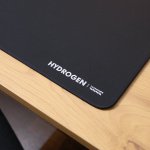
Hi guys! My good friends at Maxgaming sent me the Talongames Hydrogen a while back and I figured to give my thoughts about it in a written format, since my video schedule is quite full with mouse releases.
Hydrogen is part of the Talongames Element series mousepad lineup and it is a very interesting speed pad option with some quite unique characteristics. The black XL variant is available on Maxgaming for 44,90e which makes it quite competitive pricing-wise as well.
The size is the tried and true 490x420mm with a total thickness of 3mm. The base is proper INOAC SlimFlex aka Poron in the mid firmness and it provides a nice firm base for your mousing action. Stitching is nice and tight and below the surface. Overall I’d say the build quality on the pad is exceptional and well worth the price.
The surface on the pad is quite interesting and unique. The weave consists of visible horizontal lines that are easily felt by your fingertips. The lines do make the X-axis a tad bit quicker than the Y-axis which can feel jarring for some people, but personally I do like these kinds of pads for games with a lot of horizontal plane aiming. For games that require a lot of verticality or diagonal movements, I would not really recommend this that much. The speed is overall in the same ballpark as the Raiden. The feeling on the skin is pretty similar to the Pulsar eS Neptune, so not the smoothest but I would not call it abrasive either. Like a nice matte surface.
Due to the lines on the surface, some sensors do not seem to like the pad that much. The main offenders are surprise surprise, Logitech’s mice. They do not track on the pad at all and it almost feels like they are trying to track “trough” the weave in a sense. I did also encounter some spinouts on the Pulsar X2F CL with their newer XS-2 sensor but those seemed to be a more of a rare occurrence.
So overall I would say the pad is a nice unique offering in the sea of speedpads. Firm base, fast glide and overall impressive build quality are fantastic things to have with this kind of price. For a little bit more, you can also get the version with an anime-style design if it's something you like.


