

Game Dev : {Animator, Rigger, Designer, Coder, Tool Maker, Artist} | {Stumbling after Jesus } { cgmTools | MRS | @cgMonastery } #maya #python #rigging
Texas
Joined April 2022
- Tweets738
- Following317
- Followers919
- Likes3K




Been iterating on my bezier setup for MRS. Think I'm gonna rerig Dragonling with it (this is it's tail). Have it implemented on segment, limbs, necks. This is a tail with stretch...
Finding Better AI Coding Flows | Problem 2 — Testing A(i)ssumptions
The second big improvement was building actual tests to get measurable results instead of manually eyeballing everything.
Believe it or not, eyeballing isn't a particularly accurate workflow.
And AI lies. It's a perpetual sycophant, often telling you what you want to hear. So, wherever possible, make it prove its work with math—its native tongue.
A few lessons from this process:
1. AI won't reliably follow your rules. Verify everything.
You can establish project rules, coding standards, and architectural constraints, but don't assume AI will consistently respect them.
It will happily slap a Band-Aid on a problem rather than fix the underlying issue.
Regularly have it audit its own work against your project rules.
2. Stop eyeballing. Start measuring.
I began building Unity EditMode and PlayMode tests using Unity's Test Runner.
Initially, Cursor couldn't execute the tests itself, so I developed a workaround:
-Cursor would generate or modify tests.
- I'd run them manually in Unity.
-I'd save the results to a known location.
-I'd tell Cursor "results up."
- Cursor would analyze the results and we'd iterate.
It worked surprisingly well...for a few nights.
But manually saving results and hunting down specific tests quickly got tedious.
3. Let AI optimize against actual data.
This is where testing became genuinely useful.
For example, I've been tuning spring/curve-based pathing to achieve two competing goals:
Move as fast as possible.
Adhere as closely as possible to the intended curve.
Instead of repeatedly changing values and eyeballing the behavior, I could measure maximum speed, deviation from the curve, and other metrics.
Now Cursor could iterate on the actual numbers rather than guessing what looked better.
That's a much better use of both my time and AI's capabilities.
4. Close the testing loop.
Eventually, I asked ChatGPT whether Cursor could execute Unity tests directly.
It outlined a workflow. I fed that back into Cursor and voilà!
Cursor now runs the tests itself.
No more manually running tests, saving results, or telling it where to look.
It can make a change, run the relevant tests, inspect the results, and iterate.
That's a significant improvement in the workflow.
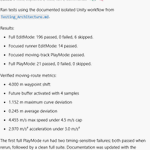
Some examples of the tests I'm running:
Impact testing: Programmatically shoot balls at a debug toy to measure impact response, aiming, drift, etc.
Curve path tracing/rebuilding: Measure how accurately objects follow and reconstruct paths while optimizing movement.
Track completion: Verify that objects can successfully navigate tracks across different movement modes.
The larger lesson?
Don't just ask AI whether its code works. Build a system that makes it demonstrate that it works.
The less you depend on AI's confidence and the more you depend on measurable results, the more useful it becomes.
Images: My new around-the-room behavior and examples of the automated test results.

Finding better AI Coding Flows | Problem 1 — Burning Tokens
I've been jamming again on my nights and refining my workflow as I've been making things move around better and more.
When I jumped back in the project I was burning tokens at a unsustainable rate. Seeing that I’d be running out in a couple weeks per month or less and being a cheapskate I wanted to see what we could do. Asked ChatGPT for advice for using Cursor more efficiently.
- Do NOT use auto agent mode
- Turn off the expensive models as options
- Make your default something efficient. (I’m using Composer 2.5 for most basic issues at present). It’s perfectly fine for my Maya side tool work.
- I also setup a ChatGPT reminder to update me on recommended models every other Friday and adjust my settings.
- If you hit a hard issue, pick a higher tier model for a thread. I use Sol for my heavier lifts.
- If you already use ChatGPT on a subscription you have Codex access. I setup my personal account to connect to my personal Cursor to access Sol for deeper problems.
Gif is my new wander food toy - needed some food that played hard to get for testing.
Smuggler's Gambit - Hondo!
I had a lot of fun working on Hondo. He’s such a great character with a memorable voice, and I really wanted to do him justice.
I spent some time exploring MetaHuman’s face setup and audio-driven facial animation and ended up building a workflow around it that let us combine facial performance, mocap, and our existing Maya rigging pipeline. We created a set of reusable body performances, then layered more bespoke facial animation and timing adjustments on top for each line.
Hondo’s coat also gave me an excuse to dig deeper into Maya cloth. I developed a cloth-driven setup that worked with our existing rig and collision workflow and gave us a much better result than the simpler dynamic approaches I’d tried initially.
It ended up being a great mix of MetaHuman, mocap, Maya rigging, tooling, and cloth simulation - all focused on getting a lot of unique Hondo performances through the pipeline efficiently.
On this one, I handled the rigging, pipeline and tooling, as well as the facial processing, performance assembly, and Unreal/Maya/UEFN workflow.
Josh Burton retweeted

I used Opus 5.5 to make this dev log. It captured all of the footage and used the commit history to write the script.
Josh Burton retweeted
Driver Survivor. The dead own the streets. You have a car. Wishlist on Steam store.steampowered.com/app/5…
I keep a weekly blog at wherever I've worked the last decade or so - Confluence, Notion, whatever work uses. Just notes on what I'm working on, code snips, etc. It's been hugely helpful over the years.
Do recommend.
Dragonling - Improving Flight
Letting the little guy sleep a bit while I work on flight maneuvers with some new debug toys. Spent a few nights tinkering.
- Meander | orange tailed ones just fly about in good looking paths
- Intercept | red one hunts targets impacting and destroying them
Once I get things feeling great I'll teach dragon the better flying.
I just published Dragonling — …been a bit medium.com/@joshburton_30676…
Pathing, and click interact.
Dragonling...
Life slowed down enough to get back to my little dragonling. Getting some branches cleaned up to capture some footage.
Smuggler's Gambit - Quadjumper
Finally getting around to doing a proper write up. Here's the first snip.
(Hat tips - Ken for the great layouts, Hong for the beautiful ship model, Jobye, Molly, Martin and more for the lovely environments and lighting, Justin for the fx, Doug for the audio magic and Matthew for pushing me to learn to tolerate the graph editor in UEFN)
One of my favorite parts of the project. The Quadjumper is a fun ship with great character opportunity even at a low joint count. I was tasked with rigging it up, animating it and then ended doing a pile of cinematics with it (and other ships) in UEFN.
In Maya:
- MRS Rig mainly made of handles. I wanted fancier landing gear but…alas
- Animated nice long animation states (start up, take off, land, etc)
- Good use of my randomization tool to get some jitter
- Slightly offset some of the turbine joints to give it more character
In UEFN:
- Someone else would do the layout
- Animate the root, work on the camera anim
- Use my ship anim states in the sequence to fly, land, start up etc
- Let the rest of the team do their magic — fx, lighting, sound, environment
X limits gif size, I’ll post more examples (and higher fidelity) when I get around to making a reel for the project.