

La proyección de mi mundo geo. GIS | Product development | Maps | RaspberryPi.
Valencia, España
Joined July 2013
- Tweets13.7K
- Following1.4K
- Followers6.9K
- Likes5.1K






Óscar Martínez retweeted

Bonito recurso para aprender Algoritmos de Programación.
Son 86 lecciones y está totalmente en Español.
Estructuras de datos, algoritmos, grafos, retos...
→ byte-sized-algorithms.vercel…
Óscar Martínez retweeted

Everyone is talking about Forward Deployed Engineers
I wrote a paid deepdive in @Pragmatic_Eng when the role started to get popular, more than a year ago
Made it free today
Enjoy: newsletter.pragmaticengineer…

Óscar Martínez retweeted

Every backend engineer should build these 15 projects at least once.
Not another CRUD app. Projects that help you understand what's actually happening under the hood.
1. Distributed Rate Limiter — Explore token buckets, sliding windows, Redis atomicity and distributed coordination.
2. High-Concurrency HTTP Server — Understand TCP sockets, event loops, async I/O, connection handling and backpressure.
3. API Gateway — Learn reverse proxies, request routing, load balancing, authentication and circuit breakers.
4. Message Queue (Mini Kafka) — Understand producers, consumers, partitioning, acknowledgements and delivery guarantees.
5. Distributed Job Scheduler — Implement worker pools, retries, exponential backoff, delayed jobs and idempotency.
6. Distributed Cache — Explore cache eviction, TTL, cache invalidation, replication and cache stampede prevention.
7. WebSocket Server — Handle persistent connections, heartbeats, broadcasting and thousands of concurrent clients.
8. Database Connection Pool — Understand connection lifecycle, pooling, resource exhaustion, timeouts and concurrency.
9. Mini Database / Storage Engine — Implement write-ahead logging, indexing, B-trees and crash recovery.
10. Distributed Key-Value Store — Explore consistent hashing, partitioning, replication and failure detection.
11. DNS Resolver — Understand DNS records, recursive resolution, UDP/TCP, TTL and caching.
12. Concurrent Task Scheduler — Work with threads, processes, locks, synchronization and worker pools.
13. Log Aggregation System — Build log ingestion, buffering, indexing, searching and retention.
14. Change Data Capture (CDC) System — Capture database changes and explore event streaming, ordering and checkpoints.
15. CLI Process Monitor — Understand OS processes, CPU and memory monitoring, signals and resource management.
The real learning comes from building these from scratch, testing failure scenarios, benchmarking performance and understanding the trade-offs.
Which one would you add to this list? 👇
Óscar Martínez retweeted

the Head of Design at X just open-sourced his taste (a skill that makes your agent's UI look production-grade)
I broke down how it works ↓
Benji wrote down the hundred small decisions he makes when he designs product UI by hand, so an agent can make them too
the skill is built around one sentence:
"it reads as a real product, simplified to what the viewer needs, framed with intent, and every motion has a cause"
it names the 5 ways agent-made UI goes wrong:
> too much, real words in every cell, packed tight
> too little, a wireframe that doesn't read as a product
> boxed, the whole app shrunk into a card like a screenshot
> flat, everything has the same weight
> bland, your brand's style never shows up
then the agent works in 7 steps, and most of them happen before it writes any code:
1. medium: still or animation, where it sits, what size
2. look: light, dark, blueprint or glass, one accent
3. story: 3 to 5 beats
4. examples: start from the closest of dozens of gold examples
5. screen: a few real words, placeholder lines for the rest
6. choreograph: overlapping beats and a loop that ends where it began
7. rehearse: film it, read every frame, fix what it finds
the agent films its own work, a script creates every frame on a sheet and monitors one-frame jumps and text that doesn't fit its box, which a screenshot can't show
it reads your design tokens too, so the UI uses your real colours, fonts and corner radiuses
he built it by giving the same short prompt to 2 new agents with no other context, one with the skill and one without, then comparing the results side by side
when something looked off, he wrote down what was wrong, updated the skill and ran the whole test again, instead of fixing it by hand
works in Grok Build, Claude Code, Codex and Gemini:
npx skills add benjitaylor/skills --skill stageshow
Benji says most results still take him a few rounds of feedback, and the first pass is already a big step up from what an agent makes on its own


Óscar Martínez retweeted
Made the previously paid article "Becoming a better writer" free.
I see too many devs writing low quality slop with AI. Hopefully this helps those of you who want to share more of your own experiences, using your own words - we need more of these!
newsletter.pragmaticengineer…


Óscar Martínez retweeted

Prompt of the day:
/grill-me on how a /software-factory might help us
Helps you figure out if a software factory can help you, and brainstorms the infra you need to set it up.
github.com/mattpocock/skills…

Óscar Martínez retweeted

10 more books I can't recommend enough:
On your way to Software Architect (Part 2)
Here's the order I'd read them in again 👇
𝟭. 𝗙𝘂𝗻𝗱𝗮𝗺𝗲𝗻𝘁𝗮𝗹𝘀 𝗼𝗳 𝗦𝗼𝗳𝘁𝘄𝗮𝗿𝗲 𝗔𝗿𝗰𝗵𝗶𝘁𝗲𝗰𝘁𝘂𝗿𝗲 (Mark Richards, Neal Ford)
↳ The map of architecture styles and the "-ilities" behind them.
↳ First law: everything in software architecture is a trade-off.
𝟮. 𝗣𝗮𝘁𝘁𝗲𝗿𝗻𝘀 𝗼𝗳 𝗘𝗻𝘁𝗲𝗿𝗽𝗿𝗶𝘀𝗲 𝗔𝗽𝗽𝗹𝗶𝗰𝗮𝘁𝗶𝗼𝗻 𝗔𝗿𝗰𝗵𝗶𝘁𝗲𝗰𝘁𝘂𝗿𝗲 (Martin Fowler)
↳ The reference for problems you hit in almost every app.
↳ After it, you'll spot these patterns in code you own.
𝟯. 𝗠𝗶𝗰𝗿𝗼𝘀𝗲𝗿𝘃𝗶𝗰𝗲𝘀 𝗗𝗲𝘀𝗶𝗴𝗻 𝗣𝗮𝘁𝘁𝗲𝗿𝗻𝘀 𝗶𝗻 .𝗡𝗘𝗧 (Trevoir Williams)
↳ Saga, CQRS, and API Gateway in real .NET code.
↳ The new edition is updated for .NET 10 and C# 14.
𝟰. 𝗗𝗼𝗺𝗮𝗶𝗻-𝗗𝗿𝗶𝘃𝗲𝗻 𝗥𝗲𝗳𝗮𝗰𝘁𝗼𝗿𝗶𝗻𝗴 (Alessandro Colla, Alberto Acerbis)
↳ How to apply DDD to the legacy monolith you already have.
↳ Step by step: from a big ball of mud to modules and microservices.
𝟱. 𝗣𝗿𝗮𝗰𝘁𝗶𝗰𝗮𝗹 𝗘𝘃𝗲𝗻𝘁-𝗗𝗿𝗶𝘃𝗲𝗻 𝗠𝗶𝗰𝗿𝗼𝘀𝗲𝗿𝘃𝗶𝗰𝗲𝘀 𝗔𝗿𝗰𝗵𝗶𝘁𝗲𝗰𝘁𝘂𝗿𝗲 (Hugo Filipe Oliveira Rocha)
↳ The real pain of events: ordering, duplicates, eventual consistency.
↳ Shows how to keep data in sync when every service owns its own.
𝟲. 𝗦𝗼𝗳𝘁𝘄𝗮𝗿𝗲 𝗔𝗿𝗰𝗵𝗶𝘁𝗲𝗰𝘁𝘂𝗿𝗲: 𝗧𝗵𝗲 𝗛𝗮𝗿𝗱 𝗣𝗮𝗿𝘁𝘀 (Neal Ford, Mark Richards, Pramod Sadalage, Zhamak Dehghani)
↳ How to split a system and its data when there's no best answer.
↳ Sagas, data ownership, and service size, with clear trade-off tables.
𝟳. 𝗦𝘆𝘀𝘁𝗲𝗺 𝗗𝗲𝘀𝗶𝗴𝗻 𝗜𝗻𝘁𝗲𝗿𝘃𝗶𝗲𝘄, 𝗩𝗼𝗹. 𝟭 (Alex Xu)
↳ A 4-step framework to design any system.
↳ Rate limiter, URL shortener, chat. Classic problems, clear diagrams.
𝟴. 𝗦𝘆𝘀𝘁𝗲𝗺 𝗗𝗲𝘀𝗶𝗴𝗻 𝗜𝗻𝘁𝗲𝗿𝘃𝗶𝗲𝘄, 𝗩𝗼𝗹. 𝟮 (Alex Xu, Sahn Lam)
↳ Harder cases: payment system, digital wallet, stock exchange.
↳ Worth reading even if you never plan to interview.
𝟵. 𝗔𝗿𝗰𝗵𝗶𝘁𝗲𝗰𝘁𝗶𝗻𝗴 𝗳𝗼𝗿 𝗦𝗰𝗮𝗹𝗲 (Lee Atchison)
↳ How to keep high availability as traffic and teams grow.
↳ Teaches you to measure and manage risk, not hope it away.
𝟭𝟬. 𝗦𝗶𝘁𝗲 𝗥𝗲𝗹𝗶𝗮𝗯𝗶𝗹𝗶𝘁𝘆 𝗘𝗻𝗴𝗶𝗻𝗲𝗲𝗿𝗶𝗻𝗴 (Betsy Beyer, Chris Jones, Jennifer Petoff, Niall Richard Murphy)
↳ How Google keeps huge systems running: SLOs and error budgets.
↳ Architecture doesn't end at deploy. This book starts there.
📌 𝗢𝗻𝗲 𝘁𝗶𝗽 𝗳𝗿𝗼𝗺 𝗺𝘆 𝗲𝘅𝗽𝗲𝗿𝗶𝗲𝗻𝗰𝗲:
Before you read about a pattern, find where your project needs it.
Books stick when you have a real problem to solve.
Which of these have you read, and which one helped you the most?

Óscar Martínez retweeted

Late to the party here, but @dexhorthy's /show-me skill is awesome.
It gives a short, token-efficient overview of the changes in a pseudo-code format. Quick to generate and easily embedded in a PR description.
It's composable too. Want more on InboxView? /show-me the InboxView. Want more on the preview batching mechanism? /show-me the preview cache

ALT A PR summary for a new inbox view beside the sidebar folder tree. The inbox lists every Markdown File and HTML App, newest modified first, grouped by date like Apple Notes. Each row shows the note's first two lines and its folder. A component-tree diff adds a folders/inbox toggle, ⌘⇧E and ⌘⇧I shortcuts, InboxView, memoized InboxRows, and LiveText for the open note. A second block shows previews loading from the main process in batches of 200, reading the first 4 KB of each file. Only changed rows re-render.


Óscar Martínez retweeted
What do developer tools look like inside Uber, today? They are very different from what you would see at most places. We get a rare tour with one of Uber's longest-tenured engineers, Uday Kiran Medisetty (@udaykiran) - who was at Uber already when I joined in 2016!
Timestamps:
00:00 Intro
02:48 Uday’s early days at Uber
05:40 Uber’s move to microservices
07:55 Uber’s engineering team, then and now
09:05 Developer tooling before AI
16:03 DevPods
19:28 Building for AI agents
29:27 MCP gateway
34:37 Agent Skills repo
38:46 The context graph and Cortana
47:54 PRD and ERD tool
50:45 Minion
54:46 Testing and code review with Bazel, Slate, and Capri
1:12:26 Edge Gateway, Shepherd, and Wisdom
1:21:33 The changing role of engineer and measuring productivity
1:30:40 Uday’s favorite new products
Brought to you by:
• @turbopuffer – The tpuf eng team is rebuilding their storage architecture from first principles to make search faster, cheaper, and more reliable at scale. Follow along at turbopuffer.com/v3
• @linear – the product development system for teams and agents. Check out Linear Diffs: a new feature to review PRs inside of Linear, with all the context in one place. linear.app/pragmatic
• @WorkOS – how do you deal with agents and permissions? WorkOS built Airlock, the authorization layer for AI agents. Works with Claude Code, Codex and MCP gateways. workos.com/airlock
Three things you probably did not know about Uber:
1. At Uber, cities are a first-class concept that go all the way down to physical infrastructure.
One reason Uber had to build a lot of its custom tooling is how the concept of cities is a “basic primitive” that needs to be handled across systems like observability, feature flagging, deployments, and even service sharding. For example, in the early days, some services had their database sharded by cities. Even today, each city is pinned to a cloud region, and can fall over to another region at any time.
2. A single AI model gateway has paid lots of dividends.
In 2023, Uber’s platform team made the decision that everything built with AI needs to be model- and harness-agnostic. They built Model Gateway to support switching between Anthropic, OpenAI, other vendor models, and now also supports open models they run.
3. Uber tags PRs by the type of work each of those PRs do.
In the past, Uber measured “PR velocity:” how long it took for a PR (or, as Uber calls it: a “diff”) to get to production. With agents, doing so makes less sense, because it’s easy to create dozens or even hundreds of PRs, and many of those PRs might have no business impact on the product.
So Uber now tags all PRs by type: feature, bugfix, maintenance, testing, or docs.
They are seeing the percentage of “feature PRs” going up, and the percentage of “maintenance PRs” going down.
I find this categorization to be a clever approach!
Óscar Martínez retweeted
Some mistakes you might be making:
Your effort level is too high
Your skills are too long
You're not aligning before you start work
You're aligning too often, and too hard
Your automated checks are too lax
Your custom tooling is too token-inefficient
You aren't doing enough automated review
You aren't reviewing previous coding sessions (with an agent)
You're doing too much human review
You aren't vibe coding enough prototypes
Your agent can't verify its own work
You're babysitting the agent too much
You've overloaded your global steering files
Your codebase is hard to navigate
You aren't building a shared language
Your codebase architecture allows bad tests to be written
You aren't thinking strategically enough
You aren't thinking enough
Óscar Martínez retweeted

Paralelizar tanto que ya no sabes que pasa con tus agentes...Problema cada vez más común (y va a peor)
Os recomiendo que tengáis alguna manera de gestionar la deuda cognitiva.
doble.io/e0b59cc146a957d0839… Hablo por encima en esta charla hasta la slide 91.
Aplico esta idea de continuous training a otras cosas que no son código: proyectos, clientes, facturación, ...
TLDR: que la IA haga bookmarks de "ultima vez que informe a mi humano y mi humano se enteró" y en base a eso reacciona: resumen que se actualiza (no acumula!) cuando pasan cosas para que al volver tengas todo organizado, inyectas en el prompt para que te explique lo que no sabes antes de seguir, ... muchos usos. Pero la clave es anotar la deuda cognitiva
Puedes ser más o menos estricto con el criterio de "mi humano se enteró" pero si te engañas a ti mismo no sirve de nada
nitter.cf/mariomnts/status/21085…


Óscar Martínez retweeted

13 years in backend. Principal Engineer at Atlassian.
Concepts I wish I'd learned in year 2 instead of year 8:
→ p99 latency, and why averages lie
→ Connection pooling
→ Backpressure
→ Idempotency keys
→ Reading query plans (EXPLAIN ANALYZE)
→ Write amplification
→ Consistent hashing
→ Change data capture
→ The outbox pattern
→ Tail latency amplification
None of them are hard.
Every one of them would have saved me from tonnes of headaches.
Óscar Martínez retweeted

Lauren Tan merged 2,500 PRs last month with a team of Grok Bots
She read almost none of them
Her agents are not smarter than yours
They are just not allowed to break 12 rules
I pulled all 12 from 4 hours of her talks and put them in one file:
> No proof, no merge
> Every failure becomes a skill
> A rule the model can forget is not a rule
Most people fix their agent with a longer prompt. She fixes it with a rule it can't skip
SpaceXAI pays $750K-$1.2M for engineers who work like this
Bookmark the file and paste it into your AGENTS.md
Then read how to build the full Grok Bot team in the article below ↓


Óscar Martínez retweeted

hoy leí esta guía sobre Harness Engineering que me pareció muy buena.
explica cómo se diseñan y construyen agentes de IA, cubriendo temas como:
- gestión del contexto y memoria
- tools y MCP
- orquestación de agentes
- seguridad y permisos
- validación, observabilidad y manejo de errores
muy buen recurso para entender todo lo que hay detrás de agentes como Claude Code o Codex.
documento:
drive.google.com/file/d/1PT-…
además, les dejo un artículo que escribí sobre Harness Engineering para complementar y seguir profundizando.


Óscar Martínez retweeted

Anthropic engineer:
"90% of our engineers were already running self-improving loops
Now everyone is building agentic graphs"
"Prompting is basically over"
In just 10 minutes, she builds her whole Claude Code system live from an empty terminal
Prompts → Agents → Loops → Graphs
skip the loop and the same mistake ships again next week
skip the graph and you're still the one wiring every agent together by hand
prompting was the old workflow, graph engineering is the new one
watch it today
then save the full guide below before everyone catches up ↓


Óscar Martínez retweeted

Andrej Karpathy spent 8 years at OpenAI and Tesla
Last week he compressed everything he knows into one free 2-hour lecture
Prompts → Agents → Harness → Graphs → Loops
People spend $15k on bootcamps that teach less than this
You probably don't have 2 hours right now
Don't let it vanish from your feed
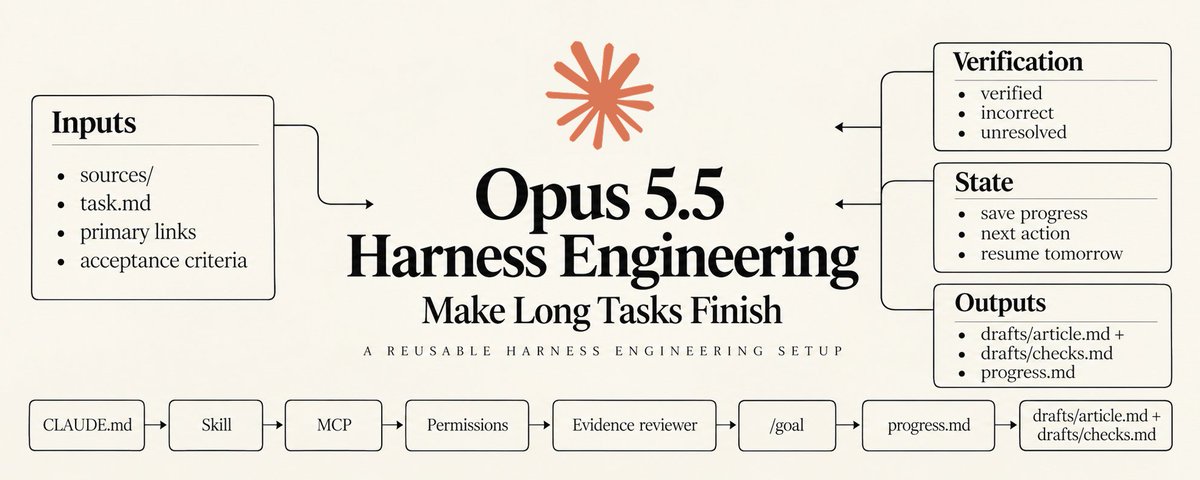
Watch it, then read the full Opus 5.5 harness engineering guide below

Óscar Martínez retweeted
This is really excellent stuff, and way better than it needs to be
Worth a watch

@mattpocockuk's skills repo has more stars than React, and the most installed skill is one line long.
I animated how his whole workflow works, from /grill-me to /retro
Óscar Martínez retweeted

if you're wondering how we ship thousands of PRs, check out this talk! and then watch youtube.com/watch?v=MN9dGgmL… for the extended Q&A with the one and only @mattpocockuk


here's how i shipped 2,500 PRs last month to production
this was originally supposed to be for Cursor Compile in London. i couldn't make it since i was livestreaming for Grok @Bot Galaxy so i'm making it available for free here on X! watch it on 2x speed, i talk slowly
Óscar Martínez retweeted

Excellent agentic coding interview.
Key points:
Build a “trust ladder”. The more you can constrain the agent’s output, the more you can trust it.
Instead of a mere “software factory”, try to create a “Michelin restaurant”. Create processes and tools that make beautiful code automatically.
Think about code reviews like sampling. You can’t afford to taste every dish, but you should spot check.
Ask “where am I the bottleneck? How can I get the agent to answer its own questions?”
Create inner loops and outer loops. Inner loops accomplish tasks. Outer loops coordinate inner loops and analyze the big picture.
Your skills should get smaller over time as agents improve.. Focus on workflows, not implementation details.
Connectors trigger new work. Connect your bots to Jira, GitHub issues, etc so they begin work automatically.
Make it easy for agents to verify their work. Create a CLI for your app and a skill that calls the CLI. Then agents can verify their work consistently and efficiently.
A good code base is easy to change.
