

A browser extension that captures full webpage screenshots, including content outside the viewport. https://nitter.cf/t.co/1WczkdWOQD
Joined June 2025
- Tweets75
- Following8
- Followers10
- Likes36





Have you thought of saving webpage as note beyond saving as pdf or image? Now we started to support this on Firefox and will roll out on Chrome and Edge later.
How it works, you can right click on any webpage and Save as Note. It will be saved and categorized by our system and you can work on multiple saved notes at the same time with batch operations.
#pagesaver


PageSaver retweeted

this recommendation actually works. before reading this, I have already adopted such strategies on our @pagesaver86 product, where we build free tools such as pdf to markdown etc and people may search them and come to us and notice we also provides extension to do similar things. that works.


We are getting more and more attention from users. Thank you for all the feedback. We will do better.
itechguides.com/how-to-conve…
itechguides.com/how-to-save-…


Thanks for recommending our extension our PHP users in China. PageSaver is definitely one of the extensions worth installing. php.cn/faq/3189926.html


We have fixed some performance related issues and resolution related issues on all different browsers and will release soon.
an insightful comparison

GoFullPage is a solid fit when the main need is capturing a page's visual appearance as an image or PDF, with unlimited free basic exports and paid Premium adding cropping, annotations, and page splitting. PageSaver targets broader content reuse with Chrome, Edge, and Firefox support, free screenshot editing, Reader Mode for clean article PDFs, and Markdown export. After capture, PixelPDF handles merge, split, crop, compress, sign, and page numbering entirely in-browser, including PDFs exported from GoFullPage. Pricing differs, with GoFullPage Premium at $12 per year and PageSaver offering free limited saves, a $4.99 PDF-only option, $1.99 per month, or $21.99 permanent without recurring payments. For a developer workflow, choose GoFullPage for simple visual captures and PageSaver when Firefox support, Markdown, clean reading PDFs, or searchable PDFs from the Mac app matter more. #pagesaver #gofullpage #webpageaspdf
pixelstech.net/article/17891…

This is what motivates us to build PageSaver to help people who need it. Thank you users! #pagesaver

We developed a standalone Mac app for saving webpage as PDF. This app is built to solve the cases where existing PageSaver extension cannot handle. Including:
1. Some long pages cannot be properly captured 2. The captured webpage is not searchable
More: pixelstech.net/application/p…
Do you want a dedicated app which can capture and save the webpage as pdf and the saved PDF is searchable and the layout is preserved? We are building one. #pagesaver
After a webpage is saved as PDF, you would sometimes need to use another tool to edit the generated PDF including OCR, compress etc. Now you can directly process the generated PDF right through PageSaver. #pagesaver
After using PageSaver to generate a PDF, you may want to do more about the PDF such as compress it so that it can be shared easily or watermark it so that others know you own it, we have created a PDF workflow for handling PDF online for free. Try it out. pixelstech.net/application/p…

this is informative
A new browser API, currently in Chrome origin trial, allows direct rendering of DOM elements into a canvas or GPU texture using the browser's native layout engine. This overcomes limitations of existing libraries like html2canvas and SVG foreignObject approaches, which suffer from fidelity issues, canvas tainting, and performance bottlenecks due to reimplementing rendering logic or complex workarounds. The new API offers perfect fidelity for same-origin content, avoids canvas tainting, and integrates with the browser's paint lifecycle, enabling dynamic updates and direct use as WebGL/WebGPU textures without intermediate conversions. While it doesn't replace server-side tools like Puppeteer or extension APIs for cross-origin content, it represents a significant advancement for in-browser DOM rendering. #javascript #webdesign
pixelstech.net/article/17828…

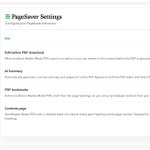
Now we support editing the generated PDF to remove unwanted content(impacting overall layout) and other styles to align with your own needs. You can go to setting to enable this. Now only Chrome and Firefox supported. Edge will come soon. Give a try. #pagesaver
Cannot believe that we have over 10K users on Microsoft Edge add-on store now. This is a BIG milestone. Thank you all for your kind support and love!!! #pagesaver
