

AI content creator | builder DMs always open
Joined July 2026
- Tweets83
- Following9
- Followers426
- Likes272


Pinned Tweet
THIS IS F*CKING GOLDMINE
10 GitHub repos with 542K+ combined stars to build your own solo motion design studio
one resource per step, from the first storyboard to the final MP4
(1/10) Excalidraw
turn the brief into a storyboard with a clear hook, scene order, and transitions
▸github.com/excalidraw/excali…
(2/10) Penpot
design the style frames, layout, colors, and reusable components
▸github.com/penpot/penpot
(3/10) Fontsource
bring in the fonts and set the type hierarchy for every scene
▸github.com/fontsource/fontso…
(4/10) Lucide
build a consistent set of icons for the visuals
▸github.com/lucide-icons/luci…
(5/10) SVGO
clean up the SVG assets while preserving the elements you need to animate
▸github.com/svg/svgo
(6/10) GSAP
choreograph the movement, easing, timing, and transitions
▸github.com/greensock/GSAP
(7/10) Three.js
build the 3D scenes, camera moves, lighting, and depth
▸github.com/mrdoob/three.js
(8/10) Audacity
edit the music and sound effects, then balance the mix
▸github.com/audacity/audacity
(9/10) Remotion
assemble the scenes and audio into one video
▸github.com/remotion-dev/remo…
(10/10) FFmpeg
encode the final delivery file and inspect its video and audio streams
▸github.com/FFmpeg/FFmpeg
the loop:
brief → storyboard → visual system → typography → assets → motion → 3D → sound → assembly → export
then create your own motion design studio, which will be run by your AI employee ↓


renproton retweeted

Anthropic engineer:
“Anthropic hired me at $250K–$850K because I build projects in Claude without writing code. I use /harness + Opus 5.5
In this 30-minute workshop, I show the workflow that takes a project from a blank chat to a working build.”
step 1 → set the rules once: “no preamble. use artifacts. you’re a react expert.” every response follows the same instructions
step 2 → give Claude the documentation and a plain-English explanation of the API. sometimes a human-written Medium article makes the concepts easier to understand than the reference docs alone
step 3 → put your request inside XML tags and tell Claude to ask questions first. answer five questions to lock down the scope before it creates a file
step 4 → start the loop: screenshot what’s broken, show Claude, let it fix the UI, then repeat. each pass gets closer to the result you want
step 5 → push the project to GitHub and share the repo link. each new iteration builds on working code, not a pile of chat history
That’s how the workflow goes from 0% to 100% without hand-writing the code
99% people restart the conversation every time. This approach makes every iteration count
Bookmark and watch it
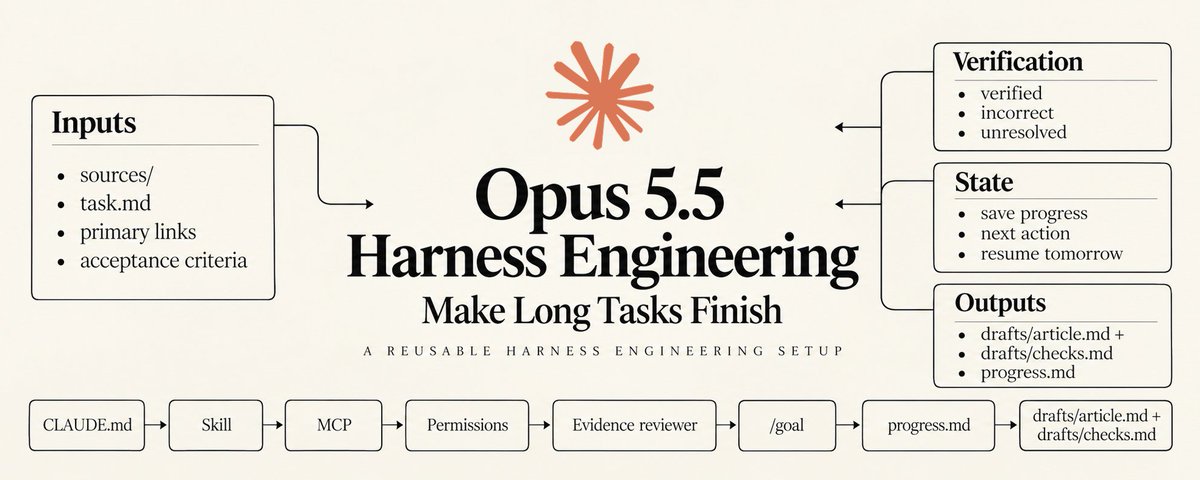
Then read the full Opus 5.5 harness engineering guide below ↓
renproton retweeted

this Apple's paper is f*cking goldmine...
Apple trained 849 AI models to find out what actually makes AI agents better at using tools
the result: as training data grows, giving agents more tools and more varied situations can matter more than adding extra tasks to the same tools
Apple built SynthAPI to test this across 458,752 synthetic tasks. it creates small apps with working APIs, database states and checks that verify whether a task was completed
here's how to use the idea when preparing training data for your own agent ↓
step 1 → pick a real workflow, like finding an order and processing a return
step 2 → build a test environment with tools that can read and change state: search_orders, get_order and create_return
step 3 → run the same goal against different starting data: multiple orders, similar products and different order statuses
step 4 → add new tool sets and apps as your dataset grows, so the agent learns to navigate unfamiliar interfaces
step 5 → check the final state in code. did it create the return for the right order without changing anything else?
step 6 → keep verified successful trajectories for training, then evaluate on separate tools and tasks the model hasn't seen
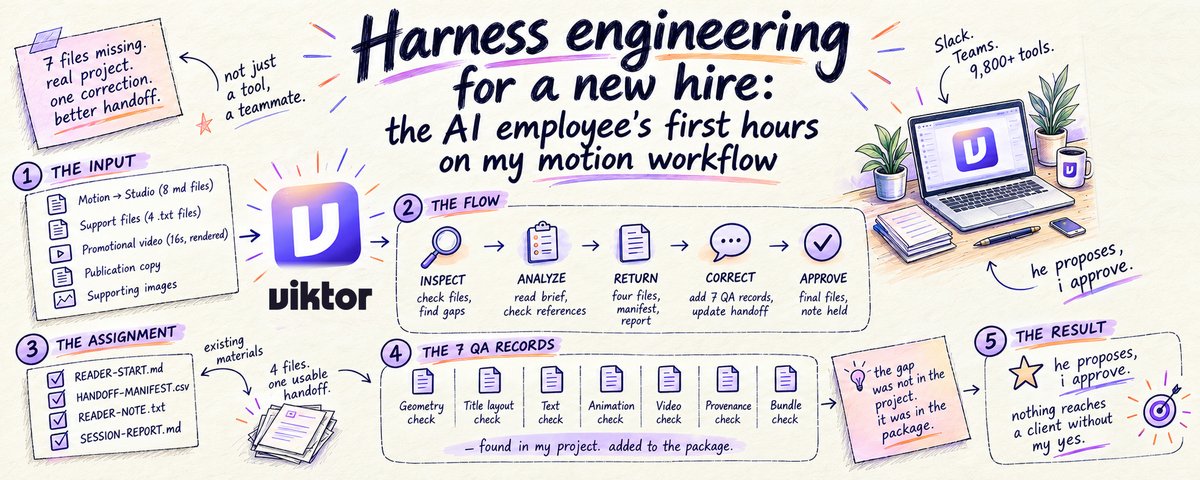
save this, then read my article below about an AI employee that saves me a ton of time every day ↓


renproton retweeted

Anthropic and OpenAI pay $600,000+ a year for people who truly understand harness engineering for agentic systems
This FREE course teaches you how to build an AI agent harness from scratch
This is agent-harness-course. Loop, tools, context, memory, subagents, safety, and evals. Pure Python
01 The full course
github.com/justxor/agent-har…
02 Week-by-week plan
github.com/justxor/agent-har…
03 The harness code
github.com/justxor/agent-har…
04 Examples
github.com/justxor/agent-har…
05 Safety
github.com/justxor/agent-har…
06 LearnHarness case study
github.com/justxor/agent-har…
07 Debugging guide
github.com/justxor/agent-har…
08 Project ideas
github.com/justxor/agent-har…
09 Glossary
github.com/justxor/agent-har…
10 The full path. Free.
github.com/justxor/agent-har…
You either open this now or keep collecting random playlists for another year.
Save this ↓


THIS IS F*CKING INSANE
ex-Anthropic motion designer shared a toolkit of ready-made assets for Opus 5.5, saying it could take over more of their work
it covers the full pipeline: 3D scenes → characters → VFX → sound → music
your next motion studio may be just 17 links away:
01 Poly Haven → HDRIs for studio lighting
polyhaven.com
02 ambientCG → realistic PBR materials
ambientcg.com
03 Poly Pizza → low-poly 3D props
poly.pizza
04 Quaternius → rigged characters
quaternius.com
05 Mixamo → motion-capture animations
mixamo.com
06 Spline Community → 3D scenes you can remix
community.spline.design
07 Kenney Particle Pack → particle sprites
kenney.nl/assets/particle-pa…
08 ActionVFX → fire, smoke, and explosions
actionvfx.com/products
09 Texturelabs → grain, grunge, and overlays
texturelabs.org
10 LottieFiles → ready-made vector animations
lottiefiles.com/free-animati…
11 Rive Marketplace → interactive animation assets
rive.app/marketplace
12 unDraw → editable SVG illustrations
undraw.co/illustrations
13 Lucide → consistent SVG icons
lucide.dev
14 Google Fonts → typography for your titles
fonts.google.com
15 Freesound → Foley and ambient audio
freesound.org
16 Sonniss GDC → sound-effects bundles
sonniss.com/gameaudiogdc
17 Mixkit → music for the final cut
mixkit.co/free-stock-music
Collect the assets, give Claude the files and a shot list, then have it write the scene and animation code.
Collect → stage → animate → mix → render.
Save this list before your next video. Then build something worth watching. ↓
renproton retweeted
HOLY F*CK, THIS IS F*CKING INSANE
my motion studio now runs on 7 open-source tools. i’ve stopped using After Effects.
Opus 5.5 handles the thinking + these tools take a project from the first frame to the final export:
01. Remotion: build videos with code
github.com/remotion-dev/remo…
02. Motion Canvas: animate your scenes
github.com/motion-canvas/mot…
03. Blender: create in 3D
github.com/blender/blender
04. Natron: composite your visuals
github.com/NatronGitHub/Natr…
05. ComfyUI: build generative workflows
github.com/Comfy-Org/ComfyUI
06. Kokoro: add a voice
github.com/hexgrad/kokoro
07. FFmpeg: finish and export
github.com/FFmpeg/FFmpeg
idea to scenes. scenes to effects. effects to final cut.
save this toolkit for your next video ↓
renproton retweeted
this is probably the best work from Anthropic on AI agents
Anthropic put the agent-building playbook on YouTube
45 minutes. a 402-line agent. tools, skills and subagents taken apart live
i paired the workshop with Anthropic’s new single-agent-loop kit and mapped a setup you can adapt:
→ one main agent keeps the goal, plan and working context
→ skills load the procedures needed for the current task
→ tools read sources, edit files, run checks and return results
→ subagents take bounded work that benefits from a separate context
→ architecture changes get measured on the same end-to-end tasks
my applied example goes from a product brief + competitor URLs to a local prototype, sourced research and launch drafts.
the atlas shows where each piece belongs, what goes in and what must come back.
also included: an implementation worksheet + editable build brief.
the official kit has templates and a 19-task offline smoke check. no API key for that check; live evals use tokens
save this, then read my article below about an AI employee that saves me a ton of time every day ↓
HOLY F*CK, THIS IS F*CKING INSANE
my motion studio now runs on 7 open-source tools. i’ve stopped using After Effects.
Opus 5.5 handles the thinking + these tools take a project from the first frame to the final export:
01. Remotion: build videos with code
github.com/remotion-dev/remo…
02. Motion Canvas: animate your scenes
github.com/motion-canvas/mot…
03. Blender: create in 3D
github.com/blender/blender
04. Natron: composite your visuals
github.com/NatronGitHub/Natr…
05. ComfyUI: build generative workflows
github.com/Comfy-Org/ComfyUI
06. Kokoro: add a voice
github.com/hexgrad/kokoro
07. FFmpeg: finish and export
github.com/FFmpeg/FFmpeg
idea to scenes. scenes to effects. effects to final cut.
save this toolkit for your next video ↓
renproton retweeted
switching AI agents shouldn't mean pasting your entire backstory again
Fulcra gives connected agents a shared context backend for your files, notes and agent work
→ a research agent leaves its findings
→ a build agent picks up the relevant context
→ you can change tools and keep the work you've already accumulated
you can inspect updates, trace what changed and revoke an agent's access
for a launch workflow, I'd keep the brief, research and decisions together, then let each authorized agent contribute back. the next agent gets a useful starting point, and you still have a record you can review
that handoff is what interests me here. better models are useful; having to rebuild the brief for every tool gets old
connect through Fulcra's MCP server or supported agent skills. the connections and permissions still need setting up
5 GB free to start ↓
🤝 Paid partnership
renproton retweeted
THIS IS F*CKING GOLDMINE
Opus 5.5 + Blender + Remotion = your own character animation studio that you can use to earn $$$
tiny worlds. expressive characters. cinematic camera moves.
character idea → editable 3D scene → animated film
steal the full stack ↓
01 give Claude a director’s brief
one character. one setting. one visual joke
specify the shots, expressions, camera moves and final pose before building the scene
02 connect Claude Code to Blender
MCP for Blender lets Claude inspect the scene and write Blender Python
with Blender + uv installed:
- `claude mcp add blender uvx mcp-for-blender`
- `uvx mcp-for-blender install-addon`
enable the addon in Blender and start its server
▸MCP for Blender
github.com/ahujasid/mcp-for-…
03 build + animate
Blender handles the scene, rigging, keyframes and character animation
block the keyboard and character first. then add the walk, eye movements, glass and close-ups
▸Blender animation tools
blender.org/features/animati…
04 light the world
Poly Haven supplies CC0 HDRIs, textures and models
give the glass something to reflect. keep the character readable against the background
▸Poly Haven
polyhaven.com/license
05 finish the film
Remotion assembles the rendered footage, titles and audio into a reusable composition
add the official agent guidance inside your video project:
`npx skills add remotion-dev/skills`
▸Remotion Skills
remotion.dev/docs/ai/skills
06 export + check
FFmpeg for the delivery file
watch the actual MP4, check the sound and keep the editable scene + project
▸FFmpeg
ffmpeg.org/ffmpeg.html
the loop:
brief → scene → character → materials → light → camera → preview → render → edit → export
the clip is the visual reference. the animated console breaks down a workflow for building this kind of scene
save this, then read the full guide for Opus 5.5 Motion Engineering ↓
THIS IS F*CKING GOLDMINE
Opus 5.5 + Blender + Remotion = your own character animation studio that you can use to earn $$$
tiny worlds. expressive characters. cinematic camera moves.
character idea → editable 3D scene → animated film
steal the full stack ↓
01 give Claude a director’s brief
one character. one setting. one visual joke
specify the shots, expressions, camera moves and final pose before building the scene
02 connect Claude Code to Blender
MCP for Blender lets Claude inspect the scene and write Blender Python
with Blender + uv installed:
- `claude mcp add blender uvx mcp-for-blender`
- `uvx mcp-for-blender install-addon`
enable the addon in Blender and start its server
▸MCP for Blender
github.com/ahujasid/mcp-for-…
03 build + animate
Blender handles the scene, rigging, keyframes and character animation
block the keyboard and character first. then add the walk, eye movements, glass and close-ups
▸Blender animation tools
blender.org/features/animati…
04 light the world
Poly Haven supplies CC0 HDRIs, textures and models
give the glass something to reflect. keep the character readable against the background
▸Poly Haven
polyhaven.com/license
05 finish the film
Remotion assembles the rendered footage, titles and audio into a reusable composition
add the official agent guidance inside your video project:
`npx skills add remotion-dev/skills`
▸Remotion Skills
remotion.dev/docs/ai/skills
06 export + check
FFmpeg for the delivery file
watch the actual MP4, check the sound and keep the editable scene + project
▸FFmpeg
ffmpeg.org/ffmpeg.html
the loop:
brief → scene → character → materials → light → camera → preview → render → edit → export
the clip is the visual reference. the animated console breaks down a workflow for building this kind of scene
save this, then read the full guide for Opus 5.5 Motion Engineering ↓
renproton retweeted
Anthropic engineer:
“95% of our engineers are using self-improving harnesses + Opus 5.5. Now everyone is building agentic systems around them.”
In 1–2 months, we’ll all be building harnesses to orchestrate self-improving agents. No more raw prompting.
In a 35-minute lecture, Anthropic engineer shows how to build a self-improving agent harness from scratch with Opus 5.5.
Worth more than a $1500 agentic course.
Watch it
Then read the full Opus 5.5 harness engineering guide below ↓
THIS IS F*CKING INSANE
Opus 5.5 just replaced Pixar
It's f*cking insane…
Drop the PDF below into Opus 5.5, thank me later
Then read the full guide on motion design in the article below ↓
renproton retweeted
Anthropic just released new agent guide: make every subagent earn its own context
steal this 18-role blueprint for turning Opus 5.5 into an entire engineering team
PLAN → TOOLS → RESULTS → REVISE
one main loop keeps the goal, plan and evidence
→ procedures become skills
→ API actions become tools
→ reference material loads when needed
keep separate workers for fresh parallel research, independent verification or a measured context/tool boundary
merge roles that repeatedly share data. compare each fold on the same end-to-end tasks and inspect what breaks
official migration kit:
> git clone github.com/anthropics/single…
copy its skill/ folder to .claude/skills/single-agent-loop/
then in Claude Code:
Run the single-agent-loop skill
18 roles in the map. evidence decides which ones need their own loop
save this, then read the full guide for Opus 5.5 Harness Engineering ↓
renproton retweeted
this is pure f*cking treasure
I used this prompt to reduce my token usage by 20-30%:


Introducing Fompt Feed to answer the burning question, what do I do with these agents?
Steal the billionaire’s Fo prompts, give your self-help books an execute button or copy your impressive(?) friends.
- for the curious, @vkhosla’s life hacks.
- for entrepreneurs and small businesses, @tferriss's delegation playbook, @JamesClear's habits.
- for job seekers @AliAbdaal's strategies.
- for parents, Emily Oyster and @GoodInside's hacks
- your friends's funny fompts,
- your mom's "i can't believe you did this" fompt.
Meet the Fo feed.
You’ve spent enough time watching other people have their shit together.
Your turn to become a frompter ↓ (the top creator earns $10k this week)
THIS IS F*CKING GOLDMINE
motion studio in 20 repos.
20 open-source skills for Opus 5.5.
Animation. Physics. 3D. Sound. Delivery.
send this to your Opus 5.5, thank me later ↓
01 \ Remotion → React video engine github.com/remotion-dev/remo…
02 \ HyperFrames → HTML-to-video renderer github.com/heygen-com/hyperf…
03 \ Anime.js → Timeline choreography github.com/juliangarnier/ani…
04 \ React Spring → Spring animation github.com/pmndrs/react-spri…
05 \ PixiJS → GPU-powered 2D graphics github.com/pixijs/pixijs
06 \ p5.js → Generative visuals github.com/processing/p5.js
07 \ Paper.js → Vector paths
github.com/paperjs/paper.js
08 \ Matter.js → 2D physics
github.com/liabru/matter-js
09 \ Three.js → 3D scenes
github.com/mrdoob/three.js
10 \ Rapier → 3D collisions
github.com/dimforge/rapier
11 \ OGL → Custom shaders
github.com/oframe/ogl
12 \ tsParticles → Particle effects github.com/tsparticles/tspar…
13 \ glTF Transform → 3D asset optimization github.com/donmccurdy/glTF-T…
14 \ GL Transitions → Shader transitions
github.com/gl-transitions/gl…
15 \ OBS Studio → Screen capture github.com/obsproject/obs-st…
16 \ Chatterbox → Voiceovers
github.com/resemble-ai/chatt…
17 \ Tone.js → Synths and sound effects github.com/Tonejs/Tone.js
18 \ faster-whisper → Caption transcription github.com/SYSTRAN/faster-wh…
19 \ OpenCut → Timeline editing
github.com/OpenCut-app/OpenC…
20 \ FFmpeg → Encoding and delivery github.com/FFmpeg/FFmpeg
Brief → prototype → animate → render → ship.
Bookmark this, then read the article below ↓
renproton retweeted
Stop saving random AI playlists. I’ve put together the best things I’ve come across this year for you
This is the actual free path that gets you from zero to being able to build and interview for real AI roles
01 Mathematics for Machine Learning
mml-book.github.io/
02 Probabilistic Machine Learning (Murphy)
probml.github.io/pml-book/
03 Deep Learning Book (Goodfellow)
deeplearningbook.org/
04 Stanford CS229 Machine Learning
youtube.com/playlist?list=PL…
05 MIT 6.S191 Introduction to Deep Learning
youtube.com/playlist?list=PL…
06 Stanford CS231n Computer Vision
cs231n.stanford.edu/
07 Stanford CS224n Natural Language Processing
web.stanford.edu/class/cs224…
08 Stanford CS336 Language Modeling from Scratch
cs336.stanford.edu/
09 Berkeley CS285 Deep Reinforcement Learning
rail.eecs.berkeley.edu/deepr…
10 Understanding Deep Learning (Prince)
udlbook.github.io/udlbook/
11 OpenAI Spinning Up (Deep RL)
spinningup.openai.com/
12 Stanford CS25 Transformers United
web.stanford.edu/class/cs25/
13 Full Stack Deep Learning
fullstackdeeplearning.com/
14 Dive into Deep Learning
d2l.ai/
15 The full path. Free.
Most people will keep collecting. A few will actually walk this
Save this ⭣
renproton retweeted
your browser tabs could be an AI team's workspace
@strawberry puts agents inside the browser, where your research, tools and team context already live
→ delegate web research and repetitive tasks
→ run sub-agents in parallel, each in its own isolated tab
→ share skills and agents across your team
→ capture meeting notes and build shared context
the part that matters: a useful workflow doesn't have to stay with the person who built it. your team can reuse it
think competitor research: split the websites across agents, compare what they find, then turn the process into a shared skill
that's the pitch: browser automation that becomes a repeatable team workflow
FREE to try on Mac and Windows ↓
🤝 Paid partnership

renproton retweeted
Holy sh*t, Opus 5.5 just f*cking killed the jobs of all motion designers
It's f*cking insane…
Drop the PDF below into Opus 5.5, thank me later
Then read the full guide on Motion Engineering with Opus 5.5 in the article below ↓