

Robomotion is a low-code Agentic RPA platform for building software robots and AI agents that operate real software, including browsers, desktop applications, a
Delaware, United States
Joined April 2019
- Tweets272
- Following78
- Followers362
- Likes61
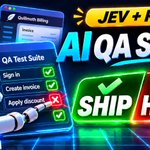





We built an Automated QA Test Suite app with Jev.
In just 3 prompts.
The result is a fully functional QA app that:
✅ Imports test cases from spreadsheets
✅ Executes tests using Jev + RPA, with browser actions described in plain English
✅ Validates expected results and captures failures
✅ Detects flaky tests instead of hiding them behind retries
✅ Generates bug reports and JUnit reports for CI/CD pipelines
✅ Decides whether a release should SHIP or HOLD
We tested it against three software releases.
One passed. Another introduced a subtle VAT calculation bug that the robot caught. After fixing the bug, the final release got the green light.
The interesting part?
We didn't write a traditional test automation framework. We used AI to build the QA app, while Jev and RPA handled test execution.
This is what happens when AI agents, RPA, and AI-generated business apps work together.
Watch the full video here 👇
youtube.com/watch?v=Zoq7-WxN…
#Robomotion #Jev #RPA #TestAutomation #AI #SoftwareTesting

What if creating a business form were as simple as describing what you need?
This is Chapter 2 of our Build with AI series, and this time we're building Robomotion Forms.
We gave Robomotion AI Assistant a simple prompt.
Create a customer workshop registration form.
Ask for a full name, work email, company, preferred session (Morning or Afternoon), and dietary requirements.
The AI built the form, created the automation flow behind it, and opened it in the preview.
No code. No drag and drop. Just prompting.
But here's the interesting part.
The AI didn't just build the form. It tested it too.
It filled in the fields, selected a session, submitted a test registration, and verified that the data was received correctly.
Then we started making changes using natural language.
Make the company field optional. Add a phone number.
Change the form to green. Rename the submit button to "Save My Seat."
Give me a link so I can share it with customers.
Later, we reopened the project and asked the AI to replace the phone number with a 1-to-5-star rating.
The AI made the changes and tested the form again.
At the end, we opened the published form through its own URL and submitted a real registration.
Every Robomotion Form has a Robomotion Flow behind it.
That means a form submission can do much more than store data.
It can trigger automations, call APIs, update databases, interact with enterprise applications, send notifications, or start an approval process.
For enterprises, there's another important advantage.
You can run the entire Robomotion platform on-premises, use your own AI API keys, or connect to locally hosted AI models.
No separate frontend to develop. No backend to maintain. No deployment pipeline to manage.
Just describe what you need, and get a working form with automation behind it.
We're moving toward a world where anyone in an organization can create the tools they need, without waiting for a development team.
Chapter 2: Build a Form with AI.
Full demo link in the comments.
#Robomotion #AI #RPA #Automation #NoCode #BuildWithAI
What if building a business app were as simple as describing what you need?
Anyone in your organization could build an app to solve their own everyday problems.
We gave Robomotion AI Assistant a prompt to build an equipment request app.
Employees request laptops, monitors, or headsets. Managers approve or reject requests. The team tracks everything until delivery.
The AI built the UI, created the backend automation flow, and made the app available through its own URL.
No code to write. Nothing to deploy. Just prompting.
But here's the interesting part.
Every Robomotion App has a Robomotion Flow behind it.
So the app isn't limited to displaying and storing data. It can connect to databases, call APIs, work with enterprise systems, automate browsers, automate ui and even interact with legacy desktop applications.
And once the app was built, the AI opened it and started testing.
It clicked buttons, submitted requests, checked the results, found issues, and fixed them.
The same RPA technology that runs business processes can also test the apps it builds.
There's also something important for enterprises.
You can run the entire Robomotion platform on-premises, use your own AI API keys, or connect to locally hosted AI models.
Robomotion manages the application runtime and infrastructure, so you don't have to maintain a separate frontend, backend, or deployment pipeline.
I think we're moving toward a different way of building internal business software.
Robomotion Apps have a UI for humans and MCP support for AI agents.
Every action available in the UI is also accessible through MCP, so you can connect your app to any MCP-compatible AI agent.
You can find the full demo link in the comments.
#Robomotion #AI #RPA #Automation #MCP #Agents
Robomotion now works with Microsoft 365 Copilot.
Ask in plain words, in the chat you already use.
Tell Copilot what you need, and Robomotion builds it on your own computer and runs it on your robots. The build shows up as a card beside the chat: what it is doing, the questions it has for you, and the result.
We filmed 16 videos, for real, from the first admin setup to working builds:
1️⃣. An app from one prompt. A loaner laptop tracker, running in Copilot, used right there, then published for the team.
2️⃣. A form by talking. A team lunch RSVP, changed live on the canvas, with a link to share.
3️⃣. An automation with a login. It signs in to a bank every morning and saves the latest statement. The password stays in the Robomotion vault and never goes into the chat.
4️⃣. Chat assistants. A conversational one for new starters, and a guided one that looks up an order and starts a return.
5️⃣. Fixing what went wrong. Say what you saw, the way you would tell a colleague, and the builder finds the cause and fixes it.
It also works in Copilot in Teams and Outlook, on your organization's own AI model if you want, and IT decides who can build and where.
Watch the series, Robomotion in Microsoft 365 Copilot:
youtube.com/playlist?list=PL…
#Robomotion #Microsoft365 #Copilot #Automation #RPA #NoCode

We've shipped so much this fall that we decided to put it all into one 35-minute walkthrough.
In our latest video, What's New in Robomotion, we walk through all the major updates, demonstrated on the real product:
💬 Chat Assistant: people talk to your automations, guided or conversational
📝 Forms: anyone can send work to a robot, files included
📚 Knowledge Base: answers from your own documents
🤖 Build with AI: a plain request in, a working flow or app out
🔍 Visual Diff: see exactly what changed between two versions
🧠 AI Agent + RPA: agents that use your RPA flows as their tools
👥 Agent Teams: agents and people working together in channels
🧩 Robomotion Apps: a real web app in front of any flow
📄 Document Understanding: invoices and receipts read on your own machine, no API keys
🖥️ UI Automation: web, Windows, Java and remote desktop, explored by Claude Code
Already running another RPA product in your business? We migrate your automations to Robomotion for free.
Let's talk: [email protected]
#Robomotion #RPA #Automation #AIAgents #LowCode #ClaudeCode
Introducing 𝐀𝐠𝐞𝐧𝐭 𝐓𝐞𝐚𝐦𝐬 in Robomotion.
Your AI team, working alongside your people.
Bring AI agents in from the Robomotion Store, add them to a channel with your team, and give the Team Lead a goal.
The Team Lead delegates tasks to the right specialists. Agents collaborate, share progress, and hand off work to one another, all in the open. Whenever a decision requires your approval, it comes back to you as an actionable card.
We recorded a real demonstration using a fictional startup called Kilnly and gave its AI team five assignments:
1. Write and publish a blog post. Research this week's trends, write the article, generate illustrations, and publish it with the owner's approval.
2. Improve visibility in AI search. Audit the website, implement schema markup and llms.txt, then re-check the live site. The score improved from 40 to 59.
3. Prepare a product launch. Create a launch post and a square video. During the website review, an agent discovered a broken trial button. The Team Lead flagged the issue and requested approval before proceeding.
4. Build an AI SDR. Research nine relevant studios, score each prospect out of 100, and draft personalized outreach emails. The agent refused to add an unqualified tenth prospect just to meet the target. Nothing gets sent without approval.
5. Build an application. Create tickets for each step, write the specification, design the interface, build a working Robomotion App, and conduct a security review with findings referenced by file and line number.
𝐀𝐠𝐞𝐧𝐭𝐬 𝐝𝐨 𝐭𝐡𝐞 𝐰𝐨𝐫𝐤. 𝐘𝐨𝐮 𝐦𝐚𝐤𝐞 𝐭𝐡𝐞 𝐝𝐞𝐜𝐢𝐬𝐢𝐨𝐧𝐬.
Every agent runs on its own Robomotion robot. Nothing gets published, sent, or scheduled without your approval.
Watch the full six-episode series. Links are in the first comment.
#Robomotion #AIAgents #AgentTeams #Automation #AI
Watch the series, Robomotion Agent Teams (six episodes, filmed for real):
youtube.com/playlist?list=PL…
Hire your AI team: robomotion.io

18
𝐑𝐨𝐛𝐨𝐦𝐨𝐭𝐢𝐨𝐧 𝐀𝐜𝐚𝐝𝐞𝐦𝐲 is live. 🎓
Most automation courses stop at "watch the video". We wanted ours to end with something you actually built, and something you can prove.
So the Academy follows four steps:
1️⃣ Learn it. Short video lessons, clear articles, and quick quizzes in six languages: English, Türkçe, Deutsch, Bahasa Indonesia, Italiano, and Hindi.
2️⃣ Build it. Automate a real process on a live training app: a bank with two-factor authentication, a tax portal, a CRM, or a shipping site. These aren’t toy exercises. They behave like the systems you automate at work.
3️⃣ Prove it. Upload your flow’s output and get it graded in seconds, with clear feedback on every check. Then take a timed exam.
4️⃣ Share it. Earn a certificate with its own public verification page and add it to your LinkedIn profile in one click.
There are four learning paths, taking you from your first flow to web and API automation, document understanding, and building AI apps with humans in the loop.
Learning is free. Your first flow is only one lesson away.
👉 academy.robomotion.io
#RPA #Automation #AI #Robomotion #LearningAndDevelopment #NoCode
2
97
Switch to Robomotion and we’ll migrate your existing RPA automations for FREE.
Keep your automations running.
And that’s not all.
Here’s what Robomotion can offer this Fall 2026:
1️⃣ Chat Assistant: let people talk directly to your automations
2️⃣ Forms: collect data and trigger flows from a simple link
3️⃣ Knowledge Base: turn your documents into knowledge for agents
4️⃣ Build with AI: build flows and apps with our Assistant, Claude Code, or Codex
5️⃣ Visual Diff: see exactly what an AI agent changed before you run it
6️⃣ Agent Teams: let multiple AI agents collaborate with each other and your team
7️⃣ AI Agent + RPA: agents think, RPA flows do the work
8️⃣ Robomotion Apps: UI for people, MCP for agents
9️⃣ Document Understanding: process documents offline on your own CPU or GPU
The direction is simple:
People use chat, forms, and apps.
AI agents use MCP.
Systems use APIs, schedules, triggers, and queues.
Underneath it all, Robomotion does the work.
Talk to us 👉 [email protected]
Robomotion can help you 𝐚𝐮𝐭𝐨𝐦𝐚𝐭𝐞 𝐲𝐨𝐮𝐫 𝐛𝐮𝐬𝐢𝐧𝐞𝐬𝐬 in several different ways today:
1️⃣ You can create 𝐰𝐨𝐫𝐤𝐟𝐥𝐨𝐰𝐬 that automate your business processes and run in the background.
2️⃣ You can create 𝐀𝐈 𝐚𝐠𝐞𝐧𝐭𝐬 that you can communicate with and that can do the work for you.
3️⃣ You can now create 𝐚𝐠𝐞𝐧𝐭𝐢𝐜 𝐚𝐩𝐩𝐬 for both humans and agents. Humans can use the UI, while Claude Code, Codex, or Copilot can connect through MCP.
4️⃣ And finally with our latest 𝐃𝐨𝐜𝐮𝐦𝐞𝐧𝐭 𝐔𝐧𝐝𝐞𝐫𝐬𝐭𝐚𝐧𝐝𝐢𝐧𝐠 capabilities, Robomotion is even more powerful. You can process almost any type of document and connect the extracted data directly to your automation workflows and your agents.
Try Robomotion for free:
robomotion.io
Thanks to Kris for creating this video.
Robomotion 𝗗𝗼𝗰𝘂𝗺𝗲𝗻𝘁 𝗨𝗻𝗱𝗲𝗿𝘀𝘁𝗮𝗻𝗱𝗶𝗻𝗴 from zero to production 👇
We just published a complete Robomotion Document Understanding course:
From PDFs and photos → structured data → validation → human review → automation → measurement → training.
1/ Turn Any Document into Data
youtube.com/watch?v=PKr1xfSH…
2/ Machines, GPUs and Models
youtube.com/watch?v=-cv8JqaW…
3/ Read Your First Invoice in 5 Minutes
youtube.com/watch?v=7RefyrRR…
4/ Let AI Draft the Schema
youtube.com/watch?v=AtzVKDlo…
5/ Designing a Great Schema
youtube.com/watch?v=zXfzq9ae…
6/ Business Rules That Catch Mistakes
youtube.com/watch?v=AFxqeFPV…
7/ Process Documents in Bulk
youtube.com/watch?v=4leThXVc…
8/ Human in the Loop: Validation Station
youtube.com/watch?v=scJcRfAD…
9/ Drafts, Publishing and Versions
youtube.com/watch?v=NcjnVZJi…
10/ Use Document Understanding in a Flow
youtube.com/watch?v=ipgDmnqa…
11/ Measure Accuracy and Tune Confidence
youtube.com/watch?v=0Wi1fu1F…
12/ Monitor Production
youtube.com/watch?v=lmbHAs77…
13/ Train a Model on Your Own Documents
youtube.com/watch?v=GsWPp7cq…
14/ Team Setup: Shared Machines, Reviewers and Data Policy
youtube.com/watch?v=nBox-0IG…
Full course:
youtube.com/playlist?list=PL…
It covers the full Document Understanding lifecycle, not just OCR, and processing can run on your own machines.
#Robomotion #DocumentUnderstanding #RPA #IDP #Automation

Robomotion can now build 𝐀𝐠𝐞𝐧𝐭𝐢𝐜 𝐀𝐩𝐩𝐬 designed for both humans and agents.
Stageline is a CRM app built for outreach campaigns.
We have also started adding ready-to-hire agents to the Agent Hub.
LinkedIn and email outreach agents are coming soon.
You will set your goals and templates, and the agents will handle the outreach pipeline while keeping your CRM up to date over MCP.
Stageline is free.
And not only can you use it for free, you can also clone it, edit it, customize it, and make it your own.
You can develop and extend it using Claude Code, Codex, or the in-app Robomotion AI Assistant.
Check it out:
robomotion.io/agents/stageli…

You don't need Claude Code or Codex to build a Robomotion App. The Designer can build it itself.
Describe the app in plain English, and its own AI Assistant builds every part:
• the screens people click
• the flow behind them that answers every button
• the robot that runs it
• and it presses every button itself before handing it back
And it runs on your key.
Designer Settings → AI API Keys takes an OpenAI, Anthropic, Gemini or OpenRouter key.
Keys stay in your browser and are never sent to our servers. Then pick any model that provider serves, by name.
We used Z.AI GLM-5.3 Flash through OpenRouter. The whole app: about six minutes, about fifteen cents.
A few things every app comes with.
Build with AI and the flow canvas are two views of one conversation. One is for the person who wants the app, the other for the person who wants every step.
Every screen is a subflow of the flow, and one control shows you which button sends which action, and which step answers it.
Point at any part of the app and say what to change, in a sentence.
Then a version, Publish, and an agent in Custom App mode. The app is live on its own robot, at an address with no /preview/ in it.
In the video we start with one paragraph and end with a two screen expense tracker in production.
No terminal. No CLI. No flow drawn by hand.
Prompt → App → Flow → Robot → Publish → Agent → Live
Bring your own key. Build with AI.
▶️ youtube.com/watch?v=jtoaOSHx…
#Robomotion #AIAgents #Automation #BYOK #OpenRouter #AgenticAutomation

We built a real browser automation using Jev, TypeSafe’s System One decision model, together with Robomotion’s new Browser Act node.
Jev does not generate text. We give it a question and a fixed set of possible answers. It chooses one and returns a probability for every option.
So the architecture becomes simple:
Jev decides.
Robomotion acts.
Code verifies.
If confidence falls below 0.55, the robot does nothing and sends the order to a human.
For our test:
6 orders
55 AI decisions
$0.0086 total Jev cost
0.49s for the same six decisions in our benchmark
And the browser instructions are just six steps written in plain English. No selectors. No button names. No page-specific rules.
Not every task needs a large language model generating tokens. Sometimes you just need a very fast, very cheap model to make a decision, then let deterministic automation do the work.
AI picks. Robot acts.
▶️ youtube.com/watch?v=L21FH2jl…
#Robomotion #Jev #TypeSafe #BrowserAutomation #RPA #AIAgents #Automation

Most RAG pipelines search once, paste the results into the prompt, and hope.
In this example, we give the DeepSeek Harness the search itself.
One question can become several searches, phrased by the agent, across a LanceDB knowledge base.
On our test corpus, a single raw search found 3 of 6 required facts. The agent’s own searches found all 6, with the source document attached to every answer.
In the video, we build the whole thing in Robomotion and expose it through an HTTP endpoint.
RPA + DeepSeek Harness + LanceDB, in action:
youtube.com/watch?v=0T7NZ2mW…
#RAG #DeepSeek #AIAgents #Robomotion #RPA

Looking for an RPA alternative?
We built Robomotion differently from the runtime up.
Git-native flows. Concurrency built into the flow. Linux, Windows and macOS. AI agents and deterministic RPA in the same flow.
And if you already have automations, we’ll migrate them to Robomotion for free.
Start with one process. Run both side by side. Compare the results yourself.
Swipe through for the differences →
#Robomotion #RPA #Agentic #Automation
Nobody wrote this RPA automation. We just prompted to Claude Code.
A carrier portal, 250 shipments, ten pages deep.
Somebody opens it every morning to find the stuck ones.
We cloned the project like any git repo and described the job to Claude Code in three prompts.
It found the selectors itself, used the login credentials from Vault, and pushed each stage as a commit. A robot ran every one.
Every change is a commit you can read in the Visual Diff before you trust it.
Robomotion In Action:
youtube.com/watch?v=kHGmWFyG…
#RPA #ClaudeCode #AIAgents #Automation #Robomotion

1
75
RPA Challenge is too easy. 😄
So we built something closer to real work.
9 working training applications for RPA developers, covering banking, ERP, CRM, tax portals, HR, logistics, healthcare, and more.
Practice multi-step automations, logins, 2FA, pagination, exceptions, reconciliation, and cross-system workflows.
All data is synthetic. All apps are built for training.
Think your RPA skills are ready? Try them here 👇

1
58
Every RPA robot forgets. This one writes down what it works out.
We handed an invoice agent a German supplier it had never seen before. It worked out the layout from scratch: which of the two dates was the invoice date, which of the two amounts was the grand total, and that decimals were written with a comma.
Then it wrote the whole procedure down as a skill, in its own words, including the traps it found.
The next invoice from that supplier? No figuring it out again. It ran on what it had learned.
Best part: the skill is readable. You can review it, promote it, tag it as v1, and pin a second robot to Replay.
One robot learns, the fleet runs what you reviewed.
Robomotion In Action, built and run for real, start to finish:
youtube.com/watch?v=YankuBeS…
See how RPA and AI Agents work together in the same automation flow.
#RPA #AIAgents #Automation #DeepSeek #InvoiceProcessing #DeepSeekHarness
