

Powertools for it-pros - Manage your remote servers using RDP, VNC, SSH, Web, S/FTP and more. Royal TS is available for Windows, macOS, iOS and Android.
Austria
Joined August 2012
- Tweets2.3K
- Following190
- Followers1.5K
- Likes514




11 days to go 👀
#automation #devops #itadmin #remotemanagement #rdp #remotedesktop #ssh #productivity #techthreads #vnc

A complete overview of the Royal TS V26 Beta ✨
🔗 Download here: royalapps.com/ts/win/feature…
🔗 Royal Terminal: github.com/royalapplications…
💬 We’d also love to hear your feedback on the new version and other topics! 👀
🔗 royalapps.com/go/forum
#automation #devops #itadmin #rdp #ssh


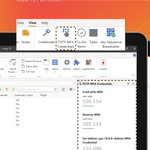
Did you know you can view your TOTP MFA Credentials with just one click? 👀
⚙️ For Windows users, go to View → TOTP MFA Credentials
⚙️ For macOS users, you can add it with View → Customize Toolbar…
#devops #itadmin #remotemanagement #rdp #remotedesktop #ssh #techthreads


Get the most out of your folder dashboard: Search, filter and find with smart overviews in Royal TS 🔎
#automation #devops #itadmin #remotemanagement #rdp #remotedesktop #ssh #productivity #techtools #techthreads


We have revised the Licensing and Versioning article to reflect changes to the model originally announced on April 28, 2026: 🔗 royalapps.com/go/blog-licens…
Read our latest licensing update, that explains the background in more detail: 🔗 royalapps.com/blog/an-update…

Here’s how to set up a Command Task in under 5 Minutes ⏳⚙️
#security #password #devops #itadmin #remotemanagement #rdp #remotedesktop #ssh


⏰ Here’s a little timesaver: Set Royal TS/X to open your documents from the previous session when launching the application. 💡 While this is enabled by default on macOS, Windows allows you to set a specific list of documents!
#automation #devops #techtools #remotemanagement


🔐 While sharing a document offers many benefits, how can you ensure it remains secure? Read more about shared and Lockdown Documents here: 🔗 royalapps.com/go/kb-all-team…🔗 royalapps.com/go/blog-ts-doc…
#security #password #devops #itadmin #remotemanagement #rdp #remotedesktop #ssh


Tired of searching for the right option? 🔎 Customize the "Add" Menu in Royal TS: Simply go to Options → User Interface → Customize Add Menu, where you can select the object types you use most frequently for quick and easy access! 💡
#itops #remotemanagement #rdp #software

Royal TS/X is known for being highly customizable, but these settings are definitely worth exploring 👀
#itops #remotemanagement #rdp #software #productivity #ssh #devops #itadmin #remotedesktop


138
🔎 No matching host key type found? Don’t worry! Here’s how to adjust your SSH configuration in Royal TSX when when a server update isn't feasible 💡
#itops #remotemanagement #technology #software #productivity #rdp #ssh #sshconfig


💡 An update to our licensing model for Royal TS/X, Royal Server, and the upcoming Royal Connect products 🔗 Read all details in our Blogpost: royalapps.com/blog/an-update… #devops #itadmin
#remotemanagement #RDP #msrdp #remotedesktop #azure #bastion #SSH #terminal #VNC


💡 Did you know that we've implemented a button that allows you to apply inheritance for Credentials, Tasks and Gateways on folder objects? 👀 Simply click on “Apply Inheritance” and save time!
#devops #itadmin #rpd #credentials #remotedesktop #ssh


How to set up AutoFill for Web Pages using TOTP MFA Code Generator 💡 👀 Read full instructions here: royalapps.com/go/kb-all-web-…
#devops #itadmin #rpd #mfa #totpmfa #codegenerator #remotedesktop #ssh #autofill


When was the last time you checked your password? 👀 Good password security is crucial and will help prevent the loss of company data. So here are 3 tips to upgrade your security and credentials! 💡
#security #password #devops #itadmin #remotemanagement #rpd #remotedesktop #ssh


The Fuzzy Search feature lets you find connections, even with typos or partial names, so you work faster with fewer interruptions! 💡
#itops #remotemanagement #software #rdp #itadmin #tips #royalts #fuzzysearch


