

A nerd marketing engineer
Joined October 2026
- Tweets237
- Following24
- Followers101
- Likes382
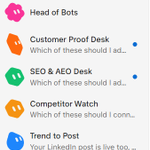


Here's my own agentic marketing team on @bot :
- Head of Bots runs the team. It knows what every agent does, follows up on the ones waiting on me, and sends work to the right bot.
- Trend to Post finds what practitioners are actually talking about on X, Reddit, LinkedIn and YouTube, then drafts posts in my voice for me to approve.
- Head of Content writes my X and LinkedIn posts in my own style.
- Outbound Prospecting finds people who match our ICP and drafts the first message to each one.
- SEO & AEO Desk turns keywords into content ideas and writer-ready briefs for search and AI answers.
- Competitor Watch tracks competitor pricing, product and hiring pages and tells me only when something really changes.
- Customer Proof Desk turns call notes into case studies and testimonials, quotes kept verbatim.
- last30days researches what people said about any topic in the last 30 days.
8 bots, each with one clear job, all working while I sleep.
I don't manage tasks anymore, I manage the bots doing them.
Still working on building more bots.


Here's how I've built an agentic marketing team on @bot within my marketing team at @Dune:
- Alsie #2 is my right hand. It takes real work off my plate and pulls the other agents together when something gets stuck.
- Team Manager is my management partner. It helps me keep track of the human team's work and spot where I should step in.
- PR & Comms tracks press coverage and helps me prepare pitches, releases and data tips for journalists.
- Events Manager runs our events, from guest lists and invites to venues, follow-ups and invoices.
- SDR handles outreach end to end, from finding the right people to drafting the first message.
- Marketing Ops keeps our campaigns, tracking links and metrics in order.
- SEO & AEO works on our visibility in search and in AI answers like ChatGPT, Perplexity and Google AI Overviews.
- Competitive Intel watches the market and our competitors so we're never caught off guard.
- LinkedIn manages my LinkedIn presence, from post drafts and comments to new connections.
Does this replace humans completely? Not yet.
The more bots you build, the more you need people with real expertise to manage them. You're only as good a bot manager as you'd be a human manager. If you don't understand the work your bot is doing, you can't manage it well. Especially in Marketing too, everything needs a human touch if it's meant to be read/perceived by humans.
If you're building something similar, I'd love to compare notes!

3
75
There's no better feeling than when someone you've admired for a long time, someone whose work you've followed and whose GitHub repo(60K stars) you've cloned and learned from, finally likes your post.
It might be a small thing for them, but it means a lot to me.
Thanks @coreyhainesco
So grateful! What an amazing way to start the day! ❤️

5
195
I am seeing this demand at both startups and bigger companies. The rare part isn’t pure engineering or pure marketing, it’s people who can build the systems and still care about the actual outcomes.
In the early days I was the same. Whenever I built anything around marketing I always went straight into the engineering side. The agents looked fine but the real outcomes were weak because I lagged on the marketing part. Once I started learning that side properly and became more of a marketing nerd, the results improved a lot. lol
From what I know, a few things that seem to separate the stronger marketing engineers:
1. Marketing judgment still comes first. If positioning, offers, channels, or what actually moves pipeline isn’t understood well, the systems tend to stay pretty useless no matter how clean the build is. Idk how many people skip this and then wonder why nothing is working.
2. Build stuff the team actually uses. Not just demos. The better ones turn the boring repeated work (reports, drafts, follow-ups, monitoring) into workflows or agents someone else can run without them sitting there. If only one person can use it, it’s still just a project.
3. Measure before going hard. Pick the one number that matters and decide what “this isn’t working” looks like early. A lot of automations look impressive and still do almost nothing for results. The good ones can point to a clear before and after.
4. Ship real artifacts with numbers attached. A live page that converts, a tool someone else used, a short write-up of what improved and what got killed. That stuff beats a list of tools. Hiring teams are starting to care more about proof than titles.
5. Go deep on one bottleneck instead of touching everything. Pick content systems, outbound, reporting, or campaign automation and own it end to end. Surface level across five areas is common. Depth in one high-leverage thing is rarer.
6. Tools are just infrastructure. Claude, Cursor, n8n, Zapier, Webflow, basic data stuff. The edge is knowing when to combine them so the team isn’t waiting weeks for every little thing, while still keeping a human checking the quality. Tbh the stack changes fast but the thinking stays the same.
The ones who close that marketing-to-systems gap are going to be hard to hire. ngl


5
351
I haven't researched a single post by hand this month.
Content research and publish on autopilot.
Every morning it researches X, Reddit, LinkedIn and YouTube, finds what practitioners in my niche are actually talking about, and picks one angle worth posting.
Then it studies how the top posts on that angle are structured and drafts mine for X and LinkedIn, in my voice.
Every draft goes through a quality check before it reaches me. Nothing goes live until I say "post it."
It covers about half the work. The other half is adding my own thoughts, and that part stays mine.
Full walkthrough in the video. The template is free.


Most Grok Bot routines fail for the same reason.
They get put on a clock before the task even works in chat.
I think the order is the whole game here.
A routine is the last step.
Not the first.
1. Give each bot one job.
Write it in the description in plain language.
If a stranger can't tell what it owns, the job is too fuzzy.
2. Run the real task once in chat.
If the output's off, fix the sources.
Tweak the format and the stop points till you're happy with it.
Ngl, this is the bit people skip.
3. Save those working instructions as a skill.
Cover when to use it.
Cover the inputs.
Cover how you check the output.
Cover what needs a yes from you.
4. Turn on Ask first in Auto Review for anything outbound.
> send a message
> spend money
> publish a post
> delete data
Read-only reports can still run.
5. Only then make it a routine.
Pick the owning bot.
Set the schedule and timezone.
Tell it what to do if the source is down or the data is stale.
Tell it: "Job: [one outcome]. Sources: [where to look]. Ask first before you send or spend, or publish or delete. If the source is down or the data is stale, stop and report."
6. Run a Test before you trust the schedule.
A Test does real work, so watch it.
See if it used the right inputs.
See if it stopped where you wanted a yes.
7. Stage outbound mail and posts as drafts.
You hit send.
If the draft changes, look at it again.
If you don't answer, it should stay blocked.
An approval you click without reading is not a control.
Keep the card short.
Once the task already works, saving the skill is the easy part.
Save this.
6
263
Salman Bareesh retweeted
A few more crazyyy ways I've been using Instinct lately. These are prettyyy much part of my daily routine now.
5. Monthly expense tracking in Notion
Every month, I download my bank statement and dump it into Instinct.
It pulls all the transactions and adds them to my Notion DB.
The cool thing is, it looks at previous months data to figure out where each expense belongs.
If it's confused about a transaction, it just asks me. I tell it what it was, and it updates Notion.
Ngl, categorizing bank transactions manually is one of those things I never wanna do again.
6. Starring GitHub repos via WhatsApp
I keep seeing so many cool GitHub repos while scrolling X, Reddit, etc.
Could be Claude Code skills, AI agents, random OSS projects... you name it.
And half the time, I forget to star them lol.
Now whenever I find something cool, I just share the repo link with Instinct on WhatsApp.
Since I've connected my GitHub account, it stars the repo automatically.
That's literally it. Don't even need to open GitHub.
7. Dumping random thoughts into Google Tasks
My brain randomly reminds me of stuff I need to work on, usually when I'm in the middle of something else.
So I just drop a quick msg to Instinct.
Something like "Need to test that new Claude Code skill tmrw."
It adds the task to Google Tasks since my account is connected.
Can also give it a deadline or category if needed.
No need to open Google Tasks every single time a random thought pops up.
What are y'all using Instinct for besides research and reminders?
Here's how I use Instinct as my everyday AI assistant:
1. Daily research on autopilot
Every morning at 10 AM, it sends me a research sweep of underrated workflows, hidden gems, and interesting ideas around Claude, GTM hacks, AI agents, and marketing engineering.
If something catches my attention, I ask it to dig deeper. If it's genuinely useful, I ask it to save the findings to Notion so I can revisit or implement them later.
2. AI & tech event discovery
It continuously researches upcoming AI/tech events, filters them against my interests and criteria, and sends me Gmail alerts when something is worth attending.
No more manually checking dozens of event websites.
3. Travel & event planning
Whenever I'm attending an event or planning an outing, I just give it the venue and date.
It researches hotels, cabs, routes, and other logistics, comparing options to find the best value at the lowest possible cost.
4. My second brain for meetings
It has access to my granola meeting notes.
Whenever I forget a discussion, decision, or something someone mentioned weeks ago, I simply ask.
It retrieves the relevant context instead of making me dig through endless notes.
The best part? I don't have to keep prompting it for everything.
It researches, monitors, remembers, and brings things to me when they're relevant.
This is what I actually want from a personal AI assistant. Not another chatbot waiting for instructions.
AI has made building software 10x easier.
A solo founder can now ship what used to take an entire dev team.
But getting even 10 paying customers? That's a whole different game.
We're entering an era where building is no longer the biggest challenge.
Distribution is.
Code is becoming a commodity. Marketing is the real moat.
And I think a lot of technical founders are learning this the hard way.

5
7
400
A few more crazyyy ways I've been using Instinct lately. These are prettyyy much part of my daily routine now.
5. Monthly expense tracking in Notion
Every month, I download my bank statement and dump it into Instinct.
It pulls all the transactions and adds them to my Notion DB.
The cool thing is, it looks at previous months data to figure out where each expense belongs.
If it's confused about a transaction, it just asks me. I tell it what it was, and it updates Notion.
Ngl, categorizing bank transactions manually is one of those things I never wanna do again.
6. Starring GitHub repos via WhatsApp
I keep seeing so many cool GitHub repos while scrolling X, Reddit, etc.
Could be Claude Code skills, AI agents, random OSS projects... you name it.
And half the time, I forget to star them lol.
Now whenever I find something cool, I just share the repo link with Instinct on WhatsApp.
Since I've connected my GitHub account, it stars the repo automatically.
That's literally it. Don't even need to open GitHub.
7. Dumping random thoughts into Google Tasks
My brain randomly reminds me of stuff I need to work on, usually when I'm in the middle of something else.
So I just drop a quick msg to Instinct.
Something like "Need to test that new Claude Code skill tmrw."
It adds the task to Google Tasks since my account is connected.
Can also give it a deadline or category if needed.
No need to open Google Tasks every single time a random thought pops up.
What are y'all using Instinct for besides research and reminders?
Here's how I use Instinct as my everyday AI assistant:
1. Daily research on autopilot
Every morning at 10 AM, it sends me a research sweep of underrated workflows, hidden gems, and interesting ideas around Claude, GTM hacks, AI agents, and marketing engineering.
If something catches my attention, I ask it to dig deeper. If it's genuinely useful, I ask it to save the findings to Notion so I can revisit or implement them later.
2. AI & tech event discovery
It continuously researches upcoming AI/tech events, filters them against my interests and criteria, and sends me Gmail alerts when something is worth attending.
No more manually checking dozens of event websites.
3. Travel & event planning
Whenever I'm attending an event or planning an outing, I just give it the venue and date.
It researches hotels, cabs, routes, and other logistics, comparing options to find the best value at the lowest possible cost.
4. My second brain for meetings
It has access to my granola meeting notes.
Whenever I forget a discussion, decision, or something someone mentioned weeks ago, I simply ask.
It retrieves the relevant context instead of making me dig through endless notes.
The best part? I don't have to keep prompting it for everything.
It researches, monitors, remembers, and brings things to me when they're relevant.
This is what I actually want from a personal AI assistant. Not another chatbot waiting for instructions.
Salman Bareesh retweeted
I made a 9 sec AI UGC video for Treg for just $1.39 using Treg itself.
Used Darkugc(.)com to find a reference, Treg to generate the AI Avatar, Playwright to record the product, and FFmpeg to edit everything.
Here's the complete workflow, including the tools, settings, costs, and what I learned.
1. Finding a UGC ad to recreate
Started with Darkugc(.)com, a library of best-performing UGC ads.
Found a StressWatch creative with:
→ 552K views
→ 23K likes
The format was simple: a person reacts, and then the video cuts to the product.
Broke the reference into two parts:
→ Hook: A surprising human expression that grabs attention.
→ Payoff: A quick transition to the actual product.
Also studied the timing, transitions, and soundtrack before generating anything.
Another useful reference was Jason Lee's open-source Silent UGC workflow on GitHub.
It follows a similar structure:
→ Generate a human reaction.
→ Use one reference image for consistency.
→ Transition into a real product recording.
→ Add text during editing.
→ Reuse product recordings with different hooks.
The original workflow uses Arcads. For this experiment, I used Treg.
Also took inspiration from Hector Serrano at Wispr Flow and Victor Guo at Composio.
The takeaway: study formats that already get attention, understand their structure, adapt them, and test. Views and likes don't necessarily mean an ad converts.
2. Generating the AI Avatar with Treg
Used Treg GPT Image 2 to generate a photorealistic image of a fictional adult woman.
Cost: $0.05.
The image was designed to resemble a casual phone recording:
→ Natural indoor lighting.
→ A realistic room background.
→ A surprised, hand-over-mouth expression.
→ A selfie-camera perspective.
→ Consistent facial features and positioning.
This became the first-frame reference for Treg Seedance 2.5.
Generation settings:
→ Mode: Image-to-video.
→ Duration: 5 seconds.
→ Resolution: 720p.
→ Cost: $1.335.
The animation prompt requested:
→ Subtle eyebrow and eye movements.
→ Natural blinking.
→ Small hand movements.
→ Slight handheld camera drift.
→ No generated speech or text.
The movement was intentionally minimal. Exaggerated expressions, unnecessary camera movement, and repeated animations can make AI-generated humans look unnatural.
Kept the generated clip at natural speed and checked the face and hands for consistency. The last frame was also used to extend the reaction during editing without looping the AI animation.
3. Recording the real product with Claude Code + Playwright
Used Claude Code to automate the browser recording with Playwright.
The target was Treg's actual AI generation page.
A mobile Chrome viewport was configured with:
→ Viewport: 540 × 960.
→ Device scale: 2×.
→ Capture resolution: 1080 × 1920.
→ Aspect ratio: 9:16.
Playwright captured a smooth scroll through the website.
The recording sequence:
→ Start at Treg's opening section.
→ Scroll toward the pricing example.
→ Reveal the $1.80 pricing card.
→ Show the "one token" heading.
→ Keep the final frame visible long enough to read.
This connected the avatar's reaction to the actual product and its pricing. One useful advantage of this approach is reusability.
The same product recording can be combined with:
→ Different AI avatars.
→ Different facial reactions.
→ Different opening text.
→ Different hooks and pacing.
No need to record the product again for every creative variation.
4. Editing with Claude Code + FFmpeg
Claude Code handled the final assembly through FFmpeg.
The timeline:
→ 0–5s: AI-generated avatar reacting at natural speed.
→ 5–6s: Gentle push-in on the avatar's final frame.
→ 6–9s: Real Treg website recording.
The push-in extended the reaction without visibly repeating the AI-generated motion. Large white text was added during editing rather than generated inside the video.
This kept the typography sharp and readable on mobile and made it easier to change the text for future variations.
The edit was synchronized to the reference soundtrack. Commercial reuse would require the appropriate audio rights.
Final export settings:
→ Resolution: 1080 × 1920.
→ Frame rate: 30 FPS.
→ Format: MP4.
→ Duration: 9 seconds.
The final export took roughly 5 minutes.
5. Cost breakdown and learnings
Here's the actual AI generation spend:
→ Treg GPT Image 2: $0.05.
→ Treg Seedance 2.5: $1.335.
→ Playwright browser recording: $0 additional API charges.
→ FFmpeg editing: $0 additional API charges.
Total: $1.385.
Claude Code usage costs and local compute costs are not included in that figure.
The final result was a 9-second UGC-style creative combining a fictional AI avatar with a real product demonstration.
It hasn't been tested as a paid ad yet, so there are no conversion or ROAS results.
A few useful takeaways:
→ Start with a reference creative instead of a random generation prompt.
→ Break down the hook and product payoff before generating.
→ Use a single image to anchor the avatar's appearance.
→ Keep AI-generated motion subtle.
→ Use Claude Code + Playwright to automate real product recordings.
→ Use Claude Code + FFmpeg to assemble and export the video.
→ Add text during editing rather than generating it with AI.
→ Reuse product recordings to experiment with multiple hooks.
I handled all through Claude Code, while Treg cooked the actual image and video generation.
Next, I'm planning to experiment with different hooks and avatars to see which formats perform better.

Introducing OpenSource Higgsfield by @treg_ai
Try at treg.to/aigc
- 3x cheaper than Higgsfield
- Replicate any viral video for $0.1/s
- Run directly in Claude code or Codex
OpenSource, 0% Markup
Repo link below 👇
I made a 9 sec AI UGC video for Treg for just $1.39 using Treg itself.
Used Darkugc(.)com to find a reference, Treg to generate the AI Avatar, Playwright to record the product, and FFmpeg to edit everything.
Here's the complete workflow, including the tools, settings, costs, and what I learned.
1. Finding a UGC ad to recreate
Started with Darkugc(.)com, a library of best-performing UGC ads.
Found a StressWatch creative with:
→ 552K views
→ 23K likes
The format was simple: a person reacts, and then the video cuts to the product.
Broke the reference into two parts:
→ Hook: A surprising human expression that grabs attention.
→ Payoff: A quick transition to the actual product.
Also studied the timing, transitions, and soundtrack before generating anything.
Another useful reference was Jason Lee's open-source Silent UGC workflow on GitHub.
It follows a similar structure:
→ Generate a human reaction.
→ Use one reference image for consistency.
→ Transition into a real product recording.
→ Add text during editing.
→ Reuse product recordings with different hooks.
The original workflow uses Arcads. For this experiment, I used Treg.
Also took inspiration from Hector Serrano at Wispr Flow and Victor Guo at Composio.
The takeaway: study formats that already get attention, understand their structure, adapt them, and test. Views and likes don't necessarily mean an ad converts.
2. Generating the AI Avatar with Treg
Used Treg GPT Image 2 to generate a photorealistic image of a fictional adult woman.
Cost: $0.05.
The image was designed to resemble a casual phone recording:
→ Natural indoor lighting.
→ A realistic room background.
→ A surprised, hand-over-mouth expression.
→ A selfie-camera perspective.
→ Consistent facial features and positioning.
This became the first-frame reference for Treg Seedance 2.5.
Generation settings:
→ Mode: Image-to-video.
→ Duration: 5 seconds.
→ Resolution: 720p.
→ Cost: $1.335.
The animation prompt requested:
→ Subtle eyebrow and eye movements.
→ Natural blinking.
→ Small hand movements.
→ Slight handheld camera drift.
→ No generated speech or text.
The movement was intentionally minimal. Exaggerated expressions, unnecessary camera movement, and repeated animations can make AI-generated humans look unnatural.
Kept the generated clip at natural speed and checked the face and hands for consistency. The last frame was also used to extend the reaction during editing without looping the AI animation.
3. Recording the real product with Claude Code + Playwright
Used Claude Code to automate the browser recording with Playwright.
The target was Treg's actual AI generation page.
A mobile Chrome viewport was configured with:
→ Viewport: 540 × 960.
→ Device scale: 2×.
→ Capture resolution: 1080 × 1920.
→ Aspect ratio: 9:16.
Playwright captured a smooth scroll through the website.
The recording sequence:
→ Start at Treg's opening section.
→ Scroll toward the pricing example.
→ Reveal the $1.80 pricing card.
→ Show the "one token" heading.
→ Keep the final frame visible long enough to read.
This connected the avatar's reaction to the actual product and its pricing. One useful advantage of this approach is reusability.
The same product recording can be combined with:
→ Different AI avatars.
→ Different facial reactions.
→ Different opening text.
→ Different hooks and pacing.
No need to record the product again for every creative variation.
4. Editing with Claude Code + FFmpeg
Claude Code handled the final assembly through FFmpeg.
The timeline:
→ 0–5s: AI-generated avatar reacting at natural speed.
→ 5–6s: Gentle push-in on the avatar's final frame.
→ 6–9s: Real Treg website recording.
The push-in extended the reaction without visibly repeating the AI-generated motion. Large white text was added during editing rather than generated inside the video.
This kept the typography sharp and readable on mobile and made it easier to change the text for future variations.
The edit was synchronized to the reference soundtrack. Commercial reuse would require the appropriate audio rights.
Final export settings:
→ Resolution: 1080 × 1920.
→ Frame rate: 30 FPS.
→ Format: MP4.
→ Duration: 9 seconds.
The final export took roughly 5 minutes.
5. Cost breakdown and learnings
Here's the actual AI generation spend:
→ Treg GPT Image 2: $0.05.
→ Treg Seedance 2.5: $1.335.
→ Playwright browser recording: $0 additional API charges.
→ FFmpeg editing: $0 additional API charges.
Total: $1.385.
Claude Code usage costs and local compute costs are not included in that figure.
The final result was a 9-second UGC-style creative combining a fictional AI avatar with a real product demonstration.
It hasn't been tested as a paid ad yet, so there are no conversion or ROAS results.
A few useful takeaways:
→ Start with a reference creative instead of a random generation prompt.
→ Break down the hook and product payoff before generating.
→ Use a single image to anchor the avatar's appearance.
→ Keep AI-generated motion subtle.
→ Use Claude Code + Playwright to automate real product recordings.
→ Use Claude Code + FFmpeg to assemble and export the video.
→ Add text during editing rather than generating it with AI.
→ Reuse product recordings to experiment with multiple hooks.
I handled all through Claude Code, while Treg cooked the actual image and video generation.
Next, I'm planning to experiment with different hooks and avatars to see which formats perform better.
Introducing OpenSource Higgsfield by @treg_ai
Try at treg.to/aigc
- 3x cheaper than Higgsfield
- Replicate any viral video for $0.1/s
- Run directly in Claude code or Codex
OpenSource, 0% Markup
Repo link below 👇
WTF is wrong with @X ? 😭
I post about AI, growth, coding, and tech.
And somehow, half my likes are coming from thirst-trap accounts.
Bro, I'm trying to build a mar-tech audience, not a dating app. 💀
Is everyone on X dealing with this?

2
4
150

Salman Bareesh retweeted
Whenever I built UI and UX for my marketing agents and workflows, Claude always shipped the worst designs.
So I tried something different with our Internal product (Outreach Engine). It looked like AI slop, loaded slowly, and clicking one tab opened another.
If you're building internal products for your own use and want a UI and UX you actually love, I believe this workflow is going to be a huge help.
The biggest lesson up front: good UI comes from good references, not just good prompts.
Here's how I fixed it 🧵👇
1/
Say what's wrong, plainly.
Mine:
> Looked like every other AI SaaS
> Slow to load
> No proper tab navigation
> Click "Actions," land on "Sequence"
Name the pain first. "Make it premium" isn't a brief.
2/
Use the library you've already saved.
I'd been saving UI resources in Notion for months. Claude searched it through the Notion MCP and picked out what fit a real app:
> efferd: dashboard blocks
> EasyUI: animated buttons, toasts
> affectUI: inputs, composer
It also rejected some resources:
> Landing-page template packs → wrong use case
> WebGL effect libraries → beautiful, but could make the app slower
A good resource list is half "use this" and half "not this."
3/
Bring in design skills.
I ran three design skills inside Claude Code:
> Impeccable: honest critique + polish
> Apple Design: calm, spacing, hierarchy
> UI UX Pro Max: design patterns and component guidance
These helped Claude make more consistent design decisions instead of guessing what looks good.
4/
Preview before writing a single line of code.
Claude built a clickable mockup as a Claude Artifact.
I clicked through it, sent screenshots, and gave feedback like:
"Too congested."
"Less color."
"Make it more minimal and luxurious."
It started with 3 screens and grew to 14 boards.
Zero production code touched.
5/
Give it ONE great reference.
Mine was rerun(.)build
Claude inspected the website and pulled its violet gradient from the stylesheet.
We established a simple rule:
> White backgrounds
> Black typography
> Grey for secondary elements
> Violet only where it matters
The design improved significantly once the visual reference was clear.
6/
List every existing feature before redesigning.
I asked Claude to send agents through the old application and inspect:
> Every tab and screen
> Buttons and actions
> Filters and columns
> Pop-ups and modals
> Existing workflows
The new design had to preserve all of them.
A redesign that loses features is just a downgrade with better fonts.
7/
Build it on a stack the components were made for.
I used:
> React
> Tailwind CSS
> shadcn/ui
This made it easier to integrate the component libraries from my Notion collection.
The new UI runs alongside the old one, and nothing gets replaced until every screen is working.
Every destructive action, like Delete or Pause, also requires confirmation.
8/
Polish in small rounds.
Once the UI was functional, I kept reviewing screenshots and giving feedback.
Some changes:
> Smaller sidebar, no scrollbar
> Removed a tab I never used
> Notification bell instead of status cards
> More breathing room, fewer badges
> Company favicons on the dashboard
Each round:
Screenshot → Feedback → Fix → Repeat.
9/
The whole workflow:
> Name the pain
> Use your saved resources (Notion)
> Add design skills
> Preview as an Artifact first
> Pick ONE great reference
> List every existing feature
> Build on the right stack
> Polish in small rounds
My biggest takeaway?
Garbage reference, garbage UI. Great reference, great UI.
I'm curious how others are handling UI/UX when building internal tools with Claude Code.
Are you using design skills, reference websites, or just prompting until something looks good?
Also, if you've found any underrated UI libraries or design skills, drop them below. I'd love to add them to my Notion collection.
Salman Bareesh retweeted
What if your next 10,000 users came from Claude instead of Google?
Just saw a founder on Reddit claiming they got 24,000+ signups in 5 weeks by listing their MCP on Claude.
That's insane.
→ Built the MCP using Claude Code in a week
→ Got listed in Claude's directory
→ Peaked at 1,500 signups/day
→ Still pulling ~250/day
I've been thinking about this for a while.
Instead of just relying on SEO, ads, or outbound, I think getting your APIs, MCP servers, and CLI tools listed and discoverable inside AI assistants could really pay off.
Imagine someone asking Claude or ChatGPT to get something done, and your tool gets recommended right there.
That's distribution without the user even visiting Google.
I think more SaaS founders should seriously look into this.
Curious, has anyone here actually got users through MCP or AI assistant directories?

Whenever I built UI and UX for my marketing agents and workflows, Claude always shipped the worst designs.
So I tried something different with our Internal product (Outreach Engine). It looked like AI slop, loaded slowly, and clicking one tab opened another.
If you're building internal products for your own use and want a UI and UX you actually love, I believe this workflow is going to be a huge help.
The biggest lesson up front: good UI comes from good references, not just good prompts.
Here's how I fixed it 🧵👇
1/
Say what's wrong, plainly.
Mine:
> Looked like every other AI SaaS
> Slow to load
> No proper tab navigation
> Click "Actions," land on "Sequence"
Name the pain first. "Make it premium" isn't a brief.
2/
Use the library you've already saved.
I'd been saving UI resources in Notion for months. Claude searched it through the Notion MCP and picked out what fit a real app:
> efferd: dashboard blocks
> EasyUI: animated buttons, toasts
> affectUI: inputs, composer
It also rejected some resources:
> Landing-page template packs → wrong use case
> WebGL effect libraries → beautiful, but could make the app slower
A good resource list is half "use this" and half "not this."
3/
Bring in design skills.
I ran three design skills inside Claude Code:
> Impeccable: honest critique + polish
> Apple Design: calm, spacing, hierarchy
> UI UX Pro Max: design patterns and component guidance
These helped Claude make more consistent design decisions instead of guessing what looks good.
4/
Preview before writing a single line of code.
Claude built a clickable mockup as a Claude Artifact.
I clicked through it, sent screenshots, and gave feedback like:
"Too congested."
"Less color."
"Make it more minimal and luxurious."
It started with 3 screens and grew to 14 boards.
Zero production code touched.
5/
Give it ONE great reference.
Mine was rerun(.)build
Claude inspected the website and pulled its violet gradient from the stylesheet.
We established a simple rule:
> White backgrounds
> Black typography
> Grey for secondary elements
> Violet only where it matters
The design improved significantly once the visual reference was clear.
6/
List every existing feature before redesigning.
I asked Claude to send agents through the old application and inspect:
> Every tab and screen
> Buttons and actions
> Filters and columns
> Pop-ups and modals
> Existing workflows
The new design had to preserve all of them.
A redesign that loses features is just a downgrade with better fonts.
7/
Build it on a stack the components were made for.
I used:
> React
> Tailwind CSS
> shadcn/ui
This made it easier to integrate the component libraries from my Notion collection.
The new UI runs alongside the old one, and nothing gets replaced until every screen is working.
Every destructive action, like Delete or Pause, also requires confirmation.
8/
Polish in small rounds.
Once the UI was functional, I kept reviewing screenshots and giving feedback.
Some changes:
> Smaller sidebar, no scrollbar
> Removed a tab I never used
> Notification bell instead of status cards
> More breathing room, fewer badges
> Company favicons on the dashboard
Each round:
Screenshot → Feedback → Fix → Repeat.
9/
The whole workflow:
> Name the pain
> Use your saved resources (Notion)
> Add design skills
> Preview as an Artifact first
> Pick ONE great reference
> List every existing feature
> Build on the right stack
> Polish in small rounds
My biggest takeaway?
Garbage reference, garbage UI. Great reference, great UI.
I'm curious how others are handling UI/UX when building internal tools with Claude Code.
Are you using design skills, reference websites, or just prompting until something looks good?
Also, if you've found any underrated UI libraries or design skills, drop them below. I'd love to add them to my Notion collection.
What if your next 10,000 users came from Claude instead of Google?
Just saw a founder on Reddit claiming they got 24,000+ signups in 5 weeks by listing their MCP on Claude.
That's insane.
→ Built the MCP using Claude Code in a week
→ Got listed in Claude's directory
→ Peaked at 1,500 signups/day
→ Still pulling ~250/day
I've been thinking about this for a while.
Instead of just relying on SEO, ads, or outbound, I think getting your APIs, MCP servers, and CLI tools listed and discoverable inside AI assistants could really pay off.
Imagine someone asking Claude or ChatGPT to get something done, and your tool gets recommended right there.
That's distribution without the user even visiting Google.
I think more SaaS founders should seriously look into this.
Curious, has anyone here actually got users through MCP or AI assistant directories?

Salman Bareesh retweeted
AI coding has reached a POINT where apparently everything needs its own engineering discipline.....
First, it was Prompt Engineering.
Then came Context Engineering.
Now I'm seeing Harness Engineering, Loop Engineering, Memory Engineering, and a dozen more!!!!!
I've been following the AI coding and agentic engineering space closely, and it's interesting how quickly the conversation is shifting from writing prompts to designing entire systems.
Here are 12 engineering terms I've been coming across lately:
1. Harness Engineering → Building the tools, environments, and guardrails that help AI agents work reliably.
2. Context Engineering → Giving models the right information at the right time.
3. Loop Engineering → Designing execution and feedback loops so agents can improve their work.
4. Goal Engineering → Defining clear objectives and success criteria for agents.
5. Model Engineering → Selecting and optimizing models for specific tasks.
6. Prompt Engineering → Writing effective instructions to guide model behavior.
7. Graph Engineering → Connecting agents, tools, and tasks into structured workflows.
8. Reducer Engineering → Compressing context without losing important information.
9. Memory Engineering → Helping agents remember and reuse information across sessions.
10. Cache Engineering → Reusing previous results to reduce latency and costs.
11. Eval Engineering → Testing whether agents actually deliver the expected results.
12. Jev Engineering → One I'm still trying to find a clear definition for.
I'm increasingly convinced that the biggest improvements won't always come from switching to a smarter model.
They'll come from engineering better systems around the models we already have.
My question
Are we actually discovering new engineering disciplines, or just giving fancy names to things software engineers have been doing for years???? 😂
Genuinely curious what builders think.