




Pinned Tweet
SKIVE is an automated liquidity desk on Solana. You deposit into a Meteora DLMM vault, and your funds become market-making capital.
Pick a pool, SOL–USDC or cbBTC–USDC, and deposit. The vault spreads your funds across a wide range of price bins around the current price.
Every swap that crosses those bins pays your share of the trading fee. When the price drifts too far, a keeper re-ranges the position inside rules the vault program enforces.
Your position reports five lines: fees earned, inventory price change, rebalance cost, net PnL, and the result against simply holding. Losses print at the same size as fees.
Claim your fees or withdraw your share whenever you choose.
$SKIVE is the desk's fee token. Staked $SKIVE claims half of what the service-fee ledger allocates, and 30% of creator fees from $SKIVE trading buys $SKIVE back to burn it.
skive.pro
Every SKIVE re-range runs under a cost cap, and the vault program enforces it.
A re-range pulls the vault's tokens out of the old range and puts them into a new one around the price. Whatever does not make it back in is what the move cost.
If more than 0.5% of either token would stay out, the program refuses to open the new range. The tokens wait in the vault until a move that fits the cap goes through, and withdrawals keep working.
What a move did cost shows on its own line in Fees & PnL.
skive.pro/app/strategy

On SKIVE, the pairs that move more pay more per swap.
A Meteora DLMM pool's base fee follows its bin step, and jumpier pairs get wider steps. HYPE-USDC charges five times the base fee of SOL-USDC.
On top of it, all five pools add a variable fee that rises when swaps cross bins quickly and fades as trading calms.
So a fast market pays the range more per fill, and the price change it causes still prints on its own line of your receipt.
skive.pro/app/pools

Your SKIVE vault share is a slice of the position, not a dollar balance.
When you deposit, the vault first claims the pool fees earned so far and credits them to the current holders. Then it measures how much liquidity your tokens added to the range.
Your new shares are that added liquidity divided by the liquidity already there, times the shares already issued. Any tokens the range could not take go back to you in the same transaction.
skive.pro/app/vault

Before you pick a SKIVE pool, compare its range with how far that pair tends to move.
A pair that mostly stays inside its range keeps earning between re-ranges. A pair that often moves further triggers more re-ranges, and each one adds to the rebalance cost on your receipt.
SOL-USDC and cbBTC-USDC reach about 1.21% each way, TRUMP-USDC about 3.04%, HYPE-USDC about 6.18% and SOL-USDC Tight about 0.5%.
Strategy rules lists every width next to its re-range trigger.
skive.pro/app/strategy

Here is what you can check on SKIVE without taking our word for it.
The program and vault addresses on Proof, each one a Solscan link. The strategy limits stored in each vault account. Every deposit, re-range, fee claim, stake and burn, each with its tx.
The $SKIVE supply and mint authority, read from the mint. Pool prices and active bins, read from Meteora's own pools.
If a number on our site disagrees with the chain, the chain wins.
skive.pro/proof

$SKIVE has no mint authority, so its supply can only go down.
The mint authority is set to none on chain, which means no wallet, program or team can create new $SKIVE. The freeze authority is none too.
A burn is not a transfer to a dead wallet. It removes tokens from the mint's total supply, so each burn on the ledger lowers that total for good.
Solscan shows the same supply and both empty authorities on the token page.
skive.pro/app/ledger

Withdrawing from a SKIVE vault has no lockup, no queue and no exit fee.
Pick a percentage of your shares and sign. The vault pays your share of every bin plus the fees credited to you, in the same transaction.
Emergency withdraw skips the pool fee claim and works even while the vault is paused.
Staked $SKIVE moves the same way: unstake whenever you want, and anything already settled stays claimable.
skive.pro/app/vault

Pool fees differ on SKIVE. The split does not.
SOL-USDC and cbBTC-USDC charge a 0.04% base fee, TRUMP-USDC and SOL-USDC Tight 0.1%, and HYPE-USDC 0.2%.
On all five, Meteora keeps 5% of each fee, SKIVE takes 15% of what the vault claims, and depositors keep 85%. The service fee is one value in the vault program's config on chain, shared by every vault.
So the base fee sets what each swap pays, and the share you keep stays the same.
skive.pro/app/stats

We do not call it impermanent loss.
The usual name suggests the loss goes away if the price comes back. Sometimes it does, but your withdrawal does not wait for that.
So SKIVE counts it as inventory price change, valued at the price of each moment, and prints it right next to your fees. Every price comes from the pool's own active bin at deposit, withdrawal, fee claim and now.
Under them sits vs simply holding, so you can see whether the range paid for itself.
skive.pro/app/pnl

Out of range does not mean your funds are gone, only that they stopped earning.
If the price runs past the edge of a DLMM range, the position ends up holding one token: the base token if the price fell through, USDC if it rose through. Nothing leaves the vault, and withdrawals work as usual.
SKIVE's keeper moves before that point. On the wide vaults it may re-range once the active bin is 6 bins from centre, while the edge sits 30 bins out.
A move fast enough to beat the 30-minute cooldown can still leave the range, and the position then waits for the next re-range.
Recent re-ranges on Stats shows each move with the active bin at that moment.
skive.pro/app/stats

Running a DLMM position by hand is a part-time job.
You pick a range and watch the active bin. When the price walks off, you close the position and open a new one around it.
Fees sit in the pool until you claim them, and checking whether you beat holding means tracking prices at every step.
On SKIVE, one deposit covers all of it. The keeper re-ranges inside on-chain limits, LP fees are claimed into the vault, and your five lines are worked out for you.
Proof counts each of those jobs and links every run to Solscan.
skive.pro/proof

Why SKIVE runs on Meteora DLMM.
In a classic AMM pool, a deposit is spread over every price from zero to infinity, and most of it never meets a trade. DLMM splits price into bins, and liquidity sits only in the bins you pick.
A swap fills at the active bin, and the fee goes to the liquidity in that bin. So a SKIVE vault holds 61 bins around the price and puts the whole deposit where the trading happens.
The catch is that bins have to follow the price. That part is the vault's job.
skive.pro

SKIVE runs on a phone the same way it runs on a desk.
Every app screen fits a phone: the page tabs scroll sideways under the header, cards stack, and the Live badge shows how fresh the numbers are. On My vault, the deposit button stays at the bottom of the screen.
Same pages, same numbers, same Solscan links, in your pocket.
skive.pro/app

The By value bar on each pool card shows what the vault holds right now.
A DLMM range keeps the base token in the bins above the price and USDC in the bins below.
When the price climbs through the range, swaps take the base token and leave USDC. When it falls, the vault ends up holding more of the base token.
So the mix moves with the price, and your share moves with it. Snapshot shows when the bar was last read.
skive.pro/app/pools

Every rule card on Strategy rules ends with the transaction that wrote it.
Range width, re-range trigger, the time between moves, the cost and slippage limits, the widest range allowed and the deposit caps are all read from the vault account on chain.
The last line, Set on chain, links to the transaction that stored them. Open it on Solscan and the rules have a date and a signature.
skive.pro/app/strategy

The $SKIVE burn table downloads as a file.
On the Buyback & burn ledger, Export CSV saves every row of the burn table: time, funding source, route, status, SOL spent, $SKIVE bought, $SKIVE burned, supply before and after, and both transaction signatures in full.
Amounts come in base units, exactly as read from the chain. Sort it, sum it, or check any row on Solscan.
skive.pro/app/ledger

You can watch a SKIVE range follow the price.
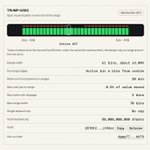
Range history on Strategy rules draws a vault's recent ranges as boxes, oldest on the left. A dot marks the active bin at each re-range, and the last one is now.
When the dots drift toward the edge of a box, the next box sits around the new price. The tabs switch between all five pools.
skive.pro/app/strategy

Fees earned on SKIVE counts fees nobody has claimed yet, and says so.
Under the Fees earned line, the number splits in two: claimed and pending. Claimed fees are valued at the price when they were paid out. Pending fees are already credited to depositors' shares and valued at today's price.
Net PnL counts both, so a depositor who has not claimed yet still sees what their share earned.
skive.pro/app/stats

Each pool card shows what the last 24 hours paid, and stops there.
24h fees / vault value divides the LP fees the vault claimed over the last day, before the service fee, by what sits in the vault now. It is marked Not annualized on purpose.
One day of fees times 365 is not a yield. Volume changes from day to day, and the price change of the tokens in the vault sits on its own line of the receipt.
skive.pro/app/pools
