

Your AI coworker for websites. Build, launch, and manage sites for your SaaS, agency, or clients on WordPress, Shopify, and more.
Joined December 2012
- Tweets128
- Following9
- Followers4
- Likes19





The free window to connect ChatGPT or Claude to a WordPress site closes on 30 November.
The default is not read-only.
WordPress.com and Jetpack are letting Free and self-hosted sites connect an agent at no plan cost until that date. The official help page is plain about what "on" means:
Enabling access turns on both the Read and Write tool groups, so the agent can view and change your content as soon as it is connected.
There's a second line agencies should not skip. On a Jetpack-connected site, one connection can give that agent access to every site on the WordPress.com account, including sites hosted there, unless you turn specific sites off.
The free window is useful. It is also a wide door if you leave the defaults alone.
Before 30 November, the job isn't "connect everything." It's this: turn Write off until you need it, and keep a client's site off a shared account door.
An AI coworker on a live WordPress site has to be limited to that site, not every site on the account. That's how Tracy is built.

2
The fastest first draft is the worst way to pick an AI website tool.
Every tool looks great in the first ten minutes. The real test is who touches the site in month six.
Three questions decide it:
1. Is there a site already?
No: a prompt-to-site builder is fine. Speed matters most here.
2. Who edits it after launch?
A designer: a visual builder with an agent inside.
The client: something they can change without breaking the layout.
3. What does a mistake cost?
If the site takes orders, bookings or leads, you want an AI coworker that works on the WordPress, Joomla or Shopify site you already have, not one that starts over.
Most bad picks come from treating three jobs as one job called "build a website."
The demo shows you day one. Pick for month six.

10
Your best client next year probably isn't a new website. It's one you launched two years ago.
New builds feel like the real work. They're also the lumpiest money: long sales cycles, one big invoice, then silence.
The sites you already shipped need something every month:
A new offer before the holidays
A price change across ten pages
A contact form that quietly broke after a plugin update
A landing page for an ad the client already paid for
Most agencies treat these as favors, or 30-minute jobs nobody remembers to bill. That's the leak.
A simple fix: end every launch with a written plan for the next 90 days. Three or four changes you already know the site will need. Price it as one monthly line, not per job.
The client stops seeing you as the people who built the site, and starts seeing you as the people who keep it earning.
That's the work Tracy was built for: the sites that already pay the bills, across every client you run.

15
Clients don't send bug reports. They send feelings.
A decoder for website feedback:
"Make it pop" = nothing on the page grabs them first
"Can we move this up?" = they couldn't find it
"It feels slow" = something jumps or lags on their phone
"Just a small tweak" = a new section, priced like a typo
"Looks good!" = they checked it once, on a laptop
Each one describes a reaction, not a fix. Take it literally and you ship the wrong change, then do round two.
One question decodes almost all of them:
"What were you trying to do when you noticed it?"
The answer gives you the real job: find the phone number, trust the price, finish the form. Fix that and the "make it pop" emails usually stop.
Agencies don't lose hours on edits. They lose them on translation.

12
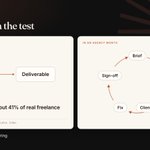
AI agents can now finish about 41% of real freelance projects.
In a test with no client in it.
Scale's Remote Labor Index hands agents 240 real Upwork projects, and experts judge whether a reasonable client would accept the result. The best agent went from 2.5% to about 41% in roughly a year. That's real progress.
Now the fine print. The test leaves out projects that need direct client interaction, and work judged over time, like SEO.
That's most of an agency's month. The brief is never complete. Feedback comes in rounds. "Looks good" turns into "actually, one more thing" a week later.
So the work isn't disappearing. It's moving. Less time making the thing, more time on the loop around it: brief, draft, client reaction, fix, sign-off.
That loop is why Tracy gives clients their own Viewer seat. They see every change and weigh in before anything is published, so nobody gets surprised.

11
"Just a quick fix" is the most expensive sentence in website work.
A React Compiler engineer warned a few days ago that when you ask an agent for the smallest, quickest change, the bandaid can get copied by the next agent until it's everywhere.
The line under it is the real insight:
"we used to write bandaid fixes by hand because we rarely had the time to do the right thing. agents change this calculus."
Agencies know the pattern. A client asks to "just" hide a button. Someone adds one line of CSS to one page. A year later there are nine of those lines and nobody knows which page needs which.
The bandaid used to be the cheap option. With AI doing the typing, the proper fix often costs about the same. Now the bandaid is just the one that spreads.
New rule for small edits: before you say yes, ask where else this pattern lives.

9
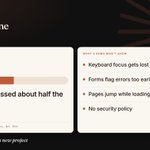
Chrome's team graded AI coding agents on web basics. Left alone, they passed about half the checks.
The misses aren't things a client spots in a demo:
Keyboard focus that gets lost
Forms that flag errors before you've typed anything
Pages that jump while they load
No security policy unless someone asks for one
The site looks done. It isn't.
With Chrome's new guidance installed, agents hit around 90%. But the line agencies should keep is this one:
"Most web development doesn't happen in brand-new projects."
It happens on WordPress and Joomla sites that have been live for years. That's where an AI coworker has to be most careful, and it's where Tracy works.
Chrome said it in the same post: speed is no longer a competitive advantage. The edge now is getting the boring parts right.

8
The bot blocker on your client's store might be turning away paying customers.
That's the line buried in OpenAI's ChatGPT Wallet launch. Not the payments part. This:
"websites need to ensure agents are not inadvertently blocked"
For years small business sites got one rule: keep bots out. Security plugins, firewall rules, captchas. Good advice, until some of the bots are shoppers with a card.
OpenAI's guidance for businesses comes down to three checks:
Can agents reach the site, or does the firewall stop them?
Are product details, prices and stock up to date?
Will the payment provider's fraud checks decline a real agent purchase?
None of that is a redesign. All of it is maintenance.
Wallet is US-only and Pro-only for now. That's the window.
Agencies made a living in the 2010s claiming and fixing Google listings. The next line on a retainer might be: can an agent actually buy from this site?

12
The hero is darker. There's a Contact page. The nav and prices didn't move.
Tracy did this on a copy, not the live site. Every change landed in Site changes, ready to review, publish, or undo.
"Darken the hero. Add a Contact page. Leave the nav and prices alone."
That's what I want from an AI coworker. Do the work, then wait.
tracy.ai
1
24
Coding agents still write long JavaScript for things modern HTML and CSS already do.
Chrome shipped Modern Web Guidance 1.0 this week, with Firefox and Edge joining the project.
Worth installing before an agent edits a live site

4
62
A prompt can redesign a Shopify store in minutes.
Publishing that redesign without a review step is how live carts break at 2am.
Name the tool. Show the diff. Keep undo one click away.
MCP orchestration beats blind autonomy on a live site.
24
An agent edited production and nobody saw the diff.
That is the failure mode most demos skip.
Review before publish. One-click undo. A clear list of what changed.
If those three are missing, a bigger model will not save you.
19
Most AI site edits go wrong before the AI does anything.
Here is the checklist to run before any AI edit on a client site:
1. Write the change in one sentence
2. Name the exact page and element
3. Note what must stay the same
4. Make the edit on a copy, not the live site
5. Check desktop and mobile
6. Confirm you can undo it
7. Only then push it live
Skip step 4 and every other step gets riskier.
Save this for your next client request.

23
WordPress just gave site owners a permission screen for AI agents.
The AI plugin 1.5.0 adds an MCP Access experiment.
It adds a new screen under Tools where you can:
• See the site's MCP endpoint
• Review which WordPress abilities agents can use
• Hide the ones you do not want exposed
It also adds WebMCP, so compatible AI browsers can insert, move and edit blocks right in the editor.
Both are experiments, not core features yet.
Our read: agents editing WordPress is no longer a question of if.
The real question is what they are allowed to touch, and how you get back if they get it wrong.
Decide that before you connect one.

1
39
"Make the homepage pop" is how you get three rounds of revisions.
Most bad AI edits start with a vague request. Steal this template. It works in Tracy and in any AI chat.
Page: [URL or page name]
Element: [the exact section, e.g. hero headline, footer phone number]
Now it says or looks like: [current text or a short description]
Change it to: [exact new text, colour, or size]
Keep the same: [things that must not move, e.g. fonts, button link]
Check on: [desktop, mobile, or both]
Fill every line. If you cannot fill one, you are not ready to ask yet.
Limit: a template will not fix a broken theme. It only removes the guessing.
Bookmark it for the next edit request.
34
A client texts you at 9pm. "The AI changed the menu and now checkout is gone."
Before any AI tool touches a live WordPress site, ask it three questions.
1. Where does the edit happen? On the live site, or on a copy?
2. Where can I see every change it made? A list, with the page and the time.
3. How do I take one change back without restoring the whole site?
If a tool cannot answer all three in plain words, keep it away from production.
This is the bar we hold Tracy to. It edits a copy first and logs each change in Site changes. Undo works where supported, and backups cover the rest.
Save this for the next tool demo you sit through.

28
Agencies, quick question.
What's the client request you get most often that takes 2 minutes to describe and 30 minutes to do?

26
The scariest part of letting AI edit your website is not the edit. It's not being able to take it back.
So in Tracy, every change goes into a list called Site changes.
Say "Make the hero darker, and add a Contact page in German." You get both changes, listed. Don't like one? Click Undo on it.
Works with WordPress, Joomla and EmDash. Still in beta.

1
1
31
Edit a live WordPress site by just asking
"Change the hero headline to 'Meet in any language.'"
Tracy made the edit in 17s. The site updated.
Changed your mind? Every change is logged in Site changes. One click to undo.
Real screen recording, no edits 👇
cowork.tracy.ai/?utm_source=…
3
45
Week 2 of the Tracy beta, by the numbers:
> 85 people signed in
> 55 websites on Tracy (30 built new, 25 imported)
> 57 tries to get in while the beta was full
Small numbers. Real people, real websites. Thank you to everyone building with us 🙏
Try now: cowork.tracy.ai/?utm_source=…

4
102