

Make premium online shopping experiences accessible to all.
The Internet
Joined January 2017
- Tweets1.5K
- Following166
- Followers1.6K
- Likes1.1K






Archetype has joined the Pixel Union Partner Program 🎉
Earn 15% when you refer Archetype, Clean Canvas, Pixel Union & Out of the Sandbox themes, as well as Theme Updater & Backups app plans.
Join today: partners.archetypethemes.co/…

ARCHΞTYPE retweeted

Woke up to find Shopify Collab Request is now live on Product Hunt 🚀
Would genuinely appreciate an upvote or feedback if you have a minute 🙏
producthunt.com/products/sho…

ALT Product Hunt launch card for Shopify Collab Request, showing the extension icon, Product Hunt badge, product name, tagline “Request Shopify collaborator access faster,” and a “View launch” button.
ARCHΞTYPE retweeted

Displaying a popup the instant someone lands on your store isn't marketing, it's a jump scare.
They haven't had a chance to see any products. Haven't read a word. No reason to trust you yet. And you're already asking for their email.
🧵 3 ways to get better results with a popup
ARCHΞTYPE retweeted
The Shopify stores that look the best start from a solid foundation.
Impulse v9.0.0 refines the design system from the ground up: typography, iconography, layout.
Subtle changes, significant results.
Experience the difference: shopify.pxf.io/qWEYbO

The Shopify stores that look the best start from a solid foundation.
Impulse v9.0.0 refines the design system from the ground up: typography, iconography, layout.
Subtle changes, significant results.
Experience the difference: shopify.pxf.io/qWEYbO
ARCHΞTYPE retweeted

Shopify has a utility that scans your store AI readiness. Even checks for llms.txt (which will make SEO nerds on youtube angry.) Looks like a Claude Code hackathon project for sure.
commerce-readiness.shopify.i…

Impulse v9 just made the theme editor a whole lot less painful.
Standardized settings. Cleaner labels. Controls that work the way you expect.
That means you can build faster and customize with confidence.
Upgrade your #Shopify store with Impulse: shopify.pxf.io/JK0b7E
You shouldn’t have to choose between beauty and performance.
With the new Shoppable Hero section, you can embed products in lifestyle imagery and create a more immersive shopping experience.
Try Impulse in your #Shopify store today: shopify.pxf.io/JK0b7E
Impulse v9.0.0 is here 🚀
Upgrades for conversion, speed, and easier merchandising.
What's new: mega menus w/ promos, shoppable hero, image grids, and more.
Plus: Faster page loads + smoother nav.
Try Impulse in your #Shopify store → shopify.pxf.io/JK0b7E
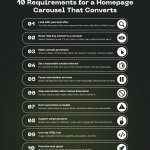
How much conversion are you losing to a homepage carousel that isn't working?
46% of ecommerce sites with carousels have usability issues, and most merchants don't know it.
These 10 requirements determine whether your carousel helps or hurts:
1/ Choose your first slide carefully
Most users never see the rest
2/ Never make carousel slides the only route to key content
Many users skip them entirely due to banner blindness
3/ Make controls prominent
Small or hidden controls mean users can't pause or navigate
4/ Set a reasonable autorotation interval
5–7 seconds for light text, up to 10 for heavier content
5/ Pause autorotation on hover
Slides changing mid-click send users to the wrong page
6/ Stop autorotation after manual interaction
If a user chose a slide, respect that choice
7/ Don't autorotate on mobile
No hover state means no way to pause, accidental detours are unavoidable
8/ Support swipe gestures
Mobile users expect it and will disengage without it
9/ Use real HTML text, not image-embedded text
Legibility and SEO both suffer otherwise
10/ Prioritize load speed
Slow carousel content gets abandoned before it renders
Why this matters for merchants:
Carousels aren't a homepage strategy. They're a feature that requires getting 10 things right simultaneously, on both desktop and mobile.
Sites that can't nail all 10 perform just as well with static homepage sections. Users scroll naturally, every offer gets equal visibility, and there's nothing to break.
Source: baymard.com/premium/blog/hom…
Follow @ArchetypeThemes for more ecommerce UX insights.

Shopify CLI 3.91 just made dev testing a lot cleaner! 💻
The Dev Console now shows all active dev previews and their extensions directly in the admin, no more switching between tools to track what's running.
What's new:
✅ See all active dev previews and extensions in one place
✅ View who created each preview and when it was last updated
✅ Access preview links for your app and extensions
✅ Open QR codes for mobile testing directly from the console
✅ Clean up unused dev previews without leaving admin
✅ Jump to your app on the Dev Dashboard in one click
Already using Shopify CLI? Run shopify app dev and open the admin to access the Dev Console now.
Faster testing. Cleaner workflows. Everything visible from one place.
Read the full app testing documentation:
shopify.dev/changelog/manage…
Follow @ArchetypeThemes for Shopify development updates.
How do specialty retailers turn a decades-old catalog into a modern shopping experience?
Craft Supplies USA shows us how with their Shopify store powered by the Expanse theme.
Their implementation proves what's possible when a 279+ product catalog meets the right theme foundation:
→ Subcollection tiles that guide beginner and expert woodturners to the right products instantly
→ Layered homepage promotions spotlighting sales, closeouts, and shipping offers
→ Volume pricing tables and variant selectors built for technical purchasing decisions
→ A 4.9-star review section that lets the community do the converting
→ Classes and blog integration that keeps customers coming back to learn, not just buy
For niche specialty retailers balancing depth with discovery, Expanse delivers the structure, merchandising tools, and content flexibility needed to grow.
Swipe through to see how Craft Supplies USA built a community hub 👇
See Craft Supplies USA in action: woodturnerscatalog.com/
Try Expanse for your brand: shopify.pxf.io/mO3RQ1
What feature would make the biggest impact on your store?

If your customers can't find it, it doesn't exist.
Most Shopify stores have a discoverability problem, and merchants don't always realize it.
Discoverability isn't just about having a search bar. It's about whether users can locate, understand, and act on what your store offers: without friction, guesswork, or support tickets.
Here's what breaks discoverability on most stores:
1️⃣ Navigation that buries products
When categories are vague or menus are overloaded, users abandon instead of dig. Clear navigation with predictable structure removes that friction before it starts.
2️⃣ No visual hierarchy on collection pages
If everything looks equally important, nothing stands out. Color, typography, and layout cues guide users toward what they're looking for, or toward what you want them to find.
3️⃣ Search that doesn't deliver
A search bar that returns irrelevant results is worse than no search at all. Users lose confidence fast and rarely come back.
4️⃣ Features users can't find
Wishlists, filters, quick buy, variant selectors, merchants add them and assume customers will discover them. Most won't without intentional placement and visual cues.
The pattern:
Discoverability is why two stores can sell the same products and convert very differently. The one that wins makes finding and understanding products effortless.
Your theme is the foundation. Build it right.
Follow @ArchetypeThemes for ecommerce UX insights.

Shopify just rolled out VAT number validation at checkout for EU and UK merchants! 🙌
Big update for merchants selling B2B across Europe.
If you use Shopify Tax in the EU or UK, you can now enable automatic VAT number validation at checkout, applying the reverse charge exemption on eligible orders without manual work.
What this means:
✅ VAT numbers entered at checkout are automatically validated
✅ Reverse charge exemption applied automatically on eligible orders
✅ VAT numbers saved to customer profiles for future orders
✅ Correct VAT invoice documentation generated when exemption applies
The exemption applies to EU → EU shipments (where destination differs from fulfillment country) and EU → UK shipments. It does not apply to UK → EU or UK → UK shipments.
To enable it: go to checkout settings and set the Company VAT number field to Optional.
A few things to keep in mind, reverse charge eligibility is based on your fulfillment location country, not your store address.
If you have multiple fulfillment locations, changing which location fulfills an order affects eligibility. And while VAT validation confirms formatting and validity, Shopify recommends verifying independently via the EU's VIES service if you suspect fraudulent use.
Shopify is rolling this out over the next few weeks.
Read the full documentation: changelog.shopify.com/posts/…
Follow @ArchetypeThemes for Shopify platform updates.
High-consideration purchases need education, not just product grids.
Liberty Safe uses Impulse to transform technical complexity into customer confidence.
Here's what stands out:
✅ Homepage establishes authority first
Full-width promotional banner, three category tiles for navigation (Gun Safes, Home Safes, Vault Doors), educational sections explaining manufacturing credentials, partnership badges building credibility.
✅ Collection pages teach while customers browse
Product grid with star ratings, "What to Consider When Buying a Gun Safe" guidance embedded on page, videos explaining security levels and fire resistance, size comparison graphics with human figures for scale.
✅ Quiz tool eliminates decision paralysis
6-step process starting with value estimation ("Under $3,000" to "$10,000 or more"), clear progress visualization, guided narrowing from broad needs to specific recommendations.
✅ Product pages packed with specifications
Key specs prominently displayed (Made in USA, fire rating, security level, locking bars), model/size dropdown, financing messaging with Shop Pay integration, embedded product videos.
✅ Recommendations positioned after confidence is built
"You May Also Like" appears after full specification review, USA-made badges for quality signaling, pricing transparency, clear product differentiation.
Impulse handles technical products where customers need research and reassurance before purchasing. Education embedded, not hidden.
See Liberty Safe: libertysafe.com/
Try Impulse for your store: shopify.pxf.io/JK0b7E
👉 Follow @ArchetypeThemes for more merchant stories.

Baymard tested mobile filtering across 80+ product lists and found a critical usability issue.
Users apply multiple filters then scroll through results. When they return to check their selections, there's no visible reminder of active filters. They must reopen the filtering interface just to confirm what they filtered by.
Real examples of this friction:
➡️ Walmart and Williams-Sonoma hide applied filters. Users reopen the interface repeatedly just to see their selections.
➡️ Nike shows six active filters in the filtering interface but provides no indication on the product list itself. Users who forget what they filtered assume no suitable products exist.
➡️ Amazon closes the interface after deselecting one filter. Removing multiple filters requires reopening it over and over.
The fix Baymard validated:
Display applied filters above the mobile product list. Users see active filters and understand result scope without leaving the page.
Two approaches work: horizontal scrolling (truncate rightmost filter, show total count, include scroll bar) or stacked rows (everything visible, no scrolling needed).
Crutchfield and Home Depot both implement this correctly. Users never lose track of what they filtered by.
Follow @ArchetypeThemes for UX insights that improve conversion.
Bounce rate knowledge pays off long after you launch your store.
For Shopify merchants, understanding why users leave without engaging helps you build stores that retain attention and convert consistently.
Here are 5 optimization areas that reduce bounce rates in ecommerce:
1. Navigation Structure
Keep menu categories between 4 and 7 options. Avoid generic "Shop" or "Products" labels with everything underneath.
Order categories intentionally since first and last positions get most interaction.
Add images to navigation, especially on mobile, to provide visual inspiration alongside category names.
2. Product Media Quality
Images capture attention first when users land on product pages. Videos demonstrate how products work and move.
Set videos to autoplay and position them in the first gallery slot to maximize engagement immediately when customers arrive.
3. Information Visibility
Display key product details prominently without forcing customers to scroll or dig. For accessories: compatibility and battery life matter most.
For fashion: sizing, fit, materials, and available colors. Run user testing to confirm customers find critical information easily.
4. Collection Grid Variation
Collections pages are typically common landing pages. Break up traditional product grids by splicing larger lifestyle images or videos into the layout.
This maintains visual interest and helps stores stand out on otherwise monotonous browsing pages.
5. Review Display
75% of consumers search for reviews and testimonials before purchasing.
Show product review ratings on collection page cards to add immediate credibility and encourage click-throughs to product pages.
Optimizing for lower bounce rates helps you:
✅ Keep traffic you paid to acquire
✅ Meet user expectations when they land on your store
✅ Showcase products effectively after spending money on ads
✅ Turn single-page visits into engaged sessions
The average e-commerce bounce rate sits at 35-45%. Above 50% signals problems worth investigating.
Explore Shopify themes built with engagement in mind:
archetypethemes.co/
Follow @ArchetypeThemes for insights on building stores that retain customer attention.

Building a Shopify store?
Your navigation type choice just became critical.
Here are the six navigation types and when to use them.
1. Streamlined navigation bars
Horizontal, top-positioned, classic approach:
→ Located on every page with links to top-level pages
→ Includes search bar, CTA, cart icon, and brand identity
→ Often sticky, following users as they scroll
2. Dropdown menus
Compact and organized:
→ Houses links, CTAs, search bar, and images in one control
→ Can include interactive components like sliders, galleries, and videos
→ Complex yet handy UI element
3. Flyout menus
The most popular type today:
→ Hamburger icon triggers slide-out menu with vertical orientation
→ May include search bar and CTA button
→ Numerous brands use this approach
4. Footer navigation
Multilevel and content-heavy:
→ Includes almost all links plus regulatory requirements (Privacy Policy, Cookies)
→ Features galleries, videos, and subscription or contact forms
→ Increasingly popular in the ecommerce sector
5. Sidebar navigation
Positioned left or right, declining in popularity:
→ Covers top-level pages, brand identity, search bar, and social media icons
→ Some brands still benefit from it
→ Particularly popular seven years ago
6. Sitemap
Separate page, hierarchically organized:
→ Includes links to all pages accessible to crawlers and users
→ One of the oldest navigation types
→ Essential for search engine accessibility
Archetype Themes support all navigation types with built-in flexibility.
Explore themes: archetypethemes.co/
Follow @ArchetypeThemes for practical insights on building high-performing Shopify stores.
