

Bitcoin Trader // Romans 12:2 @SoapCapital @LiquidTrading @rainbetcom
Fight Club
Joined December 2021
- Tweets62.1K
- Following2K
- Followers226K
- Likes109K




Some of the stats here are unbelievable to be honest.

If you’re good at buying stocks but terrible at selling them, read this.
If you roundtrip, get in two minds or end up just generally messing your exits up, make sure you read 👇
link.fink.money/go/674fb54

AI can now use your computer for you.
Still can't stop you longing the top, anon.


PROMPT:
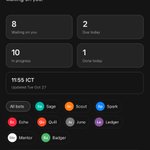
Build me a team dashboard as a canvas Page called "Team HQ". It is the shared home for my bot team: what each bot is doing, what is done, and what is waiting on me.
Layout: full width, landscape, app-like (not a report). Use theme tokens only for every colour and font, so it works in light and dark mode. Wrap rows so it still works on a phone.
Header: page title, a one-line summary, then a row of stat tiles (Waiting on you, Due today, In progress, Done today) and a tile with the last-updated time and date. Under it, a row of filter chips: "All bots" plus one chip per bot. Picking a chip filters every column to that bot.
Three columns:
1. Left, "Waiting on you": items that need my decision, each with the bot's tile, the text, a due chip (highlighted when due today) and a tick box. Ticked items grey out, show "Done" and drop to the bottom.
2. Middle, wider, "Team": a status board with one card per bot (avatar, name, role, time of its last update, "Now" focus, "Next" dated item, and counts of waiting, active and done). Below it "Next up" (the soonest dated items, marked "Needs you" when they are mine), then "Recent activity" (latest 10 events) with a "Show all" button that expands the full timeline grouped by day, newest first.
3. Right, "Tasks": "In progress" with tick boxes, then "Done", newest first.
Tick boxes save to localStorage (key "teamhq-ticks-v1"), keyed by bot plus item text, so a tick follows its item. Ticks are per device.
Bots: each bot gets a round avatar tile with its first two letters, coloured to match its sidebar icon colour. My team (edit this list):
- Chief: name, role, icon colour
- Research: name, role, icon colour
- Social: name, role, icon colour
- (add the rest)
Data model, all at the top of the file so bots edit only these:
- AS_OF: "YYYY-MM-DD HH:MM" in my time zone, the last update.
- BOTS: id to { name, role }.
- WAITING: { bot, need, due?, today? } for items waiting on me.
- TASKS: { bot, text, status: "progress" or "done", when? } where when is short text like "Thu" or "Oct 30".
- TIMELINE: { at, bot, text } events; the page sorts them.
- STATUS: optional { focus } per bot to override its "Now" line; otherwise its first in-progress task.
Team workflow: you (Chief) own the page and the code. Every bot updates only its own rows with EditCanvas (add events, move tasks to done, add or clear waiting items, bump AS_OF) and never rewrites the layout. Share the canvas link with each bot and tell them this rule.
Start with a few realistic sample rows per bot so it looks full, then send me the link.


