

💻 The Mac Mini Guy 🤖 Building pro tools for the Apple ecosystem 🚀 CEO & Cofounder @astropad 🍎 Ex-Apple, Garmin
Minneapolis, MN
Joined December 2007
- Tweets13.6K
- Following1.1K
- Followers4.5K
- Likes4.4K







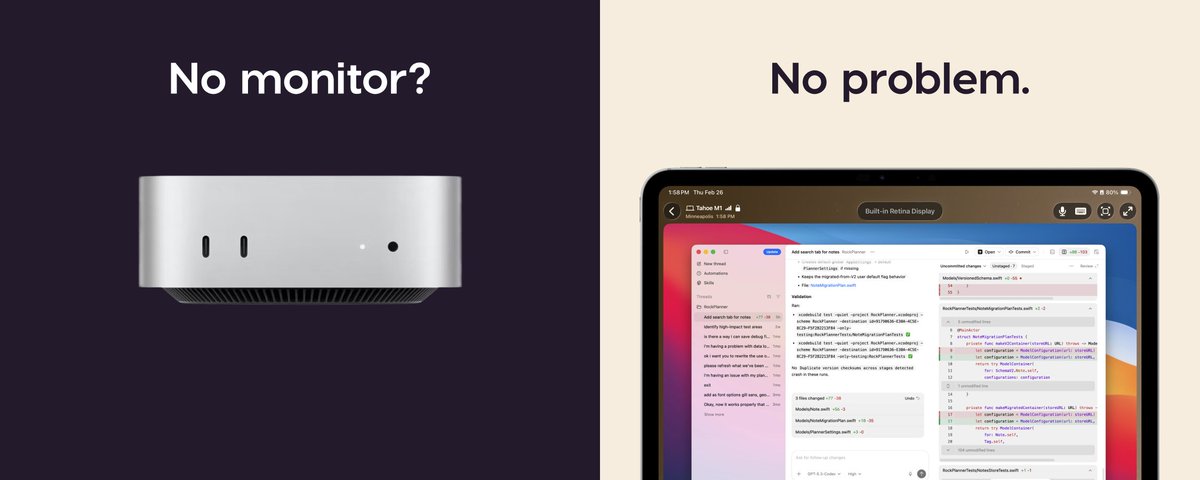
The iOS Workbench apps are very popular, but my personal favorite is the Mac app.
Especially now that we have built-in screen sharing AND a terminal!
It’s so slick being connected to my remote environment on my Mac Mini.
Matt Ronge retweeted

MacOS on my iPhone Duo thanks to @Astropad Workbench! Touch inputs and gestures are just as if it were native.

Remote desktop just got better...
Because we added integrated terminal support!
Seriously, Workbench is the only remote desktop app I’m aware of that also includes an integrated terminal.
Personally, I find the terminal awesome for working from a smaller screen, or when connectivity is spotty.


Matt Ronge retweeted

Workbench from @Astropad is soooooo good. 1.4 just shipped direct terminal access, and I happened to need exactly that while out and about today!



Matt Ronge retweeted

Astropad Workbench 1.4 adds terminal access, iPhone Duo support, and more 9to5mac.com/2026/10/27/astro… by @apollozac

Matt Ronge retweeted

If you have a Mac hosting a local AI agent, boy do I have a treat for you.
Astropad Workbench has allowed me to administer (via screen sharing) my two agent machines from across the planet via my cell phone without VPN.
And now they've added remote terminal. Finally, I can just work in the CLI without streaming the entire window manager and UI over a 5G connection.
I have waited (and begged) for this feature and it is finally here.
Thank you Astropad team!!


Today we are releasing our biggest update to Astropad Workbench since 1.0!
REMOTE TERMINAL
Switch between your Mac’s desktop and terminal without reconnecting. Dictate prompts and commands, and pick up your terminal session on another device.
IPHONE DUO SUPPORT
Native support from day one. Keep an eye on your AI agent in one pane without it taking over your whole phone.
MAC-TO-MAC FILE TRANSFER
Drag and drop files between Macs during terminal sessions.
Stay connected to your Mac and keep your AI agents moving with your iPhone Duo!

Today we are releasing our biggest update to Astropad Workbench since 1.0!
REMOTE TERMINAL
Switch between your Mac’s desktop and terminal without reconnecting. Dictate prompts and commands, and pick up your terminal session on another device.
IPHONE DUO SUPPORT
Native support from day one. Keep an eye on your AI agent in one pane without it taking over your whole phone.
MAC-TO-MAC FILE TRANSFER
Drag and drop files between Macs during terminal sessions.
Stay connected to your Mac and keep your AI agents moving with your iPhone Duo!
Matt Ronge retweeted

Can confirm: I'm GIDDY about the @Astropad update for Duo.
Trust me, if you are a coder, this will transform your workflow.
Matt and team have built an absolute BANGER of an update!
Matt Ronge retweeted

In 1994, software was dead. People told me programming was for nerds and that I should become a doctor or a lawyer instead.
In 2004, software was dead. People told me that someone from India would take my job for $5/hour.
In 2014, software was dead. People told me that no-code was going to kill every job and doom my career.
In 2024, software was dead with Devin, Windsurf, Copilot, and OpenAI o1.
We kill software every 10 years, and yet the demand for good Software Engineers has never been higher.


Matt Ronge retweeted

This is going to flop. There are so many cool things they could have done with this.
You should have partnered with OpenAI or xAI and launched personal assistants for the home.
Track events, groceries, schedules, all with the most intelligent models.
Even the name is bad.
But I suppose these are problems that could be fixed with a software update.
But for the love of God man, no one wants to use Siri.

Yup, this is why Astropad Workbench has a strong wood theme (well one of a few reasons why actually)

Oh man I change my mind, I thought you could run apps on this.
$299 for this and you can't run your own favorite entertainment, recipe or reference apps on it?
Or even ChatGPT? Dead on arrival
This is interesting as this is how I use an extra iPad I have thats parked in my kitchen at all times

Matt Ronge retweeted
One of the best parts of running most of my development on a Mac mini (via @Astropad Workbench on my MacBook Pro) is that when Claude/Codex have to completely take over the screen for some reason, I can just swipe back over to my MBP desktop and work on the same thread (or a different one) via both of their built-in remote session features.
Matt Ronge retweeted

If you’re an iOS dev who uses remote control for agents running on your Mac, don’t sleep on @astropad workbench. I use it to vnc to my computer from my phone anywhere to unlock it, Grant permissions, etc.
Combined with computer use, it’s so clutch at verifying changes end to end live on a real computer.