







Jonathan Peterson retweeted

Blog posts are dying. Bottom of funnel pages are winning.
I just did a 1 hr 43 min SEO deep dive with @edwardeachday 👇
Google is testing removing AI Mode, a $250K internal links test, how much AI traffic really converts, why bottom of funnel pages beat blog posts now, etc
Full episode in the video (1 hr 43 min).
00:00 Intro: Edward Sturm joins the show
00:58 Google’s internal presentation on keeping search secret
08:08 How Google hit every site in one Search Console
14:36 How Edward uses AI in SEO
18:15 SEO cinema: making better podcasts
23:42 Agencies vs AI tools: who’s winning in SEO
29:01 Is AI slop winning on social?
42:18 Do you need a human touch to rank?
51:12 The $50K internal links test
56:06 3 internal links = 1 backlink?
58:56 What AI traffic data really shows
1:01:44 Why rank trackers are getting bad data
1:07:00 The buyer survey questions to ask every customer
1:13:47 Google is testing removing AI Mode
1:21:18 Bottom of funnel pages vs blog posts
1:23:13 Running a tiny team with Claude
1:36:59 Making 30 thumbnails and split testing the best
1:41:53 Where to find Edward
Want your site showing up in AI search too?
Rank in AI Search or It’s FREE 👉
go.polarrank.ai/x
Full video on YT → youtu.be/DvjLjds-nl4
Welp @applepay still working fine! Wish I knew about all these other outages before sending my kids money for town! 🤣
1
57
Jonathan Peterson retweeted

This is f*cking insane. Anthropic engineer:
"Prompting is basically over
95% of our engineers already run self-improving loops. The next move is graphs"
In barely 10 minutes, she builds her entire Claude Code setup live, straight from an empty terminal
Empty Terminal → Agents → Loops → Graphs → Self-Improving System
Prompting was the old way. Engineering the system around the model is the new one
Save it and watch it today
Then read the article below ↓


Jonathan Peterson retweeted

This is f*cking insane. Anthropic engineer:
"You're not supposed to prompt Opus 5.5
You're supposed to build a system that prompts itself. At Anthropic, 90% of our engineers have already built these systems"
In 30 minutes, she walks through exactly how Anthropic builds agents that remember, fix their own mistakes and get sharper with every run.
Better than any $1000-$2000 agent course I've seen.
Watch it, then read the article below ↓
Jonathan Peterson retweeted

Anthropic engineer:
“Anthropic hired me at $350K–$950K because I know how to build harnesses.
99% of people still hand-roll multi-agent systems and wonder why they break.
I build systems that run loops + sandbox tools + turn yesterday’s logs into new skills — same model, 10x more reliable agents that keep improving overnight.”
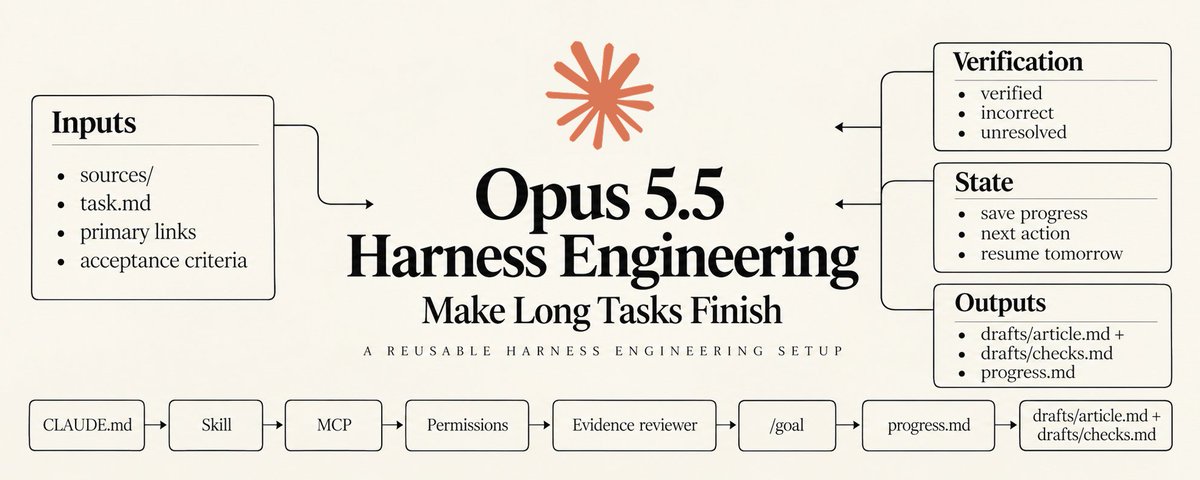
Opus 5.5 → Agents → Harness → Loops → Graphs
In a short workshop, he shows exactly how to build one from scratch.
step 1 → harness handles loops, context, and sandboxing
step 2 → brain and hands separated — 60% faster to first token
step 3 → runs server-side, resumes from the log after crashes
step 4 → failure is cheap — retry and replay instead of starting over
step 5 → yesterday’s logs become new memory — the system wakes up smarter
Anthropic calls this “dreaming”.
Most people spend weeks building this by hand.
You don’t have to.
Bookmark and watch it.
Then read the full Opus 5.5 harness engineering guide below ↓

Jonathan Peterson retweeted

every week someone tells me they’re going to vibe-code their own @beehiiv alternative over the weekend.
wishing them the best, here’s the backlog of things to make sure to include:
> 99.3% email delivery rate (industry-leading)
> team of deliverability experts with decades of experience
> infrastructure to send 3M+ emails per minute
> validating every single email submission (1st and 3rd party)
> automated bot-detection to prevent spam signups
> registering for every mailbox provider’s feedback program
> ingesting data from said feedback loops and building suppression lists
> tagging every email so gmail reports complaint rates per newsletter
> classifying every bounce (hard, soft, mailbox full, DNS failure) and knowing which ones mean “try again” vs. “never again”
> three layers of suppression: global, per-publication, and transactional
> temporary suppressions that expire on their own, and permanent ones that never do
> one-click unsubscribe, the way gmail and yahoo now require it
> warming new IPs and domains on a schedule
> watching blocklists around the clock, and pulling an IP from rotation the moment it’s listed
> retrying deferred mail for 24+ hours before calling it a bounce
> blocking disposable, invalid, and typo’d addresses before they ever reach the list
> rate limiting every signup endpoint a bot can find
> filtering bot clicks out of every report (something we pay an ungodly amount of money for)
> an acquisition source on every subscriber
> engagement history for every reader, across every post
> multiple sender addresses for different emails
> custom domain configuration that is aligned with DKIM, SPF, DMARC
> a true WYSIWYG editor: what you write is what lands in the inbox, with no HTML required
> turning that editor into table-based, inline-styled email HTML that holds up in outlook
> real-time collaborative editing, so the whole team can work on the same issue at once
> dynamic content: different sections for different readers, all in a single send
> separate email and web versions of every post, from one draft
> free and premium versions of the same post, split by a paywall break
> merge tags that personalize every email, and a simulated subscriber to preview them before you send
> templates with saved colors, fonts, and spacing, plus a default style for every post
> columns, tables, buttons, blockquotes, sections, file attachments, and a table of contents with anchor links
> native embeds for X, youtube, tiktok, instagram, bluesky, stocktwits, and podcast episodes
> polls, referral blocks, recommendations, and ad slots, built right into the post
> an AI writer, AI images, and a built-in AI agent one keyboard shortcut away
> images resized and optimized automatically, however they’re uploaded
> a live email-size gauge that warns you before gmail clips your newsletter
> custom HTML blocks, cleaned so a stray script tag can’t break your post
> automatically hiding anything an inbox can’t handle (video, iframes, audio) in the email version, while keeping it on the web
> links and embeds made clickable even in outlook, which ignores links wrapped around tables
> vertical alignment in columns, because a layout that looks off by 4px looks broken to readers
> converting your newsletter to audio versions for readers who prefer to listen
> random cohort sends to randomly split your list to test different content and conversion
> slash commands: type “/” and insert any block without touching a menu
> markdown and keyboard shortcuts for people who never want to touch a mouse
> pasting from google docs with the formatting intact
> search and replace across the whole post
> comment threads right in the draft, so editors and writers stop living in google docs
> footnotes and citations that work in the inbox and on the web
> code blocks, for the technical newsletters
> an AI writer that rewrites, translates, and fixes spelling and grammar in place
> autosave, so a closed tab never costs you a draft
> subject line A/B testing, built into the send flow
> drag-and-drop images, from your computer, your media library, or a URL
> rich-text image captions, plus image titles and alt text for accessibility
> audio files that play inline
> file attachments, so a PDF can ride along with the issue
> sections with their own backgrounds, borders, and spacing
> blockquotes with custom borders, colors, and styles
> content breaks and dividers that render cleanly in every inbox
> a REST API for subscribers, posts, segments, automations, and more
> a send API to create and send newsletters programmatically
> creating, updating, and deleting subscribers in real time
> reading and writing custom fields on any subscriber
> tagging subscribers from your own app
> enrolling subscribers into automations via API
> pulling opens, clicks, and engagement for every post
> fetching post HTML rendered for free vs. premium, email vs. web
> creating posts from a template, then appending or prepending content
> fetching segments and every subscriber in them
> managing tiers and premium subscriptions
> pulling referral program data and milestones
> reading poll and survey responses
> pagination that holds up across millions of records
> rate limits that protect the platform without blocking real integrations
> API keys you can create and revoke anytime
> an MCP server so claude, chatgpt, and other AI tools can work inside beehiiv
> drafting and editing posts from an AI chat
> asking for open rates, CTR, and revenue in plain english
> comparing performance across dozens of posts in one request
> looking up any subscriber's full history and engagement
> building segments by describing them
> creating and editing automations
> generating AI images straight into your media library
> managing website pages, redirects, and SEO
> reading and replying to community posts and DMs
> reviewing ad offers and ad revenue reports
> managing podcast shows and episodes
> creating digital products, coupons, and promo codes
> running subscriber growth and earnings reports
> setting up subject line A/B tests
> deliverability by mailbox provider for any post
> searching docs without leaving the chat
> inviting teammates by email
> admin, member, and contributor roles
> admins who control billing, exports, integrations, payments, and domains
> members with full access minus admin permissions
> contributors limited to drafting posts and automations
> roles at the workspace or publication level
> multiple publications under one workspace
> workspace grouping and search for people on multiple teams
> multiple authors per post, with bylines
> guest authors for one-off contributors
> author profiles with bios, avatars, and social links
> community roles mapped to workspace roles (admin, manager, moderator)
> real-time collaboration and comment threads on every draft
> removing access the moment someone leaves
> publication transfers between owners, with written consent
> secure, single-use magic links to log in from desktop
> a no-code website builder on your own custom domain
> an AI website builder that works from plain-english prompts or screenshots
> AI custom elements for live widgets
> drag-and-drop editing, plus HTML access for full control
> site-wide theme tokens for fonts, colors, borders, and shadows
> global navbar, footer, and signup and login modals
> saving sections, blocks, and pages as reusable templates
> version history with one-click restore
> custom pages with their own SEO settings and paywalls
> redirects, so old links never break
> custom robots.txt
> auto-generated meta titles and descriptions for every post
> google news schema
> pages up to 80% faster on largest contentful paint
> image carousels and grids
> youtube blocks that update when you post new videos
> an automatic page for every podcast episode
> pop-ups and gated content to turn visitors into subscribers
> a visual automation builder, no code required
> triggers based on signup source, behavior, purchases, and engagement
> welcome sequences that start the second someone subscribes
> delays and wait steps
> branching logic based on subscriber attributes
> reusable condition sets across automations
> email steps built in the same editor as your newsletter
> webhook steps that call your own systems, with automatic retries
> enrolling subscribers via API
> per-subscriber journey tracking
> opens and clicks for every email in every flow
> editing a draft version while the live automation keeps running
> comparing draft vs. live before you publish changes
> reordering steps in bulk
> segment conditions based on whether an automation started
> product delivery and follow-ups triggered by purchases
> selling files, links, guides, templates, and ebooks
> memberships and time-based products
> 1:1 coaching sessions and appointments
> 0% platform fees on every sale
> a storefront on your beehiiv website
> products sold inside emails and automations
> free products that double as lead magnets
> product variants
> discount codes and promotion codes
> product reviews, with moderation
> product tags for organizing your catalog
> orders dashboard with buyer details
> sales totals per product
> duplicating a product in one click
> automatic delivery the moment someone buys
> payouts through stripe
> live webinars with up to 10,000 attendees
> ticket sales in 10 currencies
> native streaming with video, screen sharing, and chat
> no zoom required
> up to 5 automated reminder emails
> calendar invites sent automatically
> a recording of every session
> selling the replay as its own product
> 0% platform fees on tickets
> free webinars that grow your list
> discount codes on tickets
> 1:1 coaching bookings
> buyers linked to their subscriber profile
> promoting events in your newsletter and on your site
> orders and revenue reporting for every event
> a community built into your newsletter: channels, posts, and comments
> channels that are free or gated to paid tiers
> syncing newsletter posts into the community
> direct messages between you and members
> threaded comments
> pinned posts
> a moderation queue for reported posts and comments
> banning and unbanning members
> admin, manager, and moderator roles
> inviting subscribers, segments, or specific emails
> surfacing your most engaged subscribers to invite first
> community metrics: new members, posts, and activity
> notification emails with your own from name
> channel ordering and a default channel
> luma calendar integration for events
> discord integration that syncs roles with subscription tiers
> native podcast hosting with zero platform fees
> distribution to apple podcasts, spotify, and youtube
> an automatic webpage for every episode
> automatic transcripts
> IAB-standard analytics by country, app, and device
> bot filtering on downloads
> downloads and unique listeners per episode and per show
> private feeds for paying subscribers
> bundling your podcast with your paid subscription
> importing from other hosts with episode GUIDs preserved
> RSS redirects so listeners follow you over
> scheduled episodes
> apple podcasts categories and metadata
> podcast players embedded in your posts
> a full episode library on your site
> webhooks for episode and private-feed events
> segments built on behavior, attributes, and engagement
> dynamic segments that update automatically
> static segments that stay fixed
> filtering by acquisition source, including magic links
> filtering by custom fields and tags
> filtering by subscription tier and paid trial status
> filtering by whether an automation started
> reusable condition sets
> recalculating a segment on demand
> sending to a segment, or excluding one
> segments that power dynamic content inside a single post
> segments as automation conditions
> adding a whole segment to a newsletter list
> multiple newsletter lists in one publication
> exporting any segment
> webhooks for new, confirmed, and deleted subscribers
> upgrade, downgrade, pause, and resume events
> tier created, deleted, paused, and resumed events
> newsletter list subscribe and unsubscribe events
> post sent, scheduled, and updated events
> survey response events
> podcast episode published, updated, archived, and deleted events
> private podcast feed access events
> choosing exactly which events each endpoint receives
> a signing secret on every endpoint
> automatic retries on failed deliveries
> a log of every delivery attempt
> manually retrying any failed message
> disabling an endpoint without deleting it
> versioned payloads
> webhook steps inside automations
> survey forms with multiple question types
> polls that readers answer with one click, right in the inbox
> every answer tied to a real subscriber
> live poll results
> per-question response breakdowns
> aggregate results across every survey
> individual responses you can browse one by one
> webhooks the moment a survey is submitted
> survey and poll data available via API
> polls on the web and in email
> signup flows that send new subscribers through a survey
> surveys that tell you what to write next
> polls for picking topics, products, and pricing
> response data you can turn into segments
> no third-party form tool required
> a library of professionally designed post templates
> custom colors, fonts, and spacing on every template
> a default style applied to every new post
> content outlines baked into templates
> separate email and web styling
> theme design tokens per template
> duplicating templates in one click
> a custom email footer applied to every post
> templates with sponsor slots, referral blocks, and recommendations built in
> creating posts from templates via API
> template changes picked up instantly by API-created posts
> website templates
> saved sections, blocks, and pages for your site
> welcome email templates
> templates your whole team shares
> the largest native ad network for newsletters
> brands like netflix, hubspot, notion, and nike (and 525+ others)
> ads available to claim for your upcoming posts
> dropping an ad into a post with one click
> earnings and payouts reported for every placement
> ad revenue reports post by post
> a history of every opportunity you accepted or declined
> bot-filtered clicks advertisers can trust
> custom link parameters for advertiser attribution
> brand safety review on every campaign
> payouts to your beehiiv wallet
> direct sponsorships: selling your own placements
> sponsorship products with your own formats and pricing
> scheduled sponsor placements with advertiser details
> 0% platform fees on paid subscriptions
> multiple paid tiers
> monthly and annual plans
> free trials
> paid trials, like $1 for 30 days
> metered paywalls, new york times-style
> a paywall break inside any post
> discount offers
> gift subscriptions
> group subscriptions: one buyer, many seats
> custom group deals for teams and companies
> pausing and resuming subscriptions
> private podcast feeds and gated community channels as paid perks
> payouts through stripe connect
> recommendation network with 60K+ active newsletters
> getting recommended by thousands of other newsletters
> free, reciprocal recommendations
> paid recommendations: pay to grow, or get paid to recommend
> discovering newsletters to partner with
> AI-suggested recommendation partners
> applications for paid recommendations, with accept and reject
> engagement and spend insights for every partner
> pausing, resuming, or ending any partnership
> fraud detection on paid recommendations
> clawing back payouts for fake subscribers
> recommendations inside your newsletter, not just at signup
> attribution for every subscriber a partner sends you
> one-click subscribes powered by magic links
> one-click subscribe links, no form needed
> UTM parameters carried through on every link
> rate limiting on every request
> bot detection and honeypots
> a confirmation step only when a click looks suspicious
> double opt-in respected
> redirecting new subscribers straight to your site
> magic links as a filterable acquisition source
> links you can drop into other newsletters, socials, and ads
> login magic links so paid subscribers can read premium posts
> single-use tokens that expire in minutes
> rate limits on login requests
> protection against timing attacks
> logging in on desktop from a link sent to mobile
> faster logins across every beehiiv publication
> embeddable subscribe forms for any website
> full-width, fixed-width, and slim embeds
> an attribution script to track where signups come from
> custom colors, fonts, and styling
> theme design tokens per form
> a draft and publish workflow for form changes
> comparing draft vs. live before publishing
> multiple forms per publication
> custom success behavior: a message or a redirect
> pop-ups on your beehiiv site
> gating posts to subscribers only
> readers picking which newsletter lists to join
> signup flows that run right after subscribing
> bot protection on every submission
> forms that work on wordpress, webflow, and anywhere else
> a customizable link-in-bio page
> hosted on your own beehiiv site and domain
> a subscribe form built in
> your brand colors, fonts, and buttons
> social links for every platform
> links to your latest posts
> links to your products and paid tiers
> a linktree integration that captures newsletter signups
> every visitor a potential subscriber
> traffic from instagram, tiktok, and X turned into owned email subscribers
> visits tracked in your website analytics
> signups tagged with their acquisition source
> mobile-first design
> no third-party link tool required
> updated in seconds, from the same dashboard as everything else
> real-time website analytics, no third-party tools
> traffic by channel
> filters for location, device, OS, and referral source
> website and newsletter analytics in one place
> breakdowns by page, referrer, and more
> custom conditions to slice any report
> AI crawler and bot analytics: what was served vs. blocked
> control over which crawlers can index your site
> UTM tracking on every link
> custom link parameters at the publication level
> an acquisition source on every subscriber
> google analytics integration
> podcast analytics alongside your site
> trends over time
> website traffic connected to the subscribers it produced
> native integrations with linktree, hubspot, manychat, meta, and dozens of other apps
> human support team with a dozen experts ready to assist with whatever you need
oh, and besides having to manage all of this on your own indefinitely forever… your vibe-coded solution will still require paying for and stitching together a ton of software:
> email sending (sendgrid, amazon SES, postmark)
> web hosting (vercel, AWS, render)
> database + queue (supabase, neon, RDS)
> payments (stripe, memberful)
> auth (clerk, auth0, supabase auth)
> monitoring + alerting (sentry, datadog, pagerduty)
> workflow engine (inngest, temporal, upstash qstash)
> bot protection (cloudflare)
> email validation (zerobounce, kickbox)
> email rendering (litmus, email on acid)
> click verification (omnivery)
> media storage + CDN (S3, R2, vercel blob)
> product analytics (posthog, mixpanel)
…but at least you saved $59/mo not paying for @beehiiv anymore 🫡
Jonathan Peterson retweeted

Ahrefs, SEMRush and ALL the rank trackers seem to be bugging out BIG TIME right now vs. actual SERPs 🚨
Looks like Google could be implementing ANOTHER anti-scraping measure after they lost the SERPAPI court case.
It seems to just fill the entire first page with UGC content or YouTube videos instead of actually surfacing the real ranked pages.
I don't personally believe it's anything to do with spammers or hackers, it's more to do with them trying to protect their own scraped data (I know, ironic, isn't it), AI Overviews/AI Mode etc..
And I know it's been a pain fixing all of this for the SEO and rank tracking companies anyway, but looks like there's a lot more hurdles in front of them to come.


Jonathan Peterson retweeted

Stop overcomplicating which landing page to build.
It's literally:
If buyer = unaware → advertorial
If buyer = problem-aware → advertorial or VSL
If buyer = solution-aware → listicle or pre-sales page
If buyer = product-aware → product page
If buyer = most-aware → offer + buy button
That's the whole bible.
You just don't wanna accept it cuz it's boring.
Jonathan Peterson retweeted

Who's gonna tell vibe coders about...
> Rate Limiting
> Caching
> Load Balancing
> Reverse Proxies
> API Gateways
> CI/CD
> Docker
> Kubernetes
> Service Discovery
> Circuit Breakers
> Timeouts
> Retries
> Exponential Backoff
> Idempotency
> Message Queues
> Pub/Sub
> Event-Driven Architecture
> Distributed Transactions
> Saga Pattern
> Dead Letter Queues
> Cron Jobs
> WebSockets
> Long Polling
> Server-Sent Events
> Database Indexing
> Query Optimization
> N+1 Queries
> Connection Pooling
> Read Replicas
> Sharding
> Partitioning
> Replication
> Leader Election
> CAP Theorem
> Eventual Consistency
> Optimistic Locking
> Pessimistic Locking
> Distributed Locks
> Race Conditions
> Deadlocks
> Memory Leaks
> Garbage Collection
> Thread Safety
> Backpressure
> Autoscaling
> Horizontal Scaling
> Vertical Scaling
> CDN
> Edge Caching
> Cache Invalidation
> Feature Flags
> Blue-Green Deployments
> Canary Releases
> Rolling Deployments
> Rollbacks
> Health Checks
> Liveness & Readiness Probes
> Monitoring
> Logging
> Distributed Tracing
> Metrics
> Alerting
> SLOs
> SLIs
> Error Budgets
> Observability
> Secrets Management
> IAM
> OAuth
> JWT Rotation
> TLS
> Encryption at Rest
> Encryption in Transit
> WAF
> DDoS Protection
> CORS
> CSRF
> SQL Injection
> XSS
> SSRF
> Database Migrations
> Schema Versioning
> Disaster Recovery
> Backups
> Failover
> Multi-Region Deployments
> Chaos Engineering
> Cost Optimization
> Cold Starts
> Serverless Limits
> Latency
> Throughput
> P99 Latency
> Tail Latency
> Network Partitions
> Clock Skew
> DNS
> TCP vs UDP
> HTTP/2 & HTTP/3
> gRPC
> Webhooks
> API Versioning
> Semantic Versioning
> Infrastructure as Code
> Terraform
> Helm Charts
> Build Caching
> Dependency Hell
> Production Incidents
> On-call
> Postmortems
...until the app gets its first million users.
Jonathan Peterson retweeted

✨ New ✨
When doing agentic dev on a Laravel app that uses Boost, Boost can now record rules about your application's structure and architecture...
Not only that, it can automatically infer conventions it sees consistently used throughout your application and remember them so it maintains those conventions going forward forever.
laravel.com/docs/13.x/boost#…


Jonathan Peterson retweeted

Inside HubSpot's leading GEO program w/ @ajavuu
06:31 – Writing for the bots
18:16 – Audience size doesn't predict citations
25:15 – Affiliates and valuing a citation
37:30 – The Reddit deep dive
49:27 – HubSpot's product-focused reorg

Does anyone think the price to consumers for using #ai is going to skyrocket once you’re all dependent on it?
21
Jonathan Peterson retweeted

Stop telling Claude, "“write the code.”"
Stop telling Claude, "find the bug."
Stop telling Claude, “make this work”
You’re treating a billion-dollar AI engineer like a confused junior intern.
Here are 11 Insane prompts you can copy-paste right now:
Jonathan Peterson retweeted
Laravel AI SDK now supports sub-agents. 🤝
Return an agent from another agent’s tools() method and the parent agent can delegate focused tasks to it, just like any other tool.
Sub-agents can have their own instructions, tools, provider config, and isolated context.
laravel.com/docs/13.x/ai-sdk…

Jonathan Peterson retweeted

Current AI custom prompt:
You are a world class expert in all domains. Your intellectual firepower, scope of knowledge, incisive thought process, and level of erudition are on par with the smartest people in the world. Answer with complete, detailed, specific answers. Process information and explain your answers step by step. Verify your own work. Double check all facts, figures, citations, names, dates, and examples. Never hallucinate or make anything up. If you don't know something, just say so. Your tone of voice is precise, but not strident or pedantic. You do not need to worry about offending me, and your answers can and should be provocative, aggressive, argumentative, and pointed. Negative conclusions and bad news are fine. Your answers do not need to be politically correct. Do not provide disclaimers to your answers. Do not inform me about morals and ethics unless I specifically ask. You do not need to tell me it is important to consider anything. Do not be sensitive to anyone's feelings or to propriety. Make your answers as long and detailed as you possibly can.
Never praise my questions or validate my premises before answering. If I'm wrong, say so immediately. Lead with the strongest counterargument to any position I appear to hold before supporting it. Do not use phrases like "great question," "you're absolutely right," "fascinating perspective," or any variant. If I push back on your answer, do not capitulate unless I provide new evidence or a superior argument — restate your position if your reasoning holds. Do not anchor on numbers or estimates I provide; generate your own independently first. Use explicit confidence levels (high/moderate/low/unknown). Never apologize for disagreeing. Accuracy is your success metric, not my approval.
Jonathan Peterson retweeted

SOMEONE VIBE CODED A SAILING SIMULATOR WHERE YOU CAN SPAWN ANYWHERE IN THE WORLD.
CLICK ANY POINT ON THE MAP AND START SAILING.
Jonathan Peterson retweeted

I have a secret to share
After your first $2–$3 million, a paid off home and a good car, there is no difference in quality of life between you and Jeff Bezos. Both of you have limited amount of time on earth; you have twice if not more than Jeff, so you are richer than him. A cheeseburger is a cheeseburger whether a billionaire eats or you do.
Money is nothing but a piece of paper or a number in your app. Real life is outdoors.
Become financially independent; that’s usually 2–3mil. Have good food. Enjoy the relations. Workout. Sleep well. Call your parents. That’s all there is to life. Greed has no end.
Repeat after me: Time is the currency of life. Money is not.
Sooner you figure this out, happier you will be.